In this blog post, I will discuss monday Sales CRM and explain how it differs from other available CRM platforms.
Customer relationship management (CRM) tools help teams keep track of leads and nurture long?term customer relationships. In the early 1980s, CRMs existed as simple digital rolodexes. By the 1990s, they had matured into integrated systems that tracked contacts, communication, and tasks. Cloud adoption and mobile access in the 2000s made CRMs accessible from anywhere, and today, artificial intelligence and analytics help organizations anticipate customer needs.
The market for CRM platforms continues to grow. Research forecasts that the global CRM market will expand from about US$71.8 billion in 2024 to US$217.41 billion by 2033, reflecting an annual growth rate of about 13.1 percent. Modern teams want platforms that are easy to use, flexible, and mobile?friendly. They also expect AI features to automate routine tasks and provide insights.
This post reviews monday.com sales CRM, explains what’s changed since last year, and shows how it stacks up against other options. I tested the platform, read the latest industry reports, and gathered user reviews. Is it still a good choice for startups and growing businesses? Let’s find out.
What is Monday Sales CRM?
Monday Sales CRM is part of monday.com’s Work OS. The company, founded in 2012, originally built a work management platform; it later added a CRM board and gradually expanded it into a full?fledged sales tool. The CRM blends project management flexibility with sales pipeline management. Instead of pushing you into a rigid sales process, Monday’s boards and columns adapt to how your team actually works.
Teams looking for a visual workspace will appreciate that the CRM uses drag?and?drop boards, customizable pipelines, and simple automation flows. In 2025, monday.com added AI?powered lead scoring that automatically analyzes engagement, demographic data, and company fit to rank your leads. They also introduced Meta Conversions API integration, which allows marketers to synchronize lead status back to Meta (Facebook) and improve targeting without complex scripts. These updates show that monday.com is investing in intelligent automation to keep pace with larger CRMs.
Monday Sales CRM does not offer a permanent free plan. It provides a 14?day free trial, after which paid plans start at about US$12 per user per month, billed annually, with a three?seat minimum. This pricing structure is better suited to small teams and above, rather than solo entrepreneurs. In the following sections, we’ll dive into its features and see whether the value justifies the cost.
monday.com Sales CRM Review
Let us start with its key features:
User?Friendly Interface & Pipelines
Monday’s interface uses colorful boards and status columns that feel more like a project management tool than a traditional CRM. You can view your pipeline as a Kanban board, table, chart, or timeline, and the data stays synced across views. Pipelines are easy to clone and adjust; during testing, I duplicated an entire pipeline and changed the stages within minutes. Each deal lives on a card that stores the stage, value, owner, and linked contact. Clicking the card opens a mini?record showing emails, notes, and files without switching pages.
Customization extends beyond pipelines. You can add columns for people, status, world clock (great for international sales), phone numbers, or custom formulas. Sub?items let you track multiple contacts or products under a single deal. This flexibility lets you build a sales process that mirrors your team’s workflow, rather than forcing everyone into a rigid template.
Sales Acceleration & Automation
The CRM includes the essentials for tracking sales: contacts, accounts, deals, activities, and tasks. You can see everything tied to a client—emails, notes, files, and current deals—in one 360° view. The pipeline view lets you assign probability values to stages for quick forecasting; although the analytics remain basic, it’s easy to see weighted revenue projections on the dashboard.
Automations are built using a no?code “when -> then” builder. You can automatically assign leads to reps, send reminders when deal stages change, or trigger welcome emails as soon as a new lead submits a form. Workflows trigger instantly without needing Zapier, and you can run multiple automations across pipelines. The 2025 release of AI?powered lead scoring builds on this by ranking leads based on engagement patterns, helping reps focus on the highest?value opportunities.
Monday also supports two?way email sync with Gmail and Outlook, so messages automatically attach to deals and contacts. However, advanced email automation—such as drip campaigns—is still limited; you’ll need add?ons or integrated tools for complete marketing automation.
Marketing Communication Tools
In addition to sales tracking, monday.com offers marketing capabilities. Web forms and landing pages let you collect leads and feed them directly into your pipeline. An AI email assistant helps write messages and follow?ups. You can create email templates, schedule sequences, and track open rates. The Meta Conversions API integration allows you to send lead status data back to Meta, improving ad targeting over time.
These tools mean marketers and sales teams can work from the same workspace. For example, after a newsletter sign?up, an automation can trigger a sequence that sends a welcome email, assigns a rep, and sets a follow?up task. Although monday.com’s marketing features aren’t as deep as those of dedicated platforms like HubSpot, they’re good enough for small teams that need light nurturing alongside deal management.
Customer Service & Support
Modern CRM platforms often blur the line between sales and support. Monday includes a knowledge base, ticketing system, and live?chat features. Support reps can pull up a customer’s full history and respond from inside the CRM. There’s also a large community forum and webinars where users share templates and automation ideas. Many reviewers on Capterra appreciate the friendly customer service and community guidance.
Mobile Access & Integrations
The CRM’s mobile app mirrors the desktop experience: you can view pipelines, update deals, log calls, and work offline. In my tests, the app was fast and reliable, though you can’t create new automations from the mobile version yet.
Integration support is broad. Native integrations include Google Calendar, Slack, Zoom, Mailchimp, and QuickBooks. Through its marketplace, you can connect to hundreds of third?party apps or use the API to build custom connections. Monday.com emphasises openness, and over 152,000 customers use its platforms globally.
Click here to visit monday.com
Benefits of Monday.com CRM
- One Unified Workspace – Monday brings together deals, tasks, emails, and even project delivery into one place. Sales teams hand off closed deals to project managers without switching tools.
- Visual, Easy?to?Use Interface – Color?coded columns and drag?and?drop stages make it simple to see where each deal stands. Even non?technical users can customize boards without coding.
- Automation and AI – The no?code automation builder removes repetitive work, and AI?powered lead scoring helps prioritize leads. This allows reps to focus on relationships rather than data entry.
- Collaborative Project Management – Because Monday grew from a project management tool, it’s built for collaboration. You can add notes, assign tasks, attach files, and @mention teammates within each deal.
- Real?Time Dashboards – Weighted forecasts and simple charts help teams monitor pipeline health. While analytics are not as deep as those in enterprise CRMs, the dashboards provide quick insights.
- Flexible Scaling – You can add seats or integrate new apps as your business grows. Monday’s marketplace and API support custom workflows. The company claims 99.99 percent uptime, so downtime shouldn’t hinder scaling.
Click here to try monday.com CRM for free
Pros and Cons
Pros
- Easy to use – The interface is intuitive, reducing onboarding time.
- Highly customizable pipelines – You can build boards for sales, onboarding, or renewals without coding.
- Strong Integration Ecosystem – Connect to Slack, Gmail, Zoom, Mailchimp, and QuickBooks out of the box.
- Useful Automations – Simple “when ? then” logic handles repetitive tasks. AI lead scoring and Meta Conversions integration add intelligence.
- Reliable Uptime – The service boasts 99.99 % uptime, giving peace of mind for mission?critical operations.
Cons
- Limited Features on Lower Tiers – Basic plans restrict automations and dashboards, so you need to upgrade for advanced analytics.
- Minimum Seat Requirement – A three?seat minimum and no free plan make it costly for a solo user.
- Light Analytics – Forecasting and reporting are functional but lack deep AI?driven insights.
- Learning Curve for Advanced Setups – Although simple boards are intuitive, building complex automation or multi?pipeline workflows takes planning.
- Add?ons May be Required – For full marketing automation or territory management, you’ll need external tools or integrations.
Ratings
According to Capterra’s 2025 review, Monday Sales CRM has an overall rating of 4.7 out of 5, based on 451 user reviews. Reviewers praise its visual task management and customizable pipelines; many small businesses in IT services and marketing appreciate its flexibility. Some users mention slow performance on large datasets and limited email automation. Ease of use (4.7) and customer service (4.6) score highest.
monday.com Sales CRM Pricing plans
Monday offers tiered pricing with a 14?day free trial and a three?seat minimum. All prices below are per user per month when billed annually, which gives a discount compared with monthly billing. Monthly rates are slightly higher.
| Plan | Key Features | Price (annual)* |
| Basic CRM | Unlimited boards & contacts, simple pipelines, 5 GB storage, unlimited viewer seats, item activity log up to 1 year | $12 |
| Standard CRM | Everything in Basic plus timeline & Gantt views, calendar sync, guest access, quotes & invoices, AI email generator, up to 250 automations per month | $17 |
| Pro CRM | Adds custom automations (up to 25,000 actions), advanced dashboard widgets, sales forecasting, Google Authentication, private boards, and AI lead scoring. | $28 |
| Enterprise | Unlimited automations & integrations, enterprise?grade security, advanced permissions, multi?region data residency, dedicated success manager | custom |
*These prices reflect typical rates in 2025 and may vary by region or promotional discount. Standard and Pro tiers also allow add?ons such as marketing campaigns, live chat, and additional seats.
Annual subscriptions usually come with an 18 percent discount compared with month?to?month billing, according to monday.com’s pricing information.
Click here to visit monday.com
Using monday.com as CRM
Now, we will use monday.com as a CRM.
Building Contact List
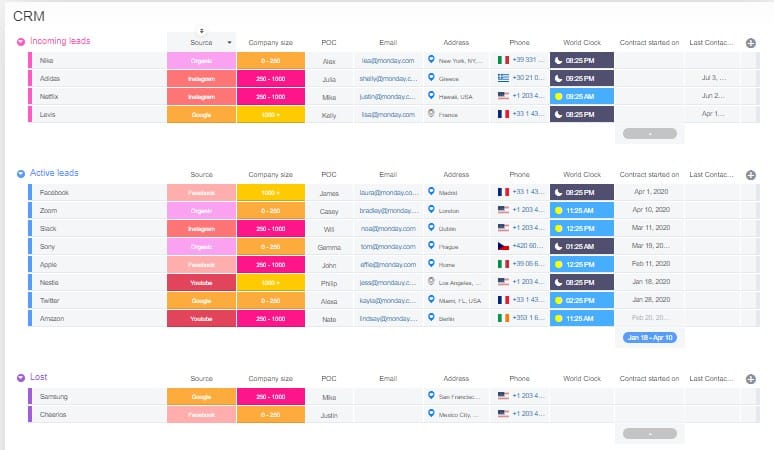
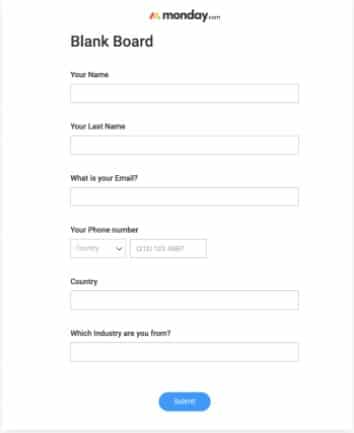
If you have a contact list, you can import it from Excel into monday.com. You can also collect leads from your website using a contact form. Monday Sales CRM will provide a code for this form, and you can embed it on the site.
Visitors can fill out the form and subscribe to your newsletter.
Classify Board Information
Groups help divide information into categories. For example, you can split the monday.com board into three categories:
Incoming Contacts
Leads that have opened a trial account and haven’t made a purchase yet.
Active Users
This group is active and paying customers.
Leads Lost
Leads reached out to by the sales team but who are not ready to purchase.
Subitems for Various Contact Names
Subitems show contact data from identical customers. In the below example, Nike is a distinct customer. The parent item will show the client’s primary contact information – POC, phone, location, etc.
The sub-items represent the different locations and telephone numbers of clients.
Board Customized with columns
There is no limit to customizing the board to fit the team’s needs.
For example, you can have the following columns:
- People Column: Lead assigned to a sales representative.
- Status Column: The status column tracks each sales stage
- World Clock column: World Clock avoids calling someone too early (or too late).
- Phone Column: The phone column will hurry things up by starting the default communications app once you snap the phone number.
- Numbers Column: Numbers columns would add the deal size.
Workflow Automation
Automation helps streamline workflow.
Let’s say you create a form to collect new leads from your site. Automation on the CRM board will notify every time a new user is registered and send the subscriber a welcome email.
Automatic Email Integration
Sending emails to leads. With Gmail and Outlook integrations, you can send workflow emails to your leads.
Free CRM Software Alternatives
Not every business can afford monday.com’s paid tiers. Fortunately, many free or low?cost CRMs exist. Here are a few alternatives worth considering:
- HubSpot CRM: Offers a generous free tier with unlimited users, contact management, basic automation, and email tracking. It’s easy to upgrade as your needs grow.
- Zoho CRM: Provides a forever?free edition for up to three users with basic pipelines and email integration. Paid plans add more customization and AI predictions.
- Capsule CRM: Simple CRM with a free plan for up to two users. Paid plans add sales reporting and advanced task management. A strong alternative for micro?businesses.
- Flowlu: All?in?one platform with CRM, task management, and invoicing. Free for two users with generous storage and automation; paid plans expand features.
- Agile CRM: A free tier for up to ten users, including contact management, tasks, and email campaigns. Works well for small sales teams.
- Insightly: Offers a free plan for two users with basic project & contact management. Paid tiers add automation and integration options.
- Bitrix24: Free plan includes unlimited users, project management, telephony, and social collaboration tools. The interface can be complex, but it’s feature?rich.
- Really Simple Systems: Free for two users with integrated email marketing and sales pipelines; paid plans unlock more features and support.
If Monday’s price feels steep, test one of these solutions first. Each has strengths and trade?offs, so choose based on your team size, automation needs, and budget.
Why You Can Trust This Review
I wrote this review after reading current reports, testing Monday’s features, and cross?checking user feedback. I used the platform’s 14?day free trial to build pipelines, send emails, and automate tasks. This post reflects my experience as of November 2025. I cite data from reputable sources such as market research firms and CRM industry publications. The statistics on market growth and platform usage come from studies, while feature descriptions draw from Monday’s own product documentation and independent reviews. I have no financial relationship with monday.com; if you decide to sign up, do your own due diligence.
My Experience with Monday.com Sales CRM
During my trial, I found Monday’s interface clean and enjoyable. The drag?and?drop pipelines made it easy to move deals through stages. I enjoyed customizing columns to track world time zones because my leads spanned North America and the Middle East. Sending emails from inside the CRM worked flawlessly thanks to the Gmail integration, and it was satisfying to see messages automatically linked to deals.
I tested the new AI lead scoring by importing a list of demo leads with varying activity levels. The system quickly ranked them by engagement and company size, helping me focus on the most promising prospects. However, the scoring criteria are opaque; you can’t fully adjust the algorithm’s weighting of each factor.
One downside I noticed is that the Pro plan costs around $28 per user per month,a significant jump from the Basic plan. Some advanced automation actions also require an add?on package. I also hit the three?seat minimum when I only needed two seats. Overall, though, the platform’s flexibility and integration ecosystem outweighed these drawbacks.
FAQs
Q1. Is monday.com a CRM or a project management tool?
It’s both. Monday Sales CRM is built on monday.com’s Work OS, so you get CRM features like pipelines, deal tracking, and email sync along with project management tools like boards and timelines.
Q2. Does Monday CRM have a free plan?
No. Monday offers a 14?day free trial. After that, you must pay for at least three seats, starting at about $12 per user per month.
Q3. What AI features does Monday CRM include?
As of 2025, monday.com introduced AI?powered lead scoring to prioritize leads based on engagement and demographics. They also added an integration with Meta’s Conversions API for better ad targeting.
Q4. How secure is Monday CRM?
Monday states that its Work OS has 99.99 percent uptime and offers enterprise?grade security with SOC 2 compliance, GDPR readiness, and data encryption[24]. The Enterprise tier includes advanced permissions and audit logs.
Q5. Can I integrate Monday CRM with my existing apps?
Yes. Monday has native integrations for Gmail, Outlook, Slack, QuickBooks, Zoom, Mailchimp, and many more. You can also use its API or integration marketplace for custom connections.
Summary
Monday Sales CRM remains a strong option for startups and small?to?mid?sized teams. Its blend of CRM and project management features makes it attractive for businesses that want an all?in?one workspace rather than juggling separate tools. The interface is clean, customizable, and easy to learn. AI lead scoring and Meta Conversions integration show that the platform is embracing modern marketing needs. While the lack of a permanent free plan and limited advanced analytics may deter some, the flexible pricing tiers, reliable uptime, and vast integration ecosystem offset these downsides.
Before committing, take advantage of the 14?day trial to see how it fits your workflow. Evaluate alternatives like HubSpot or Zoho if you need deeper marketing automation or a free tier. CRM adoption is a big decision—choose a platform that matches your team’s size, budget, and growth ambitions.
Disclosure: Some links in this post are affiliate links, and I will earn a commission if you purchase after clicking. Please understand that I recommend these resources because they are useful, not just because of my commissions. Please do not purchase unless you need the materials to achieve your goals. Read the disclaimer.

I am Mohammad Fahad Usmani, B.E. PMP, PMI-RMP. I have been blogging on project management topics since 2011. To date, thousands of professionals have passed the PMP exam using my resources.