On-demand and iterative scheduling are two popular approaches Agile teams use to plan and deliver work. Each approach solves a different problem. On-demand scheduling focuses on flow. Teams pull tasks only when they have capacity. This works well when work arrives without warning. Iterative scheduling follows fixed time cycles. Teams plan tasks at the start of each iteration and deliver at the end. This suits work with clearer goals and timelines.
Many teams struggle to choose between these two methods. Which one gives better results? The answer depends on work type, change level, and team needs. Understanding the difference helps teams plan smarter, reduce waste, and deliver value faster.
In this blog post, I will explain on-demand and iterative scheduling, compare their benefits, and help you decide when to use each.
Let’s get started.
Understanding Project Scheduling
Project scheduling is the art of planning and tracking when tasks will be performed. A logical schedule model enables a project to be divided into phases or groupings to optimize scope, cost, and time. Traditional project planning often sets a fixed schedule from start to finish. This works when requirements are clear and unlikely to change, but it can be rigid when you face uncertainty or evolving needs.
Modern project management embraces flexible scheduling techniques that allow teams to adjust. Two of the most common are on-demand scheduling and iterative scheduling. Both fall under the broader umbrella of agile or adaptive methods, and both encourage collaboration and continuous improvement.
What is On-Demand Scheduling?
On-demand scheduling is a pull-based technique, also known as Kanban scheduling. Instead of assigning all tasks at the start of a project, work is pulled from a prioritized backlog when team members have capacity. This approach balances demand against available resources and reduces idle time. It is especially useful in maintenance, support, or operations teams where tasks arrive unpredictably.
How it works
- Create a prioritized backlog: List tasks or user stories in order of value or urgency.
- Visualize the workflow: Use a Kanban board with columns (e.g., To Do, In Progress, Done) so everyone can see where work stands.
- Pull when ready: Team members pull the next task when they have capacity, rather than receiving assignments from a manager.
- Limit work in progress (WIP): Setting WIP limits prevents overloading the team and exposes bottlenecks.
Example
Imagine an IT support team handling software bug fixes. Bugs are logged in a shared backlog. When a developer completes a fix, she pulls the next-highest-priority bug from the backlog. This method ensures that the team focuses on the most important issues and adjusts to changing priorities without re-planning the entire schedule. It also prevents starting too many tasks at once, which can slow down delivery.

What is Iterative Scheduling?
Iterative scheduling divides work into small, time-boxed cycles called iterations or sprints. Each iteration produces a tangible output, such as a working software increment or a completed deliverable. After each cycle, the team reviews progress, gathers feedback, and plans the next iteration. This allows for frequent course corrections and continuous improvement.
How it works
- Plan short cycles: Define iterations that last one to four weeks, each with its own objectives.
- Commit to a set of tasks: At the start of an iteration, the team selects tasks from the backlog and commits to completing them.
- Deliver and review: At the end of the iteration, present the completed work to stakeholders and gather feedback.
- Adjust for the next cycle: Update the backlog and priorities based on feedback and plan the next iteration accordingly.
Example
Consider a product team building a new mobile app. In the first two-week iteration, they implement the login feature and a basic dashboard. After demonstrating this to stakeholders, they gather feedback, adjust the backlog, and plan the next iteration to add notifications and user settings. This cycle continues until the app meets user needs.
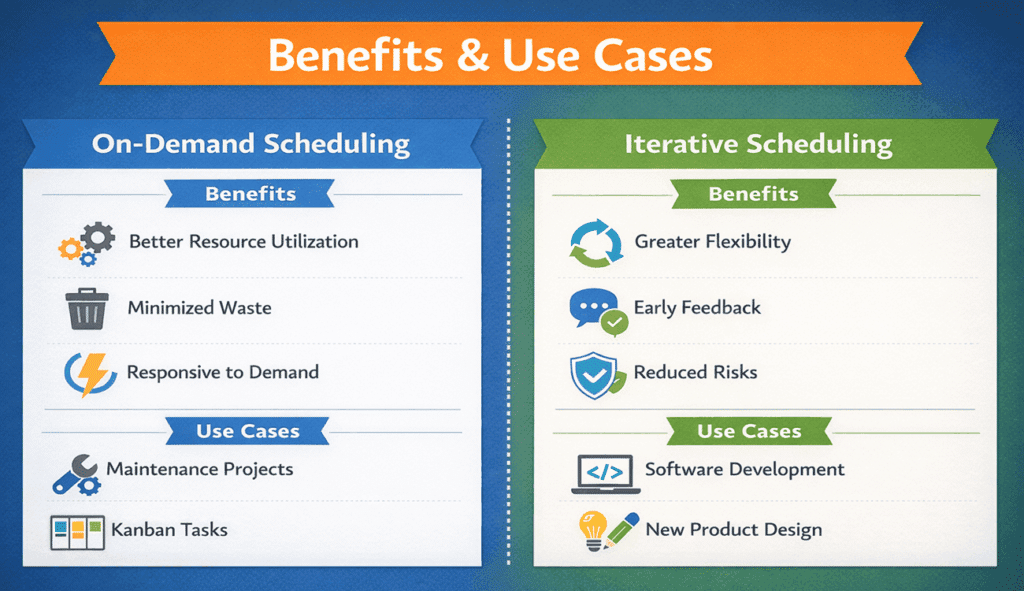
Benefits and Use Cases
Comparing On-Demand and Iterative Scheduling
The table below summarizes key differences and common use cases. Short phrases help you scan quickly.
| Approach | Key Features | Typical Use Cases |
| On-Demand | Pull-based tasks; Kanban board; WIP limits | Support queues, maintenance, and continuous delivery |
| Iterative | Time-boxed cycles; commit to tasks each iteration | Software development, research projects, product design |
| Hybrid | Combine on-demand flow with short iterations | Complex projects that need continuous flow and regular review |
When to Use Each Approach
- Choose on-demand scheduling when task arrival is unpredictable, priorities shift often, and you need to minimize idle time. It works well for bug fixes, help-desk requests, and operations teams.
- Choose iterative scheduling when you have a clear product vision but expect changes along the way. It suits innovation projects, new product development, or research where feedback is essential.
- A hybrid approach can combine the best of both worlds. For instance, a software team may run two-week sprints but pull bug fixes from a Kanban queue during the sprint. This helps them respond to urgent issues without abandoning iteration goals.
The following table summarizes the key differences between on-demand and iterative scheduling:
| Parameter | On-Demand Scheduling (Kanban) | Iterative Scheduling (Sprint-Based) |
|---|---|---|
| Work Cadence | Continuous flow | Fixed time periods called iterations or sprints |
| Planning Style | Just-in-time and pull-based | Planned in advance for each cycle |
| Delivery Frequency | As tasks finish | At the end of each iteration |
| Best for | Unpredictable and reactive work | Predictable and project-based work |
| Feedback Loop | Ongoing | At the end of the iteration |
| Common Tools | Trello, Jira Kanban boards, ClickUp | Jira Scrum boards, Azure DevOps, Asana |
Real-World Insights and Trends
Recent research highlights why flexible scheduling matters. The PMI Future of Project Work report notes that, on average, 73.8% of projects meet performance expectationsacross all respondents. Organizations have increased the use of hybrid project approaches by 57%. At the same time, 64% of senior leaders say their teams need new technical skills.
These figures show that teams are blending agile, predictive, and hybrid methods and that continuous learning is essential to stay competitive. On-demand and iterative scheduling techniques help project managers adapt to this evolving landscape.
FAQs
Q1. What is the main difference between on-demand and iterative scheduling?
On-demand scheduling pulls tasks from a backlog as resources become available, while iterative scheduling plans work in fixed cycles and adjust after each cycle. Both aim to improve flexibility and delivery.
Q2. When should I use on-demand scheduling?
Use on-demand scheduling for maintenance, support, or operations work where tasks arrive unpredictably. It helps teams stay responsive by balancing workload with capacity.
Q3. When is iterative scheduling a better choice?
Iterative scheduling fits projects with evolving requirements, such as software development or research. It allows teams to deliver small increments, collect feedback, and refine the next iteration.
Q4. How do these techniques relate to the PMP exam?
The PMP exam covers various scheduling methods, including predictive, iterative, and on-demand. Understanding when to use each technique helps you answer exam questions and apply the knowledge in your projects.
Summary
On-demand and iterative scheduling both support Agile teams, but they solve different problems. On-demand scheduling works best when priorities change fast, and work arrives at any time. Iterative scheduling fits teams that need structure, clear goals, and planned delivery cycles. The right choice depends on workflow, risk level, and customer needs. When teams match their scheduling style to their work type, they improve speed, focus, and results. Choosing wisely helps projects stay flexible and deliver real value.
Further Reading:

I am Mohammad Fahad Usmani, B.E. PMP, PMI-RMP. I have been blogging on project management topics since 2011. To date, thousands of professionals have passed the PMP exam using my resources.