Online learning has grown quickly. Studies show that the Learning Management System (LMS) market could expand from $28.58 billion in 2025 to $70.83 billion by 2030. The global online learning industry is projected to reach almost $400 billion by 2026, while the U.S. online education market alone may generate nearly half of global revenue. This explosive growth means choosing the right platform is critical.
I have been running an online PMP exam training school since 2011, and I’ve tested many LMS platforms. After years of trial and error, I chose LearnWorlds because it offered the flexibility and features my school needed.
In this updated LearnWorlds review, I will explain why I use LearnWorlds, highlight new updates, discuss pros and cons, compare pricing, and offer insights from my own experience.
LearnWorlds Review
LearnWorlds is a cloud-based LMS that helps teachers, trainers, and businesses create, market and sell online courses. Founded in 2012, LearnWorlds has grown into a global platform with over 5 million learners. It supports SCORM files, interactive videos, quizzes, certificates, marketing funnels and a customizable website.
In 2025, LearnWorlds introduced major updates for its mobile app and admin tools, making learning smoother on phones and giving administrators more control.
As the founder of PMSprout.com (an online school for project management certification), I needed an LMS that could handle SCORM content, process payments in USA, Kuwait and India, and scale as my business grew. LearnWorlds met these requirements when many competitors could not.
LearnWorlds is a course creation tool that helps teachers, educators, and trainers to create, market, and sell courses online with premium support. This platform allows users to create online cloud-based courses, webinars, onboarding lessons, and more in a few steps within minutes. LearnWorlds does not require any coding or technical skills.
Click here to Try LearnWorlds for Free
LearnWorlds Background
LearnWorlds was launched in 2012 by its current CEO Panos Siozos. With over 5.2 million users currently learning with the platform, the platform focuses on catering to a global audience. It is best known for having a quality support team since the beginning of LearnWorlds’ launch, as the company is determined to create an eLearning audience like never before.
LearnWorlds Features
SCORM Support
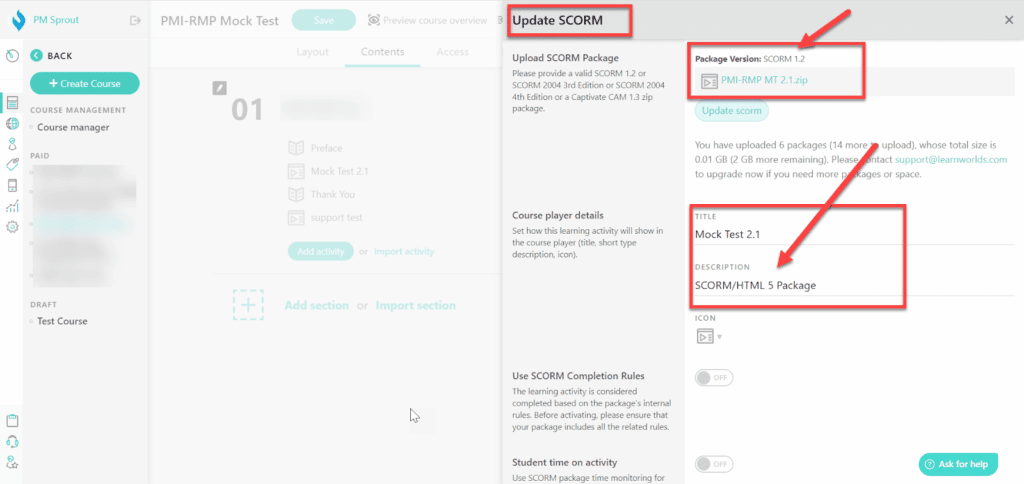
SCORM support was my key requirement. I provide courses for the PMP exam preparation, and aspirants need Mock Tests with some unique features that were not available with any LMS available in the market.
So, I went for a third-party authoring tool, i.e., ispringsolution, to design the SCORM-based solution. I contacted Thinkific, but they said the process was long and they would need the file, and then it would take a week for them to upload the file if everything was okay.
This was a discouraging process, as changing and updating the file would take weeks.
Unlike its alternatives, LearnWorlds is the only platform that offers native SCORM support that helps businesses build online courses that can sell across different platforms and perform well. This feature lets users streamline their content with various authoring tools and import content to their online school form anywhere.
The industry’s best tools, like Adobe Captivate, Camtasia, Articulate, ispringsolution, and more, are associated with LearnWorlds offering end-to-end SCORM compliance. You can publish courses on these platforms and connect directly with LearnWorlds.
Click here to Learn About SCORM Features
2Checkout Payment Gateway
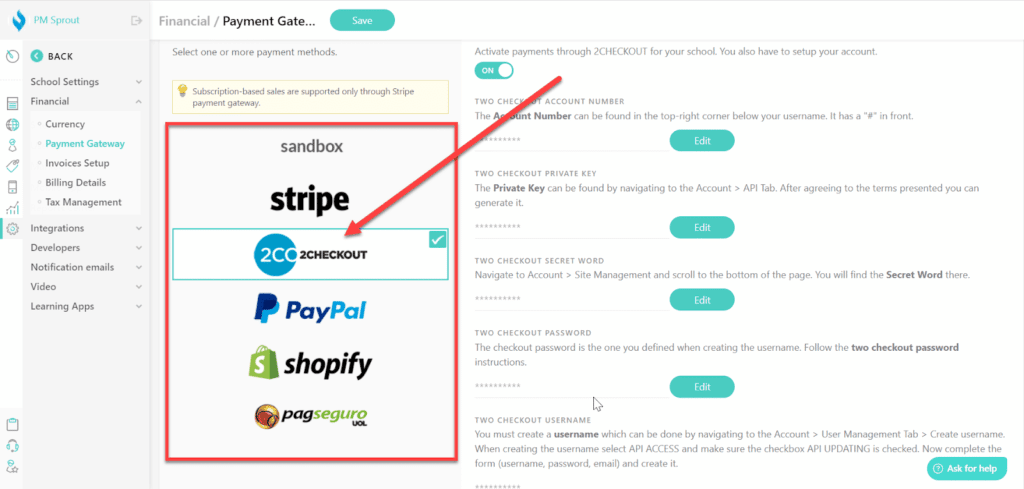
This was my second and final key requirement.
I am an Indian and live in Kuwait. Unfortunately, when I launched my school, Stripe was not offering its service in Kuwait, and it still does not provide it as of today, i.e., January 5, 2024, as you can see in the image below.
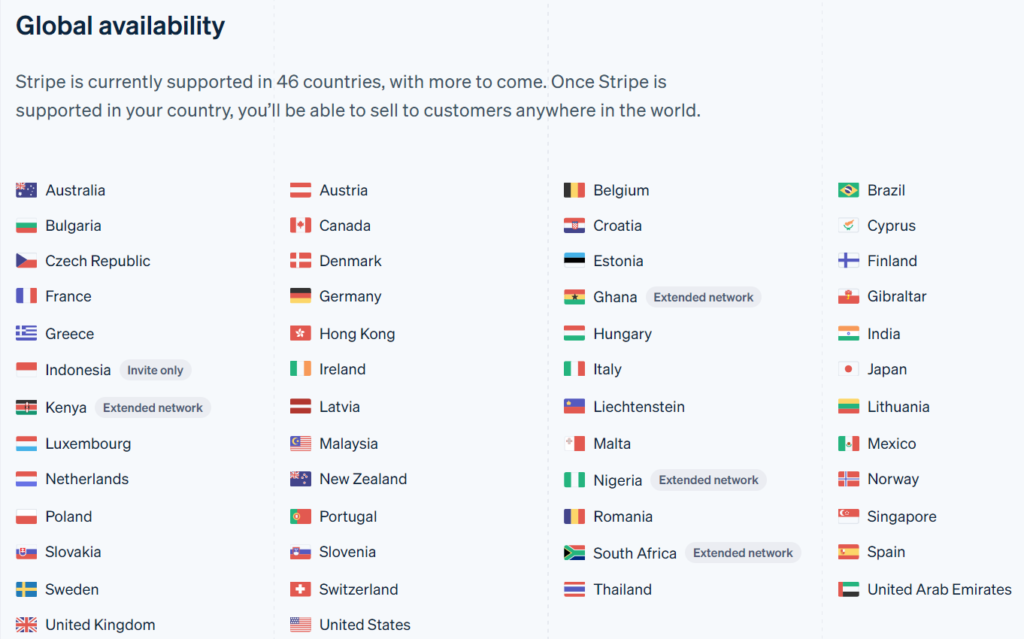
You can visit the following URL and see if Stripe is available in your country or not:
Without Stripe, I became forced to have PayPal integration, and many people do not use PayPal. Over 80% of my customers buy my courses through credit cards. If I had stuck with PayPal, I would have lost many customers.
2Checkout was another payment gateway offering its services to Kuwait, and no course management platform offered 2Checkout integration except LearnWorlds.
In countries that do not have Stripe as a payment service provider, the 2Checkout integration makes payments easier and hassle-free.
Click here to Lean LearnWorlds Checkout and Payment Features
Course Creation
Before coming to LearnWorlds, I tried several other online course platforms, including Teachable and Thinkific. Those were great platforms, but preparing and launching courses took time.
However, with LearnWorlds, it was quick. After logging into the platform, I could publish the course within minutes. Therefore, I find it the easiest course creation platform.
You can build flexible and fully customizable courses within minutes. In addition, it offers several ways to create, market, sell, and distribute your digital course to global audiences.
You can design every bit of your course as per your demand and incorporate different learning preferences and styles, like adding an interactive element in your video player that gives quick information about the creator or the course while your video is playing.
Adding engaging assessments and surveys are super easy and fun in LearnWorlds.
You can even add live sessions to your courses through Zoom integration.
You can schedule content delivery and automate workflows. You can also schedule one-on-one and live meetings with students to give them a personalized learning experience.
You can add files, videos, slideshows, and surveys, and it also allows you to give course completion certificates to your students.
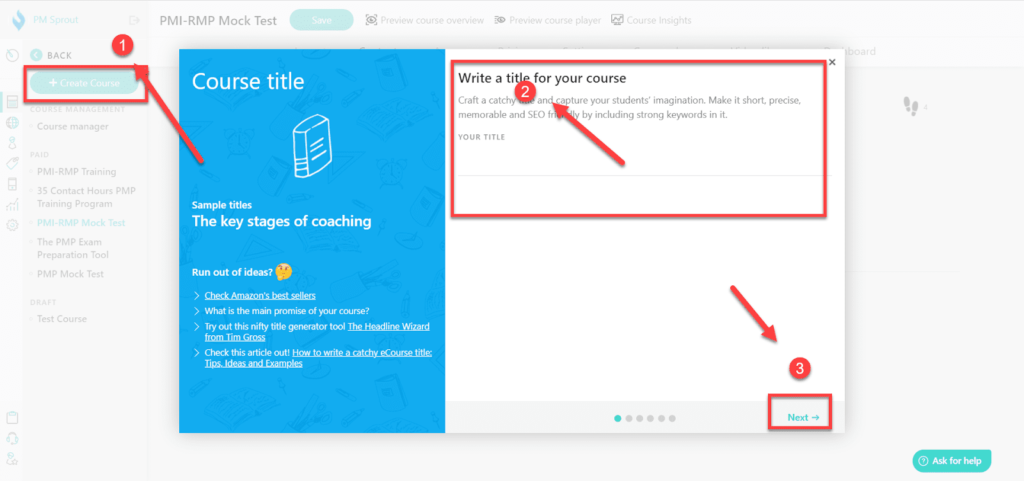
Click on the “Create Course” for the wizard, and your course will be ready in a few minutes.
Learn More About LearnWorlds Flexible Courses
AI Assistant Course Planner

In this era of ChatGPT and artificial intelligence, LearnWords is nowhere behind. They have introduced their AI assistant, who works on prompts and helps you plan your course’s ideal content as per the prompt.
It helps you in course creation and assessment creation, helps you in writing when you get stuck, and also helps you write your professional emails.
It’s a great feature added by LearnWorlds to help course creators.
Marketing Tools
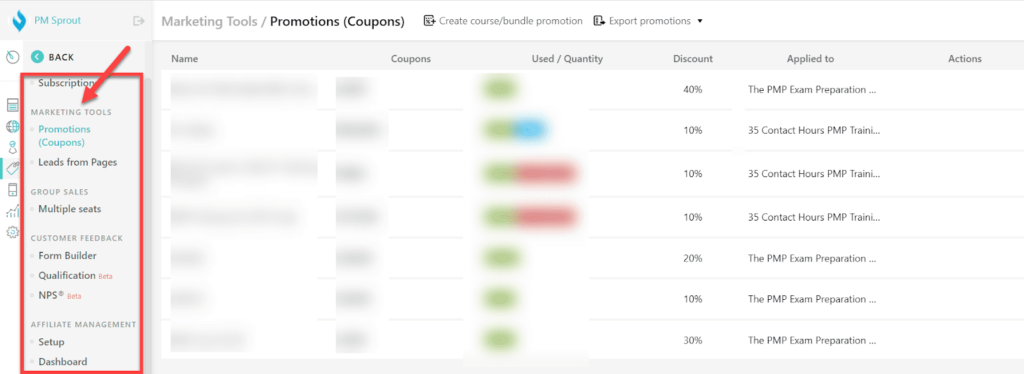
The next feature in our LearnWorlds Review is its marketing tools.
You can offer coupon codes to learners and increase sales. In addition, it allows you to collect leads through lead generation forms. After collecting leads, you can send them marketing emails.
You can up-sell and downsell your online courses through memberships, subscriptions, bundles, or a one-time purchase. You can even offer your courses in installments. And facilitate buy now and pay later flexibility as well. You can also limit the number of seats for a class.
Pre-built widgets, forms, attention grabbers, pop-ups, exit pop-ups, custom forms, timers, and everything else are available on the platform.
You can also edit your checkout page and make it as convenient as possible. LearnWorlds marketing tools also let you create a 1-click checkout funnel so your audience can buy your course without any delays.
It also helps you optimize your courses thanks to its built-in SEO.
It has several integrations with email marketing tools that make your emailing game stronger. Integrations are with big names like Mailchimp, ActiveCampaign, GetResponse, MailerLite, and more.
Learn More about LearnWorlds Marketing Tools Features
Builders
Click here to Try LearnWorlds for free
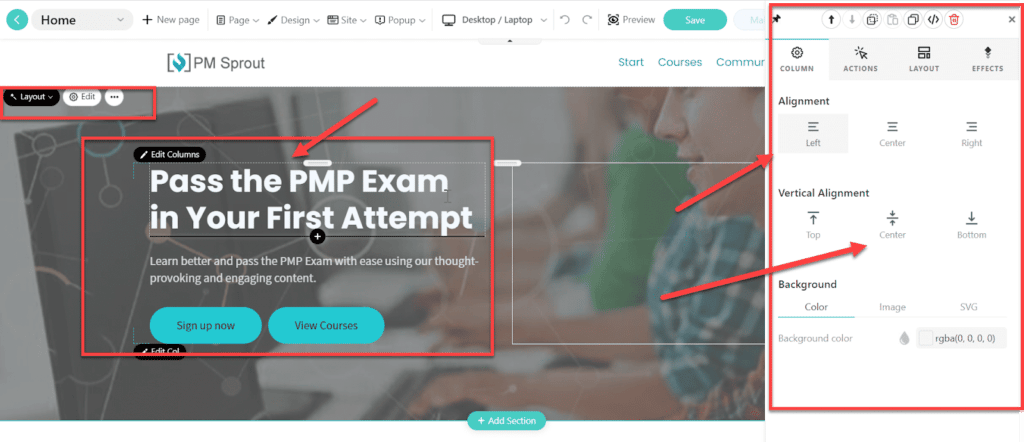
LearnWorlds builders let you create surveys, websites, mobile applications, assessments, and pop-ups. Let us discuss each builder in detail in this LearnWorlds Review –
- Survey Builder: The survey builder allows you to create engaging forms and surveys for pages, funnels, and websites. You can do this quickly with a few clicks using a graphical interface. Post-event feedback, market research to instructor evaluations, content info, and much more – you can collect everything through these forms and manage it from a single dashboard. These forms help maximize, capture, and convert leads into actual customers.
- Website Builder: Its website builder comes with pre-made templates that let you design the website of your choice. It offers several website styles for different businesses and only takes a few minutes to build. With LearnWorlds, you can use the no-code editor to create a course-selling website with pop-ups, themes, assets, built-in SEO, and powerful response time. The websites can be multilingual, too!
- Mobile App Builder: LearnWorlds comes with a white-label mobile app builder that lets you create applications in only an hour. With no coding and full flexibility, you can give the app the branding you require with its editing tools. In addition, this feature offers app testing, in-app purchases, push notifications, App Store publishing, and more.
- Assessment Builder: This feature enables users to build online exams and assessments with a powerful editor. It also allows adding feedback and grades for a better student experience. The feature offers 16 diverse question types, customizable summary screens and question banks, certifications, tagging, SCORM assessments, and secure testing for robust processing.
- Pop-up Builder: Pop-ups are necessary for lead capturing, growing email lists, and expanding the customer base, and with LearnWorlds’ pop-up builder, you can do it all. It has over 60 customizable, mobile-friendly pop-up templates. Its drag-and-drop editor edits without coding fun. It also offers in-depth analytics for the business to analyze whether their pop-ups and offers are performing as expected.
Click here to visit Website Builder Features
Video Creator
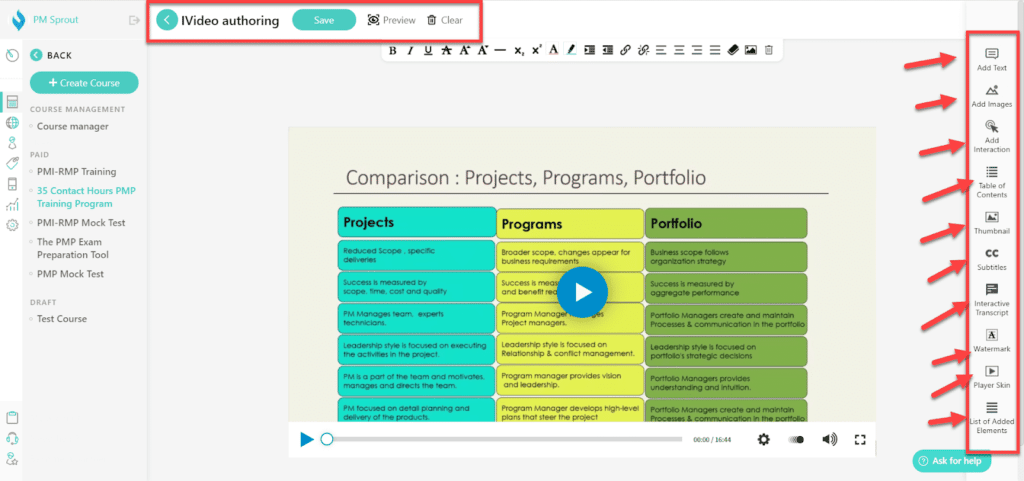
Another powerful feature in our LearnWorlds Review is the platform’s interactive video creator and editor. This tool lets users gamify their videos by adding questions and changing video flows. It also adds a feedback button for higher engagement and allows users to own the video streaming as per their feasibility.
You can add text over video, CTA, subtitle, and watermark.
You can select the video skin as well.
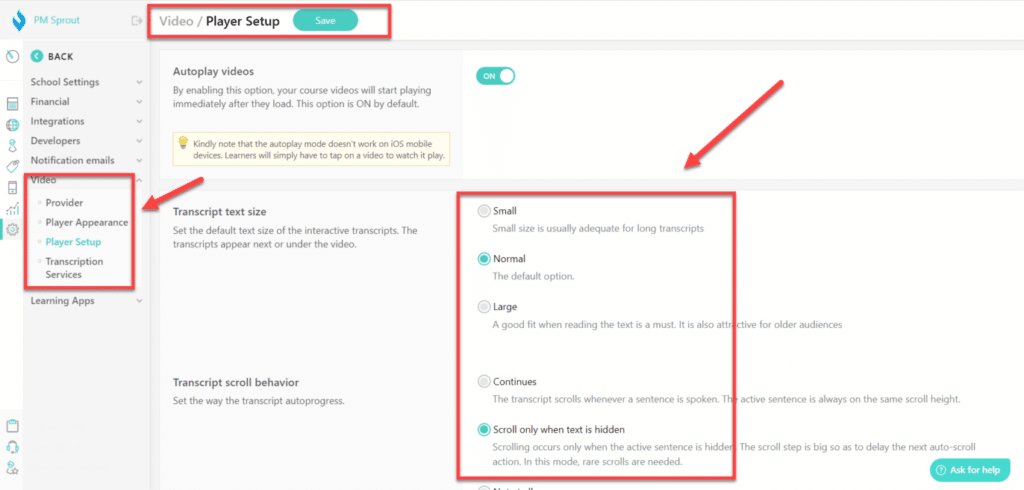
It can make navigating through long videos easy through a table of contents. Video transcripts are another feature added in this category for ease of understanding. Adding buttons, branching, pop-ups, and overlaying is also easy.
Learn More About Interactive Video
Live Sessions
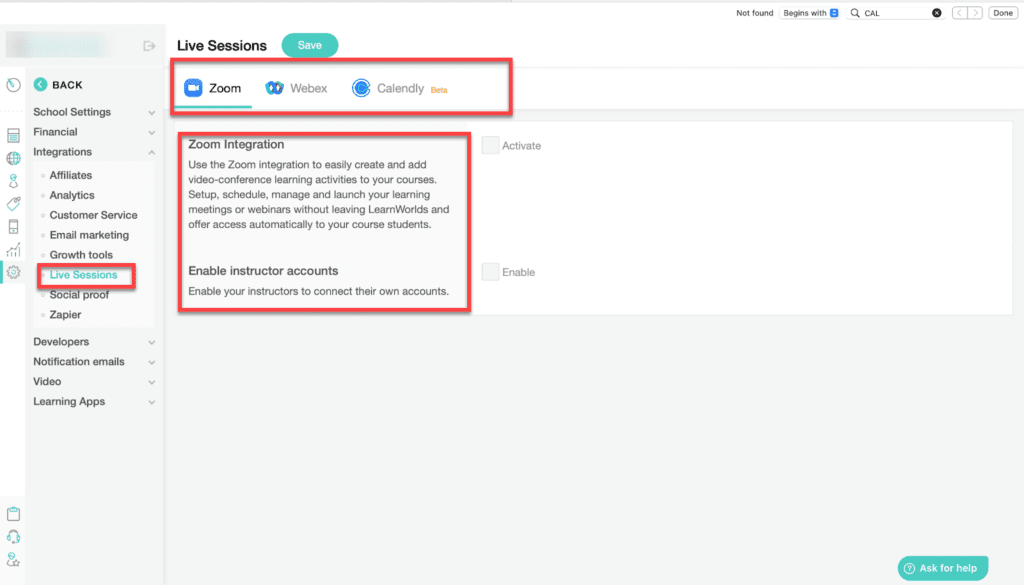
You can host live meetings, sessions, and classes seamlessly with LearnWorlds. It has Zoom, Calendly, and Webex integrations to make this a worthwhile experience. Also, live meetings foster real-time learning experiences, which lead to personalized learning.
You can also convert your courses into live meetings and discuss concepts live by doing them on laptops or mobile phones.
Each live session is saved on the platform forever. Its schedule tracker tracks multiple live sessions and instructors through a single dashboard. Not only that, you can follow the audience and their attendance too. In addition, event reports get generated to understand how many students are interested in live sessions.
The platform includes live engagement tools like screen sharing, breakout rooms, segment chat, and opinion polls.
Learn More about Live Sessions
In 2025, LearnWorlds improved live sessions by allowing the call-to-action button in the course player to open Zoom or Teams in native apps, reducing friction for learners.
Custom User Roles
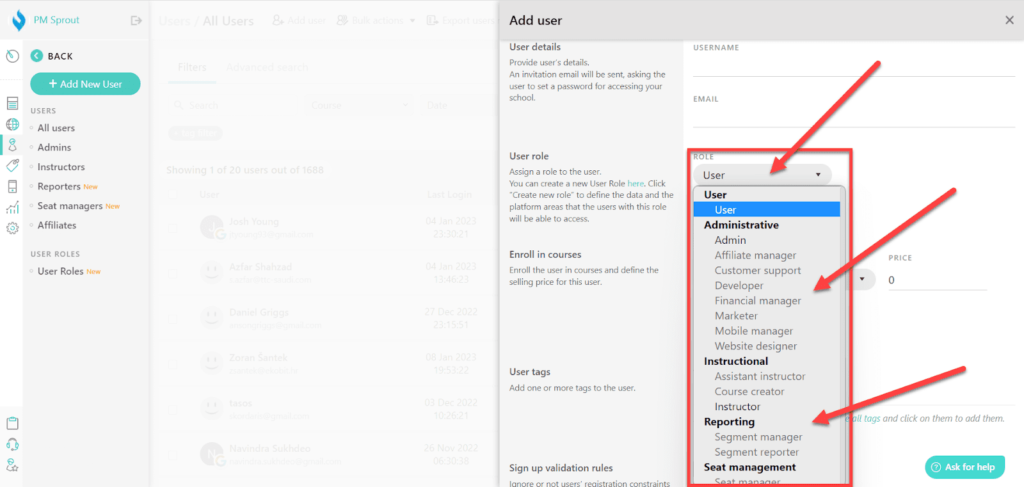
Custom user roles give you full control over your online courses. It lets you create specific admins, managers, instructors, reporters, affiliates, and other custom users.
It leads to a clutter-free task view, permission and responsibility tables, and access levels. Not only that, but you can also customize permission levels with the tool easily. In addition, external partners and B2B training clients can collaborate seamlessly with the feature and monitor the course’s progress.
Learn More About Custom User Roles
Reports and Analytics
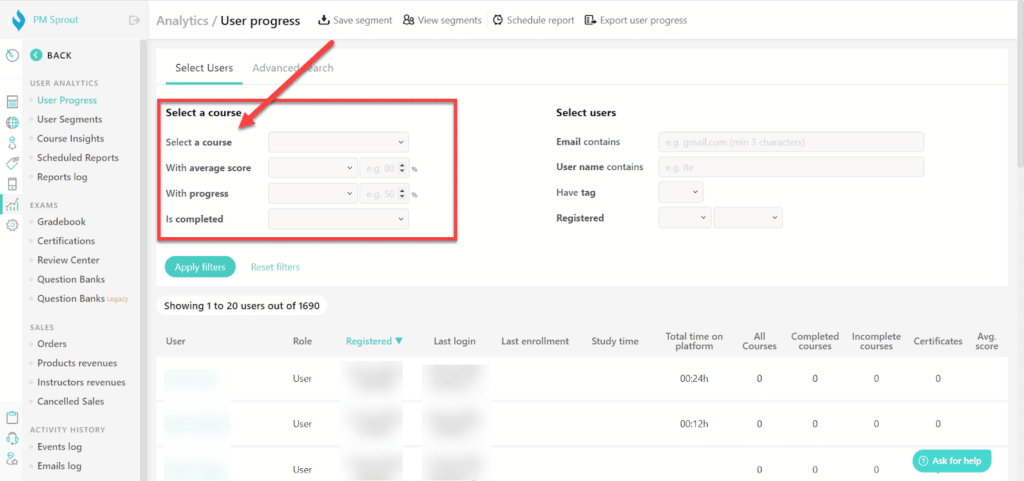
With LearnWorlds, you can experience the most powerful performance reporting and analytics under a single roof. From user progress and engagement to course insights and financial metrics, the tool provides the reports you need to improve your business.
Each training program has a dedicated report that measures its performance, such as user progression, survey response, exam results, training history, and more, which you can track with a single click.
Course insights like consumption data, bottlenecks, and automated report preparation are seamless. It comes with several filters to segregate reports and maximize data visualization. Different types of charts, course dashboards, and scores are added to the tool as well.
Learn More About Analytics and Reports
White Label Website
With LearnWorlds, you can create a 100% white-label website as a fully branded online academy. This helps you control your brand identity without any issues. In addition, its white label tool is limitless as it offers a custom domain, strong customization capacities, colors and fonts, and more.
From branding in signup screens, email notifications, native branded apps, and mention of brands throughout the website and app – it does everything.
However, this option is available on the the Learning Center Plan.
Learn More About White Label Website
Bundles and Subscriptions
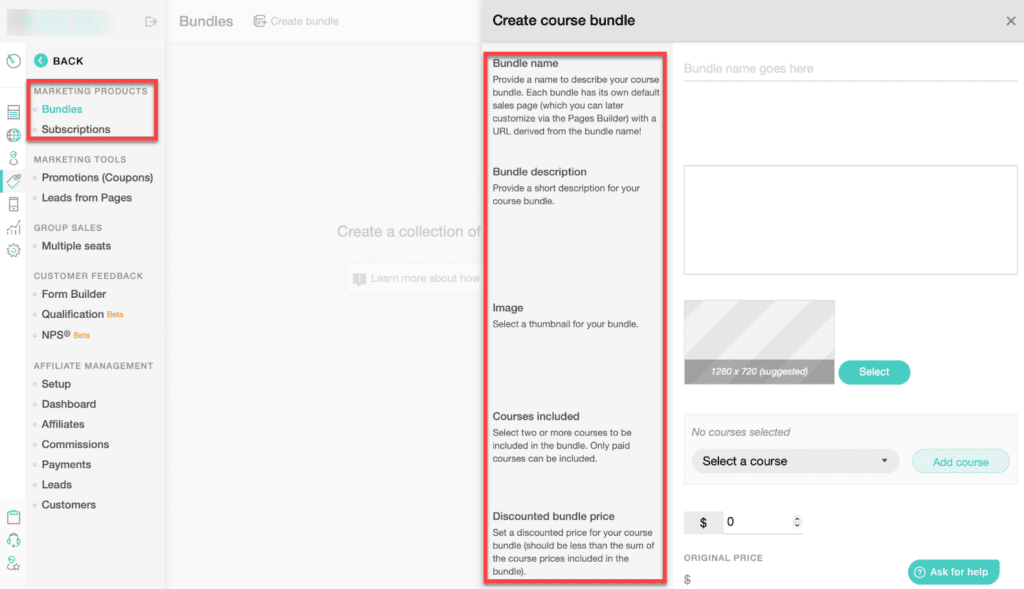
LearnWorlds’ bundles and subscription features come with several models to choose from. These models help in creating a strong membership business. This feature makes revenue, profitable membership website launch, and all types of subscriptions possible.
Online coaching sessions exclusive to some members, niche customer education, and subscriber-only groups are some specifics of this feature. It helps in selling more exclusively and creating incredible offerings. Not only that, but it also helps in increasing sales as customers purchase several courses as bundles.
Learn More About Bundles and Subscriptions
Affiliate Management
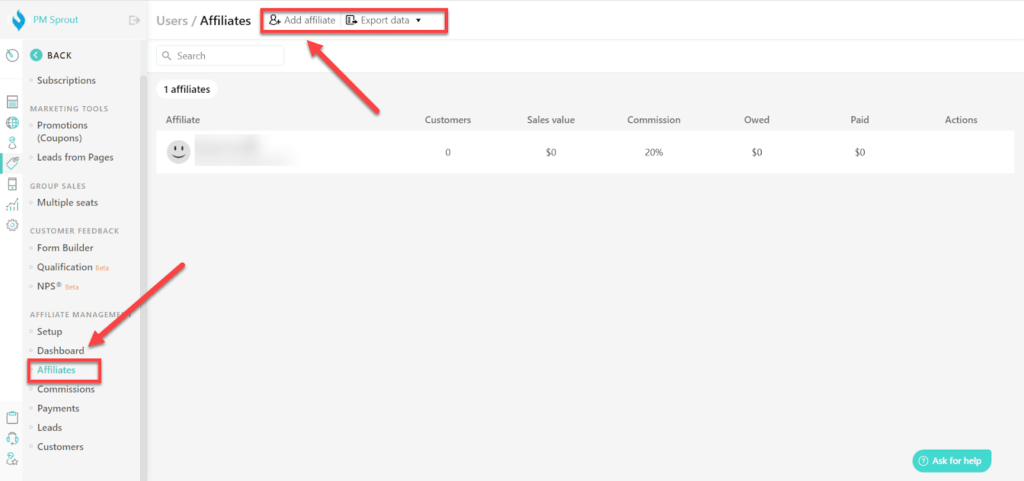
Like many other platforms, LearnWorlds also has an affiliate program to help create a scalable affiliate network and increase traffic and income. Supported by real-time data reporting, it increases your business’s brand awareness and reputation along with the social network. With this platform, you can launch your affiliate program within minutes in only a few steps.
It has an integrated dashboard, reporting, a commission tracker, and an easy affiliate connection. Everything is detailed, and you can know how many customers an affiliate got on board, their sales, payment, commission, the top-performing affiliates, total referred customers, and more.
Learn More About Affiliate Management
Integrations
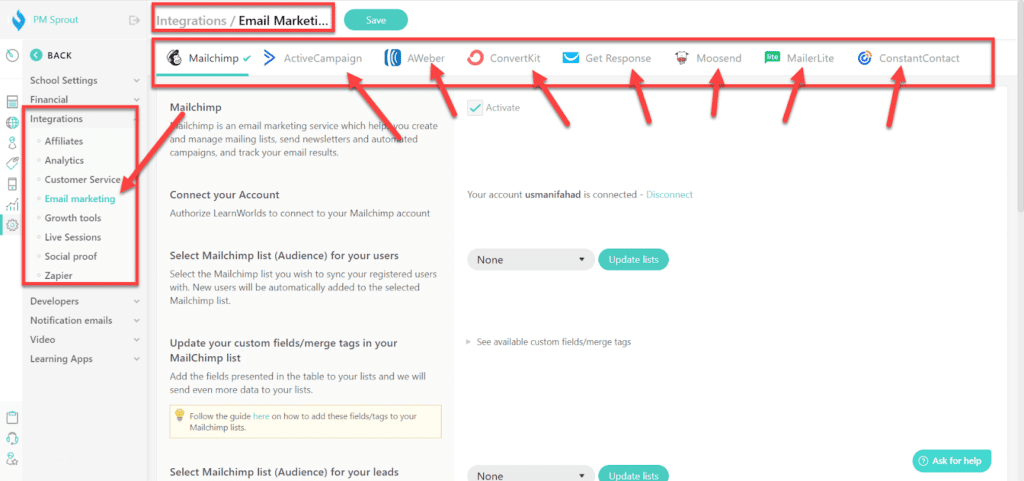
LearnWorlds offers many features to help you create and sell the course. However, sometimes it may lack a feature that you may require—for example, email marketing.
LearnWorlds has many integrations that cater to the different needs of a user. If you have LearnWorlds, you can rest assured that you have access to everything under a single roof.
The above image shows the email integration.
It has integrations with applications for financial services, analytics, marketing, growth, customer service, email marketing, live sessions, social proof, video, affiliates, developers, and more.
In 2025, the platform improved its User API to let administrators retrieve group members and seat-offering data. This makes it easier to synchronize users with CRM systems or automate enrolment processes.
Interactive eBooks
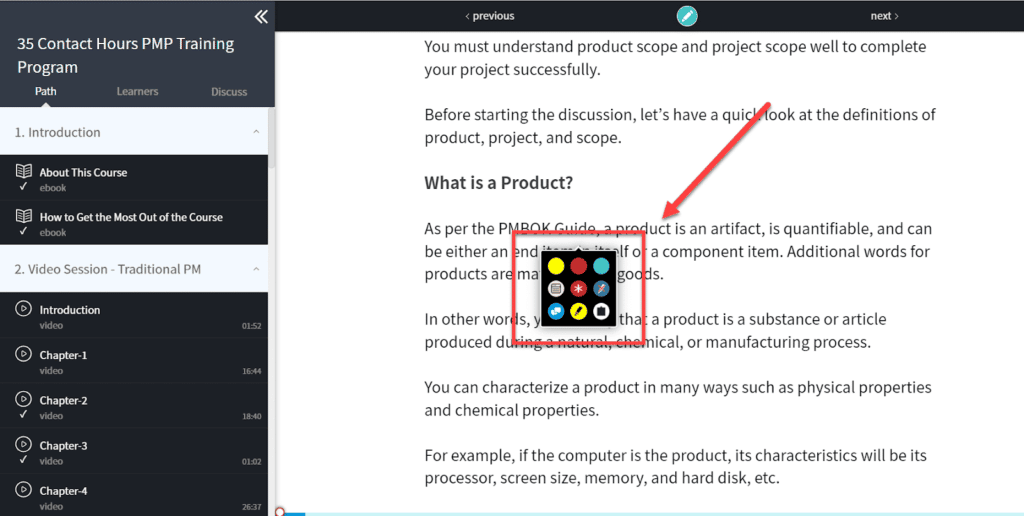
LearnWorlds offers interactive digital books that help users engage with different learning styles. These books can be read and heard. However, users can also make annotations directly on the book, like on a real book. Not all learning management programs offer this feature, making it unique to LearnWorlds.
This helps learners physically interact with the learning material. Furthermore, it is also helpful for people with low retention or focus, as the audio makes learning more interesting.
Mobile & 2025 Improvements
Most learners now consume content on mobile devices. LearnWorlds recognized this trend and released major mobile improvements in early 2025. These include:
- More design flexibility: You can adjust border radius, set full-width sections and add padding in the mobile app to match your branding.
- Skip intro for returning users: Learners who have logged in before are taken straight to the login screen.
- Quick course access: You can let course cards open directly into the course player instead of the overview page.
- Sorting options for course discovery: Learners can sort courses by ascending or descending order or by popularity.
- Offline learning controls: Admins can enable autoplay and auto-delete for offline video downloads, while learners can toggle these settings.
- New widgets: Mobile apps now support Text with Icon and Sliders widgets for richer layouts.
- Category filters for blog posts: You can filter blog posts by category within the mobile app.
- Bulk upload self-assessments: Admins can bulk upload quizzes and exams via Excel files.
These enhancements make the learner experience more intuitive and give school owners more control. They reflect the growing importance of mobile learning; in North America, AI is integrated into about 43% of LMS platforms.
Resource Bank
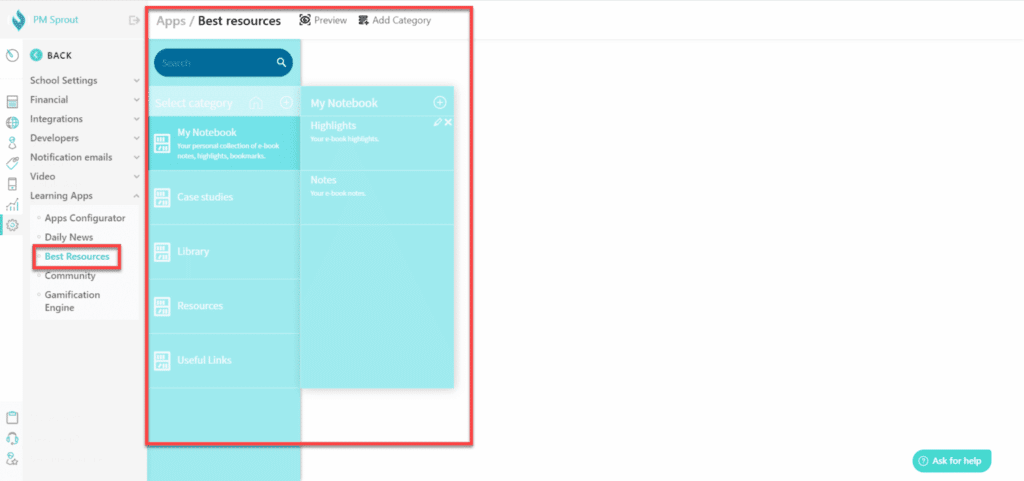
LearnWorlds’ resource bank has useful material you can use. From templates, eBooks, tips, and checklists to LW academy, webinars, and FAQ sections – it has everything you need in one place. In addition, it has a blog section that provides product updates and other useful information.
LearnWorlds’ resources give you 18 course templates, 57 video ideation cards, 50+ school design examples, and 19 email templates. Also, 50 instructional design cards are an add-on feature that helps in online course creation.
One-Stop Solution
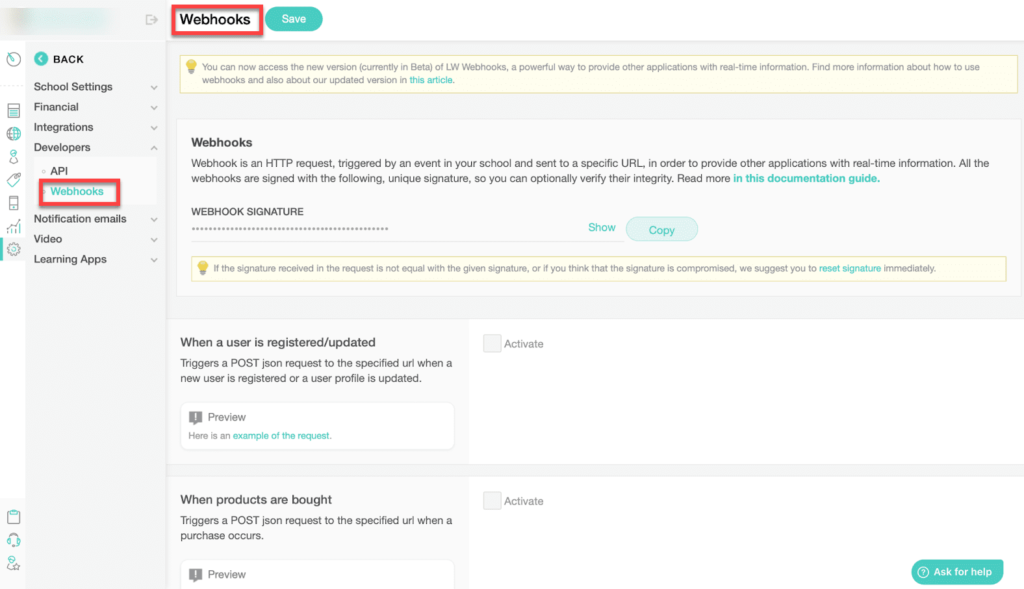
LearnWorlds is a one-stop solution for different businesses and entrepreneurs in various industries. It caters to everyone from coaches, finance professionals, health service providers, and Fitness enthusiasts to NGO people and creators. With its tools diverse enough to provide to a range of users, it has a full-fledged case study segment on its platform that provides insight into how it can help almost every existing industry.
Enterprise LMS is their most sought-after segment as it supports eCommerce and does everything education-related!
LearnWorlds Pros and Cons
This LearnWorlds review will only be complete if we discuss its pros and cons.
Pros
- Complete Branding: You can use custom domains and white-label websites to create a branded academy.
- Unlimited Courses: All plans let you create unlimited paid courses.
- Flexible Payments: Multiple payment gateways and currencies, including Stripe, PayPal and 2Checkout.
- SCORM Support and AI Tools: Native SCORM, interactive video editor and AI assistant help create engaging courses.
- Integrations & Analytics: Zapier integrations, API access and detailed analytics help automate marketing and track success.
- Strong Customer Support: 24×7 support on higher-tier plans; the author’s personal experience shows responsive assistance.
Cons
- No Permanent Free Plan: Only a 30-day free trial is available; after that, you must select a paid plan.
- Transaction Fees on Starter Plan: There is a 5 USD fee per course sale on the Starter plan.
- Mobile App Costs Extra: The branded mobile app requires the Learning Center or custom plan and an additional fee.
- Certificate Design: Although LearnWorlds offers certificates, customizing them deeply may require external design tools.
- Language Translation Limitations: Automatic translation is available but may require manual review for accuracy.
- Gamification Evolving: Gamification options are improving but still basic compared with some competitors.
What Feature I Would Like LearnWorlds to Include
One feature I like in Teachable and Thinkific is their native payment processor. You would not need to create a separate stripe account and connect with the LMS; creating an LMS account is enough. In addition, they will take care of the payment processing.
Though setting up a payment processor is quick, you will not face any issues once it is connected, and it would be a nice feature for LearnWorlds to offer its customers.
Apart from it, LearnWorlds is one of the best online course platforms; you should give it a try.
Click here to Try LearnWorlds for Free for 30 Days
LearnWorlds Alternatives
If you are not interested in using LearnWorlds for your online school, there are some alternatives you can use in its place.
These alternatives are:
- Teachable
- Thinkific
1. Teachable
Teachable is the most popular online course platform and has helped thousands of creators sell courses.
This is my first alternative to LearnWorlds.It is affordable and provides responsive customer support. It offers a free plan, and paid plans are affordable, but they have transactional charges in their plans.
2. Thinkific
Another beginner-friendly platform with a free plan and tiered pricing. Thinkific supports unlimited courses, memberships, and integrated payment gateways. It provides flexible design but has fewer advanced marketing tools than LearnWorlds.
However, it has limited SCORM support and fewer customization options.
Support
LearnWorlds’ support is its biggest feature, as it offers customer support throughout the day and night all days of the week. Furthermore, the starter plan has 24X5 support, and all other plans have 24X7 support.
I have contacted LearnWorlds support many times and received a response within minutes.
Their response is fast, and they solve the issue. Many times, they logged into my account and solved the problem.
From having a course-building academy, powerful blog, and free resources library to live master classes.
The platform conducts webinars where they bring industry experts to discuss strategies, best practices, and techniques to become the number one online seller in the market.
Pricing and Plans
LearnWorlds offers three main plans. Prices below are for annual subscriptions (monthly billing is slightly higher). A 30-day free trial and a 30-day money-back guarantee apply to all plans.
| Plan | Annual Price* | Key Features |
| Starter | US$24/month (or $29 when paid monthly) | 1 admin; create unlimited paid courses; 3-page website; custom domain; two pop-ups; four payment gateways; basic integrations; drip-feed courses; 5 USD transaction fee per sale. |
| Pro Trainer | US$79/month (or $99 monthly) | All Starter features plus 5 admins; no transaction fees; unlimited landing pages and pop-ups; subscriptions and memberships; customizable course player and checkout; form builder; live webinars; 20 SCORM/HTML5 uploads; advanced assessments; affiliate management; 24/7 priority support. |
| Learning Center | US$249/month (or $299 monthly) | All Pro Trainer features plus 25 custom user roles; full white-label options; bulk user actions; interactive video with transcripts; user segments; unlimited SCORM/HTML5 uploads; advanced analytics; API integrations; webhooks; premium onboarding; dedicated success manager; optional iOS and Android app. |
*Annual prices are billed annually; monthly subscriptions cost slightly more.
LearnWorlds also offers Enterprise and Learning Center + Mobile App plans with custom pricing. You must contact sales for a quote. Payments can be cancelled anytime, and the cancellation takes effect at the end of the billing cycle.
Click here to See Learn Worlds Pricing
Who Should Use LearnWorlds?
From my experience, LearnWorlds is ideal for:
- Course creators and educators who need an end-to-end platform that handles course creation, marketing and sales. The AI assistant and interactive video tools help non-technical creators produce professional content quickly.
- Small-to-medium businesses that want to train employees or clients. With user roles, bulk enrollments and detailed analytics, managers can track progress and performance.
- International educators who need flexible payment gateways and multiple currencies, especially in regions where Stripe is unavailable.
- Organizations seeking a branded experience: The white-label website and optional mobile app let you create a custom-branded academy.
FAQs
Q1. What is LearnWorlds used for?
LearnWorlds is a cloud-based platform used to create, host and sell online courses. It supports videos, quizzes and SCORM packages to teach students effectively.
Q2. Does LearnWorlds offer a free plan?
There is no permanent free plan, but you can start with a 30-day free trial and access all features before choosing a paid plan.
Q3. How does LearnWorlds work?
You sign up, create your school, add courses using the drag-and-drop builder, connect a payment gateway and publish your school. Students enroll and learn through your website or mobile app.
Q4. Does LearnWorlds provide a money-back guarantee?
Yes. If you are not satisfied, you can request a refund within 30 days of payment.
Q5. Does LearnWorlds charge transaction fees?
On the Starter plan there is a 5 USD fee per course sale. Pro Trainer and Learning Center plans have no transaction fees.
Conclusion
LearnWorlds is one of the best learning management platforms. It offers traditional features and unique features like a 2Checkout integration, SCORM support, and interactive eBooks. This makes the platform one of a kind.
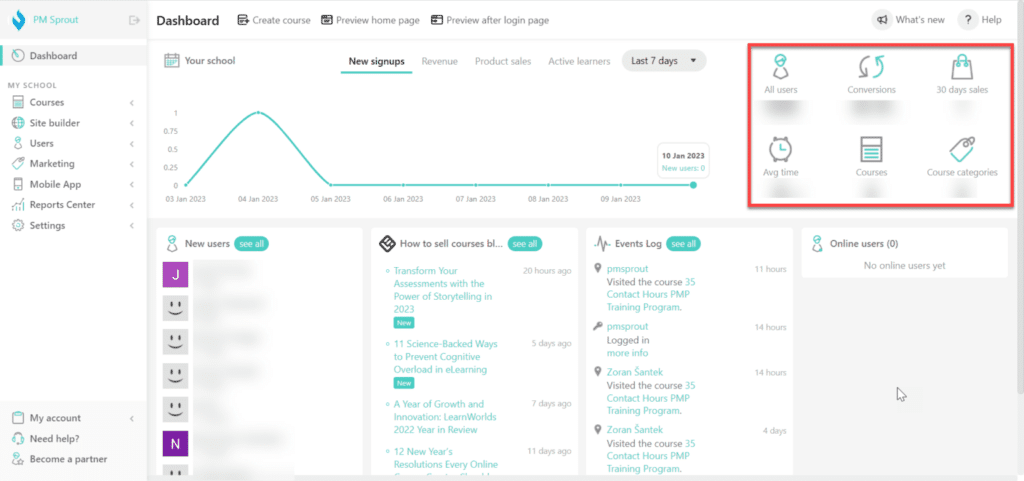
It is a robust tool that will help you build the courses of your choice and host several of them on the same platform. Its dashboard is neat and informative, portraying conversion rate, sales, average time, number of users, courses, and more.
Some links in this post are affiliate links, and I will earn a commission if you purchase after clicking. Please understand that I recommend these resources because they are useful, not just because of my commissions. Please do not purchase unless you need the materials to achieve your goals. Read the disclaimer.

I am Mohammad Fahad Usmani, B.E. PMP, PMI-RMP. I have been blogging on project management topics since 2011. To date, thousands of professionals have passed the PMP exam using my resources.