Choosing the right Customer Relationship Management (CRM) software is crucial for small businesses aiming to streamline operations, enhance customer interactions, and boost growth. With numerous options available, finding the perfect fit can be overwhelming.
In today’s article I will provide you with the nine best nine CRM software solutions useful for small businesses, considering affordability, ease of use, and robust features. Whether you want to improve sales, customer service, or marketing efforts, these CRM tools offer scalable solutions to meet your unique business needs.
You can use any of these CRM systems to help you build stronger customer relationships and drive your business forward.
Before we proceed further, let us understand the CRM Software.
What is CRM?
CRM stands for Customer Relationship Management, and it helps manage relations between customers and the company. It uses data analysis on customer history to strengthen its business relationships with the company and drive sales growth. It also helps retain customers longer by nurturing them and letting them know about the product and its benefits.
CRM systems compile data from different communication channels, including website, telephone, email, live chat, and social media.
These channels help businesses learn their audience and respond to their needs through CRM software.
What Should be the Best Features of a CRM for Small Business
The best CRM for small businesses should have the following key characteristics:
- Affordability: Cost-effective pricing plans that fit within a small business’s budget.
- Ease of Use: Intuitive interface and user-friendly features that require minimal training.
- Customization: Flexibility to tailor the CRM to the specific needs and processes of the business.
- Scalability: Ability to grow with the business, accommodating more users and data as needed.
- Integration: Seamless integration with other tools and platforms commonly used by small businesses, such as email, social media, and accounting software.
- Automation: Features to automate repetitive tasks, such as email marketing, lead tracking, and follow-ups.
- Customer Support: Reliable customer service and assistance with issues or questions.
- Mobile Access: Mobile-friendly access ensures that business operations can be managed on the go.
- Reporting and Analytics: Robust reporting tools to track performance, customer interactions, and sales metrics.
How have I evaluated CRM software for small businesses?
To evaluate the best CRM software for small businesses, I have taken a comprehensive approach considering the following criteria:
- Features and Functionality: I have assessed the range of features offered, such as contact management, sales automation, marketing automation, customer service tools, and reporting capabilities. I evaluate the ease of use and intuitiveness of the software interface.
- Affordability: I compared the pricing plans to ensure they are budget-friendly for small businesses. I considered the value provided relative to the cost, including any hidden fees or long-term contracts.
- Customization and Scalability: I examined the ability to customize the CRM to fit the specific needs and workflows of the business. I assessed the software’s scalability to accommodate business growth and increased data volumes.
- Integration Capabilities: I evaluated the ease of integration with other essential business tools and platforms, such as email marketing services, social media, accounting software, and e-commerce platforms.
- Mobile Accessibility: I ensured the CRM offers a mobile-friendly interface or dedicated mobile apps for managing business operations on the go.
- Security and Compliance: I checked the security measures to protect sensitive customer data. I ensure compliance with relevant data protection regulations, such as GDPR or CCPA.
Best CRM Software for Small Businesses
The following is a list of nine top CRM software for small businesses.
- monday.com
- Capsule CRM
- Zoho CRM
- Hubspot CRM
- SugarCRM
- Freshworks CRM
- Salesforce CRM
- Microsoft Dynamics 365 CRM
- Close CRM
1. monday.com CRM

monday.com is a cloud-based CRM software platform. It has a simple interface, and you can get started in minutes. You can choose from over 200 pre-built workflow templates for designing forms to send communications. You can customize these templates per your requirements or create workflows from scratch.
monday.com is a complete project management tool. It helps in project management, marketing, task management, sales, design, software development, construction, HR and recruitment, IT, etc.
It is a popular platform with a user base of over 100,000. The support is 24X7 and has a quick response time. It also has an in-depth tutorial to help you understand the process or how-to.
monday.com has many integrations and automation. You can automatically get lead data into monday.com, notify a manager when a new lead is created, or remind account managers to check at a specific time.
You can also move clients from one group to another easily.
All meeting recaps, call notes, and client emails can be accessed in one place. monday.com has dashboards in the form of chart widgets to track sales and leads; a board updates widget to see all communications, and a board-to-globe widget to show off where clients are located.
Key Features of monday.com CRM
- Highly customizable
- Over 200 pre-built templates
- Slack integration for chat
- Daily webinars to help you get the most out of monday.com
- Support for all devices
- Enterprise-grade security
- Calendar sync
- Over 30 customization column types
- Due date reminder
- Time tracking
- Forms
- monday.com API for Complex Integrations
- Automation
monday.AI
- Automated Task Generation
- Summarize and Rephrase
- Formula Builder
- Updates Creation and Fast Replies
monday.com CRM Pros
- Easy to use
- Many useful integrations
- Open API
monday.com CRM Cons
- Expensive
- No chat feature
monday.com CRM Pricing Plans
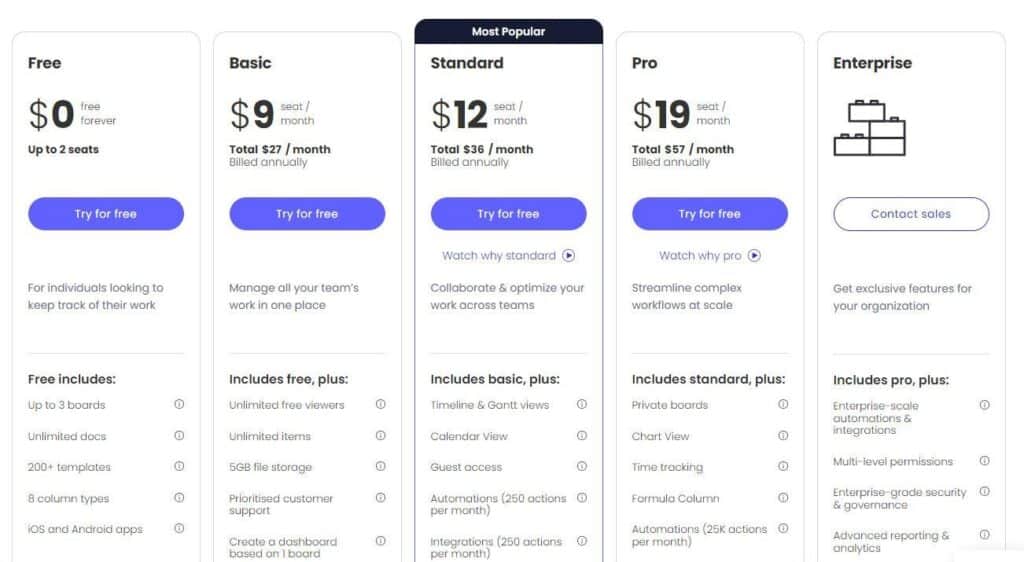
monday.com has five pricing plans:
- Free: Price is 0 USD
- Basic: The price is 9 USD/user/month.
- Standard: The price is 12 USD/user/month.
- Pro: The price is 19 USD/user/month.
- Enterprise: This plan offers enterprise-level features and support. For a quote, contact monday.com support.
You will get an 18% discount with a yearly plan.
2. Capsule CRM

Founded in 2009, Capsule CRM is a tool for tracking business relationships and managing a sales pipeline that fosters business growth. It helps you strengthen relationships between your organization and its leads and clients. Capsule CRM captures, analyses, and organizes leads and provides you with the reporting and insights you require to improve your business operations.
It tracks communications and allocates tasks to your team members with complete transparency and data security. Capsule realizes that every business is different and requires unique functionalities. Therefore, it offers high flexibility in customizations and solutions unique to each business.
It provides special features to industries like travel, accounting, real estate, construction, and hotels to ensure that every part of the finance industry is covered and uses the Capsule CRM features.
Key Features of Capsule CRM
- Pipeline dashboards, Kanban visual pipeline, opportunity filtering, and currency support
- Task reminder emails and task automation
- Calendar views
- Advanced reporting, activity reproving, and report exporting
- Full-text search and automatic addition to social network profiles
- Importing contacts from any place
- Two-factor authentications, SSOs, and restricted access
- Restoration of deleted emails
- Security with GDPR compliance
- Solid integrations and add-ons
- Zapier and API access
- Complete customization of tags, fields, lists, branding, milestones, and more
AI Features
- AI Content Assistant: Write Relevant Emails in Seconds
- Easy Setup: Tell the Assistant Your Requirements
- Customizable Content Generation
- Seamless Integration with Capsule Data
- How to Access the AI Content Assistant
- Enhancing Client Communication
- Revamp Existing Emails with AI
Capsule CRM Pros
- Competitive pricing
- User-friendly interface
- Create multiple lists without third-party e-newsletter tools
- Solid integrations with Google, Microsoft, and more
- Offers a forever-free plan
- Advanced reporting
- Timely reminders
- Excellent note-taking functions
Capsule CRM Cons
- Limited support channels
- No live chat functions
- Lacks marketing features and tools
- Does not offer birthday/anniversary reminders
- No email campaigning
- G-suite integrations are a bit complex to identify
Capsule CRM Pricing Plans

Capsule CRM has five pricing plans:
- Free: The price is 0 USD
- Basic: The price is 9 USD/month/user
- Standard: The price is 12 USD/month/user
- Professional: The price is 19 USD per month.
- Enterprise: Contact sales team for quotes
Read my in-depth Capsule CRM review.
3. Zoho CRM
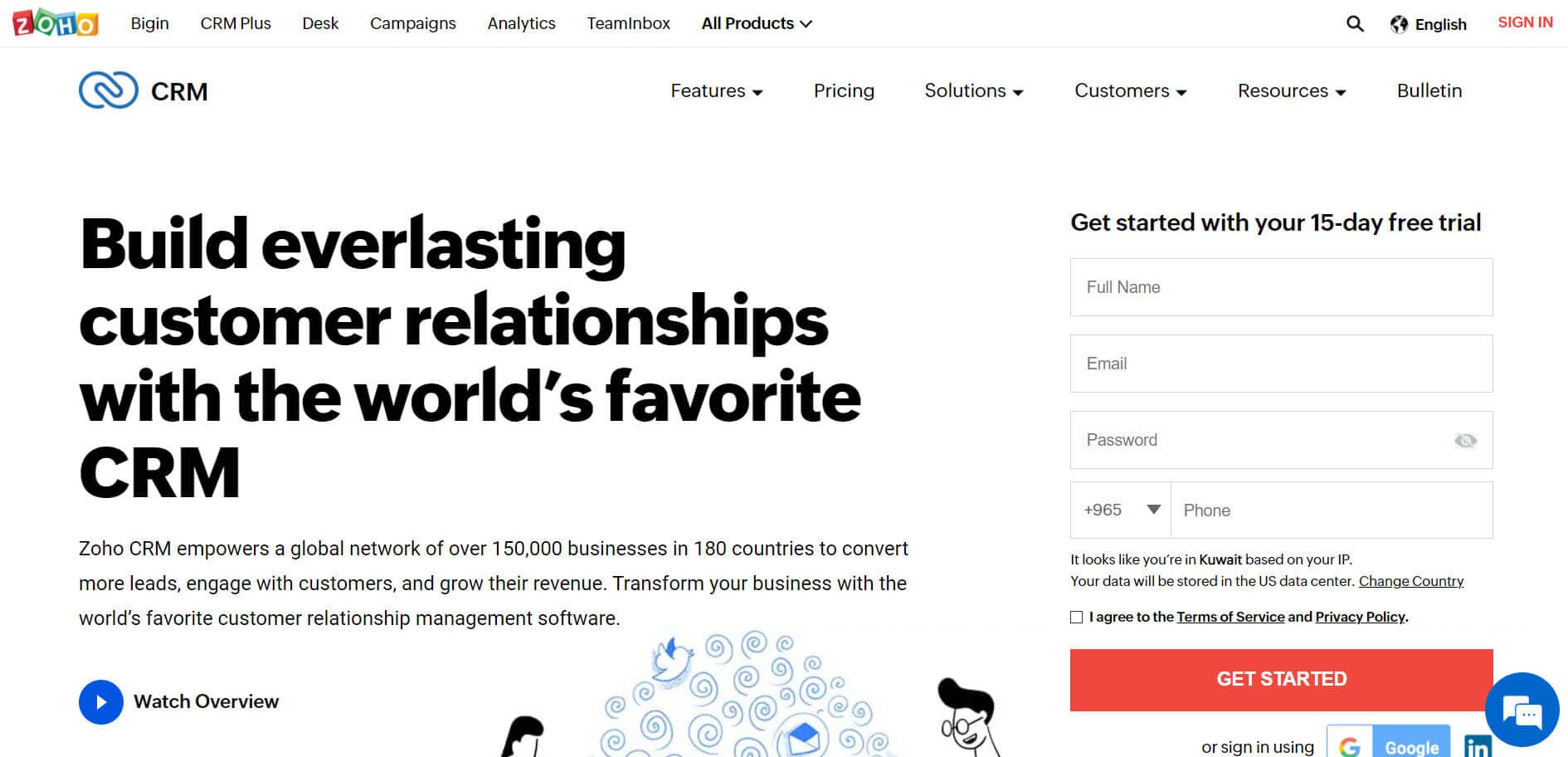
Zoho CRM is a cloud-based, integrated platform for customer relationship management that caters to the needs of all companies and industries. Over 150,000 companies use Zoho CRM to build lasting customer relationships and maximize productivity.
Zoho CRM is one of the most tightly integrated systems on the market. It provides a 360-degree view of your complete cycle and sales pipeline.
The support is omnichannel, including phone, email, live chat, social media, and in-person meetings.
Zoho’s AI-powered sales assistant, Zia, offers advanced interpretations, solutions, and predictions for salespeople. With the help of workflow automation, lead scoring, real-time notifications, and built-in gamification, your sales team can spend more time selling instead of entering data.
Key Features of Zoho CRM
- Lead management
- Workflow automation
- Advanced analytics
- Process management
- Marketing automation
- iOS and Android apps
- Developer platform automates routine sales
- Marketing and support functions using Zoho CRM
- Optimized workflow
- Accurate potential revenue forecast
- Use AI predictions to prioritize leads using Zia (AI assistant)
AI features
- Data Management: Zia optimizes and maintains data integrity in Zoho CRM.
- Data Enrichment: Automatically enrich customer data for better insights and engagement.
- Image Validation: Zia Vision verifies and validates images using AI.
- Productivity: AI-powered workflow automation and macro suggestions.
- Similarity Recommender: Personalized product recommendations to enhance customer experience.
- Record Owner Suggestions: Efficiently assign leads and deals to the best-suited sales reps.
Zoho CRM Pros
- Easy to use
- Free plan
- Free trial without credit card
Zoho CRM Cons
- Lack of pre-built templates
Zoho CRM Pricing Plans
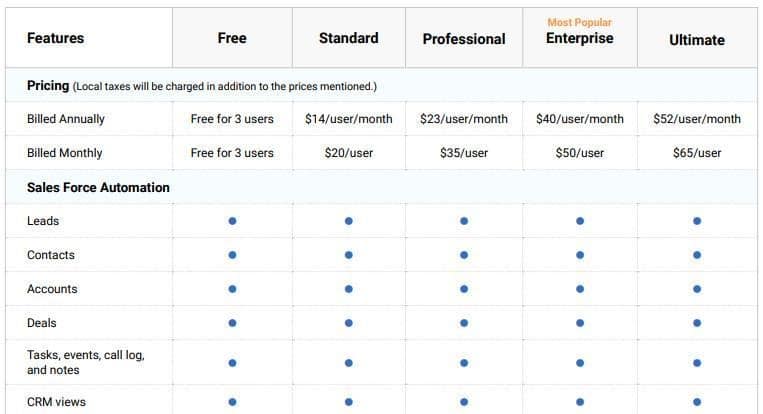
Zoho Projects has five pricing plans:
- Free: The pricing is 0 USD/user/month. Free for three users
- Standard: The pricing is 20 USD/user/month, and you can have three users.
- Professional: The pricing is 23 USD/user/month.
- Enterprise: The pricing is 50 USD/user/month.
Ultimate: The pricing is $62/user/month.
4. Hubspot CRM
HubSpot is a complete CRM software and is quite popular with small businesses. It lets you keep track of your business activities and manage all information in a comprehensive dashboard visible to all team members.
HubSpot shows you an up-to-the-minute view of your entire sales funnel on a neat, visual dashboard. You can sort won and lost deals, schedule appointments, and monitor results in one clear view against your set quotas—all within a fraction of the time.
HubSpot CRM automatically monitors client interactions via email, social media, or call. You can sync your sales with Gmail or Outlook and catch every call, text, or meeting as it occurs.
All information is stored in a tidy timeline, including calls, emails, meetings, and notes.
Key Features of HubSpot CRM
- Free to use
- Customer data, tools, and teams are in one place
- Offers integration with several apps and tools such as Salesforce and D365
- Ready to use email templates
- Email monitoring is possible
- Call tracking and recording are possible
- Store up to 1,000,000 contacts with no expiration.
- Effortlessly manage tasks and create reminders.
- Integrates with Gmail and Outlook for productivity.
AI HubSpot
- Review and edit AI content before publishing.
- Align AI content with your brand’s voice.
- Balance AI-generated and human-crafted content.
- Verify AI outputs, especially statistics.
- AI may produce incorrect or biased information.
- HubSpot AI may have inconsistencies in non-English.
- Verify non-English content for accuracy and clarity.
HubSpot CRM Pros
- Highly customizable
- Free to use instead of the just trial version
- Data is synced automatically among multiple hubs (e.g., marketing hub, sales hub, etc.)
- Over 500 integrations
HubSpot CRM Cons
- The commercial version is expensive
- Social media integration is not available
- Workflow creations are a little confusing
- Reporting is limited
HubSpot CRM Pricing Plans
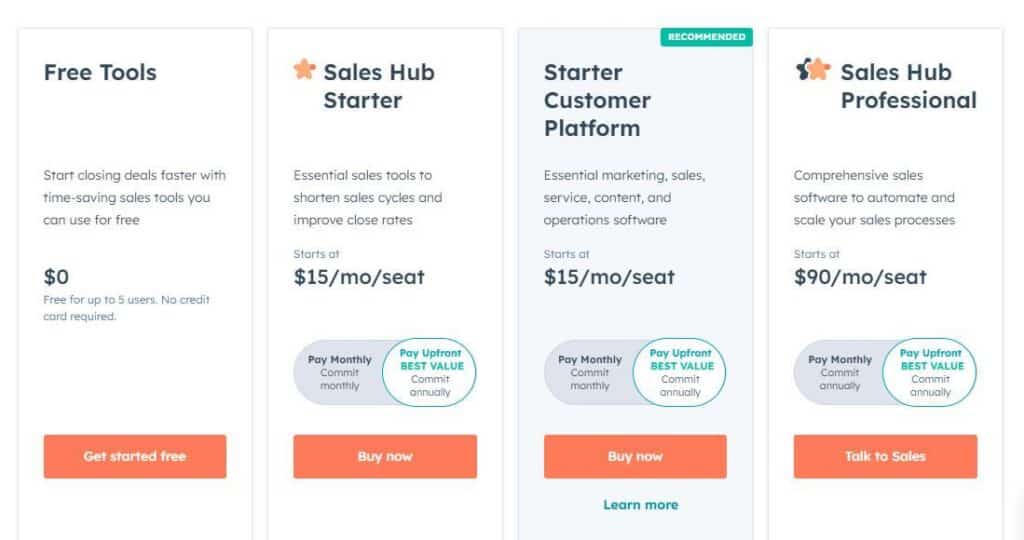
HubSpot has four pricing plans for CRM:
- Free: The price is 0 USD/month for at least five users.
- Sales Hub Started: The price is 15 USD/month
- Starter: The price is 15 USD/month.
- Sales Hub Professional: The price is 1,200 USD/month for at least ten users.
You will get a 10% off on all plans if you pay yearly.
5. SugarCRM

SugarCRM is a collaborative CRM that allows users to monitor and track activities, map customer journeys, and automate workflows. It is a lean, fast, easy-to-integrate, and highly customizable customer management system that provides accurate account management for sales-related tasks.
This CRM has a great solution for small businesses called Sugar Professional. The platform provides customer experience solutions, creating a simple and consistent experience.
Key Features of SugarCRM
- Reporting and dashboard
- Mobile version available
- Support automation
- Role-based views
- Third-party integrations
- Sales automation and forecasting
- Marketing lead management
- Call center automation
- Cloud or on-premises deployment
- Sales management
- Forecasting and analytics
- Mobile apps
SugarCRM Pros
- Unlimited online support
- Outstanding contact management
- Easy to integrate
- Cheaper pricing options
- Forecasting and dashboard features are great to use
SugarCRM Cons
- Slow at times
- The overall interface is not that appealing
- Mass report creation is challenging
- Complex UI
SugarCRM Pricing Plans
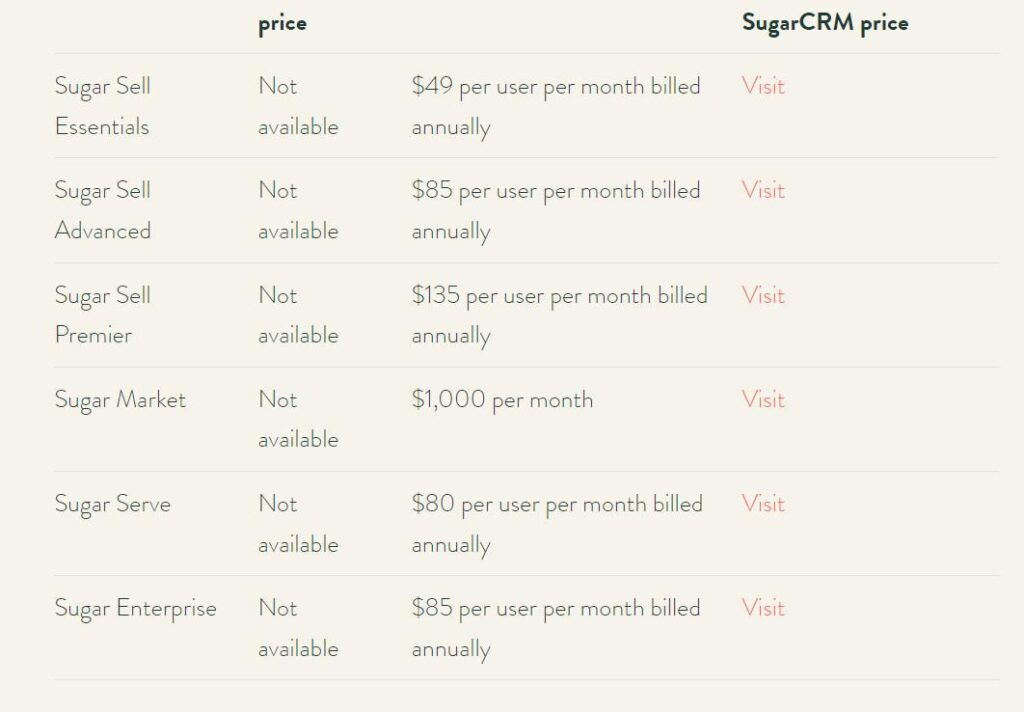
Sugar CRM has five pricing plans:
- Sugar Market: The monthly pricing is 1,000 USD for 10K contacts and is billed annually.
- Sugar Sell: The pricing is 80 USD/user/ month, and you must enroll ten users minimum.
- Sugar Serve: The pricing is 80 USD/user/ month, and you must enroll ten users minimum.
- Sugar Enterprise: The pricing is 85 USD/user/ month, and you must enroll ten users minimum.
Sugar Professional: The pricing is 52 USD/user/ month, and you must enroll ten users minimum.
6. Freshworks CRM
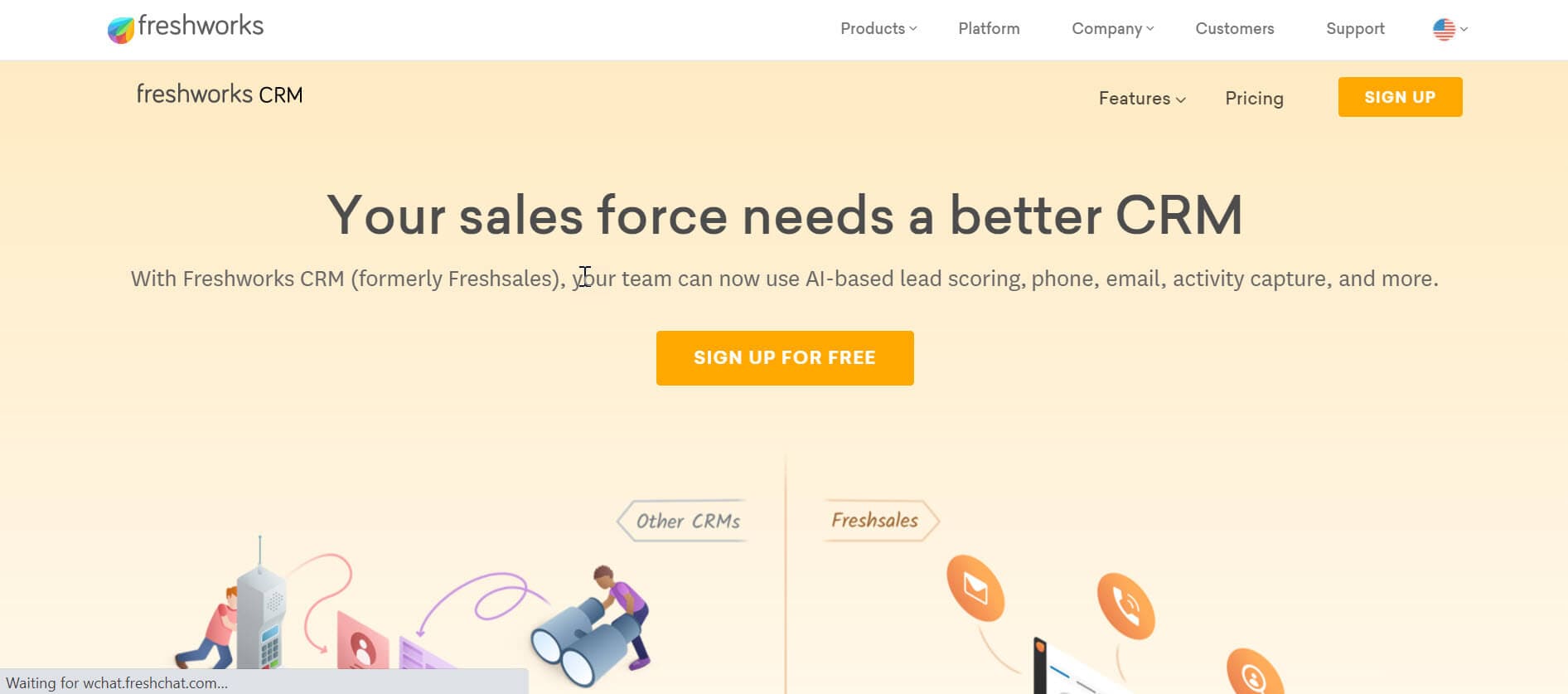
Freshworks CRM software makes managing customer relationships easy for companies. It helps attract, manage, close, and nurture leads. Freshworks CRM is intuitive, with intelligent workflow automation and customizable visual dashboards and reports. The AI-powered CRM helps sales and marketing professionals understand customers with the right insights.
CRM includes CRM automation, marketing automation, chat, and telephone. Freshworks CRM Marketing Cloud helps marketing teams offer personalized customer experiences.
You can use AI chatbots to automate interactions with website users, segment contacts into lists, create tailored custom email campaigns, and nurture leads.
It combines salesforce automation, marketing automation, chat, and call support in one central location so you can organize customer information and interactions. Marketing teams have a greater idea of who they advertise to, and sales teams understand to whom they must sell.
Key Features of Freshworks CRM
- Highly customizable
- Real-time notifications
- Readily available templates
- Live chat, phone, email, and SMS all in one place
- Insights include events, behavior-based data, activity timelines, email tracking, etc.
- Workflow automation and auto-assignment of leads
- Visual sales pipeline and sales goals display
- Different reports like revenue analytics, trend reports, sales activity, etc.
- 360-degree customer views for better service.
- Increases productivity with automation.
- Provides detailed analytics for insights.
Freshworks CRM Pros
- Highly secured
- Mobile app available
- All communication channels in one place
- Highly customizable reporting and configuration
Freshworks CRM Cons
- Poor tech support
- Limited templates
- Less available integrations
Freshworks CRM Pricing Plans
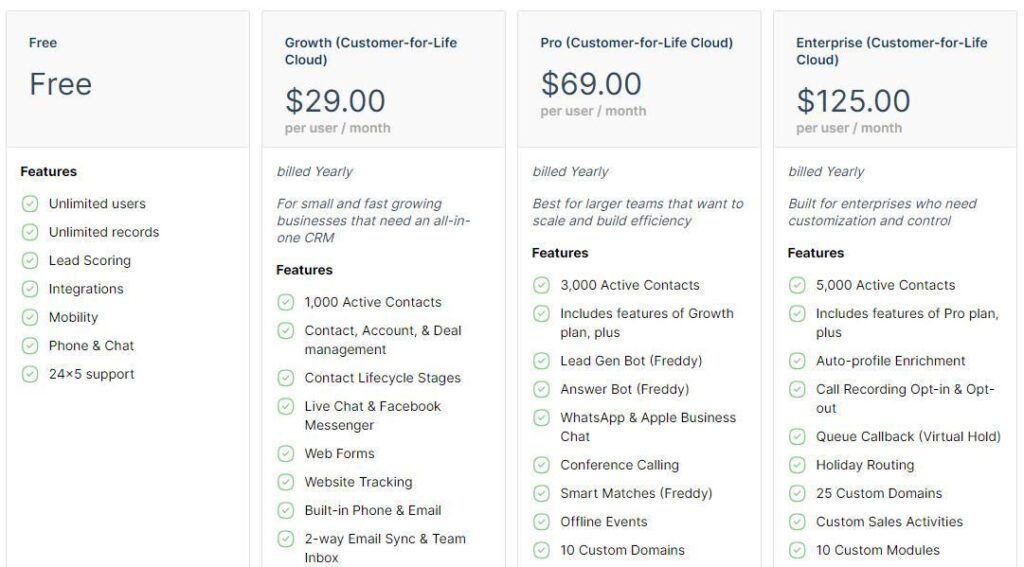
Freshworks CRM has three pricing plans:
- Growth: The price is 29 USD/user/month and billed annually.
- Pro: The price is 69 USD/user/month and billed annually.
- Enterprise: The price is 125 USD/user/month and billed annually.
7. Salesforce CRM
SalesForce is perhaps one of the largest and most popular CRM applications. It provides a basic version called Lightning Basics for small businesses. This kit offers an advanced contact manager with email integration and reminders for follow-up. It also provides many integrations and customization options to help teams improve their profits, close transactions, handle leads, and increase productivity.
Salesforce is an integrated CRM solution that automates sales forces, customer support, communications, promotion management, and more.
Key Features of Salesforce CRM
- 360-degree customer view
- Account management
- Activity feed
- Activity tracking
- AppExchange Marketplace
- Case auto-assignment
- Case escalation rules and queues
- Collaboration tools
- Contact management
- Lead contact account management
- Lightning app builder
- Reports and dashboards
Salesforce CRM Pros
- Mobile app is available
- Task management can also be done
- Easy and fast CRM setup
- Ease of use
- Feature rich
- Responsive support
Salesforce CRM Cons
- Dynamic dashboards are not available
- API access is not available
- No omnichannel support
- Not much custom reporting is available
- Visual workflows are not available
Salesforce CRM Pricing Plans

Salesforce has five pricing plans for small business CRM:
- Starter Suite: The pricing is 25 USD/month/user and billed annually.
- Pro Suite: The pricing is 100 USD/month/user and billed annually.
- Enterprise: The pricing is 165 USD/month/user and billed annually.
- Unlimited: The pricing is 330 USD/month/user and is billed annually.
- Einstein 1 Sales: The pricing is 500 USD/month/user and is billed annually.
8. Microsoft Dynamics 365 CRM
Microsoft Dynamics 365 CRM is a Microsoft platform for sales and marketing. It drives sales growth and marketing efficiently via social insights, business intelligence, and campaign management in the cloud, on-site, or in a hybrid mix.
The product focuses primarily on distribution, marketing, and customer support. Still, Microsoft has marketed Dynamics CRM as an XRM platform (Extended Relationship Management) and has allowed partners to customize it using its proprietary (.NET-based) system.
Key Features of Microsoft Dynamics 365 CRM
- Common client interface across multiple platforms
- Activity timeline
- Integration with social media platforms
- Salesforce automation, marketing automation, customer service, etc.
Microsoft Dynamics 365 Pros
- Integrated with all other Microsoft products
- Analytics can be derived
- Available on-premises or in the cloud
Microsoft Dynamics 365 CRM Cons
- Only one portal is available for free
- No on-premises support
- Data storage limits
- No database access
- Minimum user licenses
Microsoft AI
- Implement AI with intuitive interfaces.
- Integrate processes and data.
- Gain data-driven client insights.
- Adapt with customizable AI.
Microsoft Dynamics 365 CRM Pricing Plans
Microsoft Dynamics 365 CRM has four pricing plans for small businesses:
- Business Central Essentials: The pricing is 70 USD/user/month.
- Business Central Premium: The pricing is 100 USD/user/month.
- Custom Service Professionals: The pricing is 50 USD/user/month. For every additional user, you must pay 20 USD/month/user.
Sales Professional: The pricing is 65 USD/user/month. For every additional user, you must pay 20 USD/month/user.
9. Close CRM
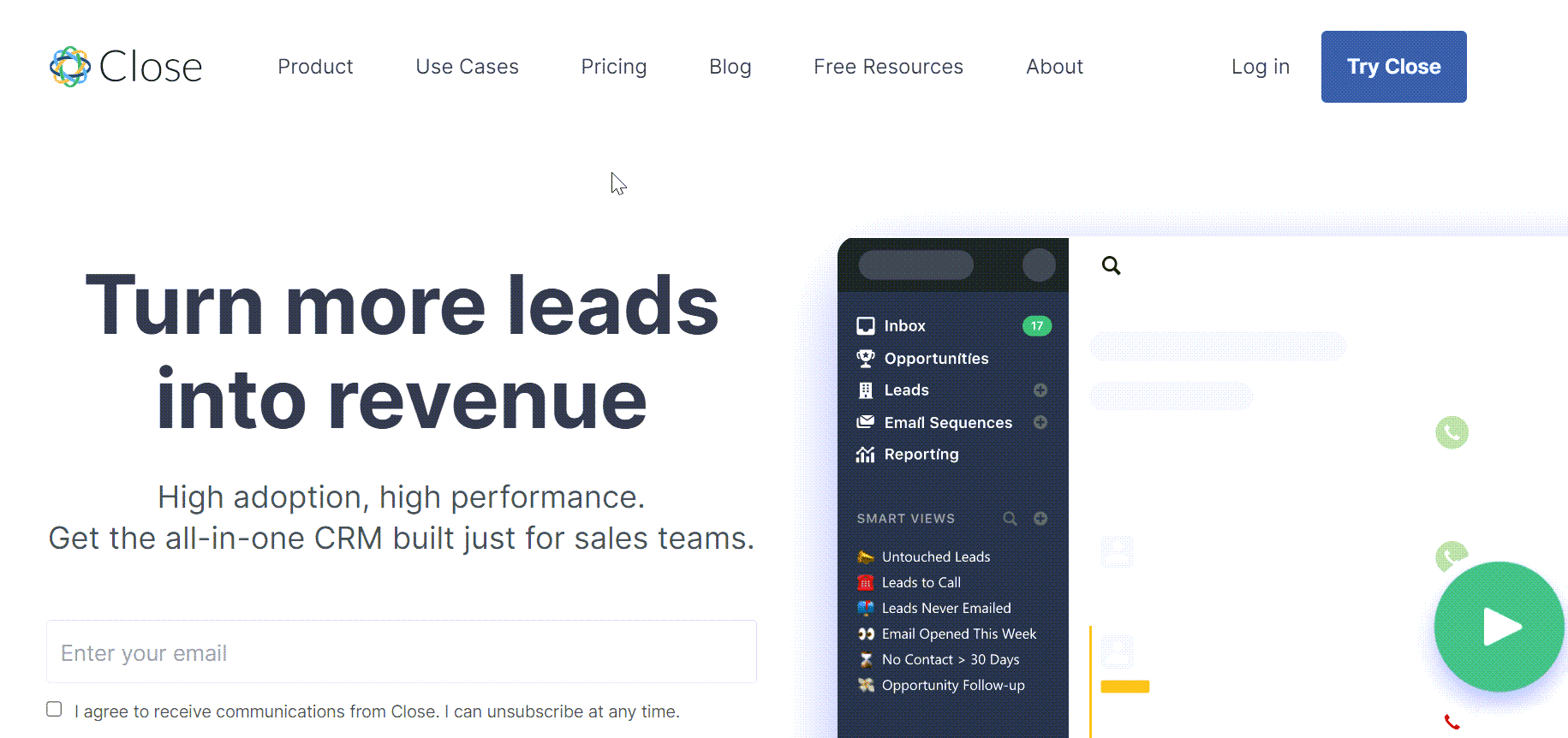
Steli Efti founded the Close CRM in 2012. It started as a software-as-a-service business called ElasticSales to help businesses scale. Frustrated with available CRM solutions, they decided to develop their own, and in January 2013, they released the Close CRM. If your job involves managing a sales team that follows up leads and closes sales, Close CRM can be a good choice for you.
VOIP is its distinguishing feature. It automatically handles outgoing calls and helps your sales team close more sales. You can also use email marketing to nurture your leads and convert them to customers without technical knowledge or coding skills.
You can use SMS marketing to contact your lead. Though it will cost you money, this feature is worth trying for your business.
Close CRM Pros
- Easily imports your leads within minutes
- The interface is intuitive and user friendly
- It has an easy-to-use dashboard with custom fields
- Automatic calling
- Flexible API
- Solid integrations
- Strong customizations and features
Close CRM Cons
- The SMS feature is available in the US, CA, GB, and AUS
- SMS texts cost about 0.01 USD per outgoing message
- No free basic plan
- It is a little tricky to understand for novices
Close CRM Pricing Plans
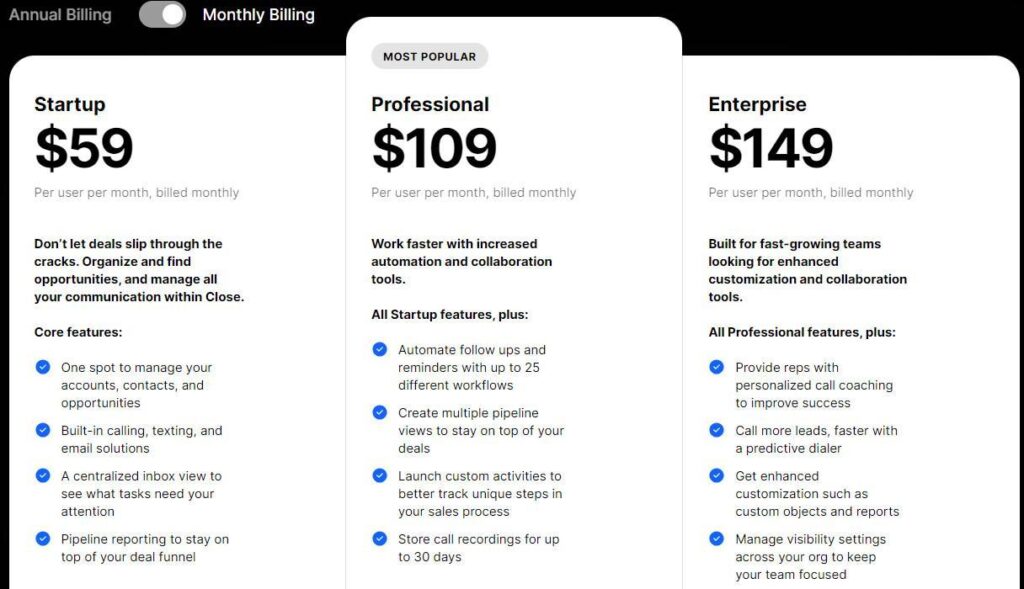
Close CRM has three pricing plans:
- Starter: The price is 59 USD per month.
- Professional: The price is 109 USD per month.
- Enterprise: The price is 149 USD per month
Read my Close CRM Review.
Why Should Small Businesses Go for a CRM?
CRM software lets you combine your sales and marketing data with accounts, stock-keeping, delivery, etc. This helps you determine when the customer purchased an item, how long it took to deliver it, and whether it required any after-sales support. You can see your customers’ interactions with your business at a glance.
CRM software helps you understand your customers better.
Research has shown that CRM helps boost sales and retain customers longer. With all the customer information at your fingertips, you can target your sales efforts more precisely, enhance your conversion rate, and increase sales per customer.
Keeping customer records lets you provide a personal service that will enhance customer satisfaction and increase brand loyalty.
Customer purchasing patterns help identify up-selling and cross-selling opportunities to maximize every customer’s value.
CRM is about productivity; it helps you remove duplicate and unnecessary processes. This reduces waste and, hence, fewer marketing costs.
Many small companies operate on the back foot and respond to post-event changes in the market. CRM software can help you identify changing customer requirements early, and you can take proactive actions to solve any issue before it occurs.
Analyzing the data of your existing customers can help you find new customers and sell them your product successfully.
How to Select a CRM Service for Small Business
Choosing a Customer Relationship Management (CRM) service for a small business involves carefully evaluating various factors to ensure it meets your needs and helps you achieve your business goals.
Define Your Objectives and Priorities
Define your objectives and priorities by understanding your aim with the CRM. Set clear, measurable objectives like increasing customer retention by 20% or reducing lead conversion time by 30%. Prioritize your needs by determining the most critical functions for your business, such as lead management, sales forecasting, customer support, or marketing automation.
Find Your Business and Team Requirements
Assess your business and team requirements. Understand your team’s daily workflow, identify inefficiencies or challenges, and consider the number of users and their roles. Ensure the CRM can grow with your business, supporting adding more users and features as needed without significant cost increases.
Identify existing tools and software your business uses, such as email platforms, accounting software, and eCommerce platforms, and ensure the CRM can integrate seamlessly with them.
Identify Key Features
Identify key features by looking for essential CRM functionalities like contact management, lead tracking, sales forecasting, and customer support. Ensure it includes a robust reporting and analytics system to help track performance and make data-driven decisions. Consider additional features such as marketing automation, workflow automation, social media integration, and mobile access, depending on your business needs.
The CRM should allow customization to fit your unique business processes and terminology and offer flexible modules tailored to your needs.
Review and Test Multiple CRM Software
Review and test multiple CRM software by researching various solutions available in the market, considering user reviews, expert recommendations, and case studies. Shortlist a few CRM systems that appear to meet your requirements and priorities. Take advantage of demos and free trials offered by CRM platforms to test the user interface, ease of use, and key functionalities.
Engage your team during the trial period for feedback and assess how well the CRM fits into your daily operations. Test the customer support provided by the CRM vendors during the trial period, as good support is crucial for resolving issues and maximizing the CRM’s potential.
Select the Software
Finally, you can compare the costs and value by analyzing the pricing models of the shortlisted CRMs. Consider the total cost of ownership, including subscription fees, setup costs, and any additional charges for extra features or users.
Balance cost with the value offered, as sometimes a slightly more expensive CRM might provide better features and support, justifying the cost. Ensure the vendor has a good reputation and reliability by looking for reviews, testimonials, and case studies to verify their credibility and performance.
Select the CRM that best aligns with your business objectives, team requirements, and budget. Then, have a clear implementation plan, including training for your team, to transition to the new CRM system smoothly.
Following these steps, you can choose a CRM service that will effectively support your small business’s growth and streamline customer relationship management processes.
Which CRM is the Best for Small Businesses?
Salesforce, SAP, Oracle, and Microsoft accounted for 42% of stand-alone or embedded CRM system offerings. These CRMs are very expensive and used by big organizations. Some CRMs, such as Salesforce, exclusively handle customer relationship management, whereas some players like SAP, Oracle, and Microsoft offer CRM as an integral part of an ERP solution.
As there are different CRM types, each category has different market leaders.
Each business has its own needs, and you must consider your requirements and select the most suitable one.

I am Mohammad Fahad Usmani, B.E. PMP, PMI-RMP. I have been blogging on project management topics since 2011. To date, thousands of professionals have passed the PMP exam using my resources.