A test grade calculator helps you find a student’s score in seconds. You enter the total number of questions and the number of wrong answers, and the calculator shows the percentage grade, letter grade, and fraction score. This saves time and reduces manual mistakes. It is useful for teachers, students, tutors, and parents who want a fast way to check results.
A test grade calculator is especially helpful when you grade quizzes, class tests, and practice exams often.
Test Grade Calculator
Use this calculator to find the test grade based on the total number of questions and the number of wrong answers. It gives you the percentage, the number of correct answers, and the letter grade instantly.
Test Grade Calculator
How to Calculate Test Grade
You can calculate a test grade with a few simple steps. The process is quick, and it works for school tests, quizzes, mock exams, and practice papers. Most grade calculators follow this same method.
Step 1: Find the Total Number of Questions
First, count how many questions the test has. This is the full number of questions a student could answer. For example, a quiz may have 20 questions.
Step 2: Find the Number of Wrong Answers
Next, count how many answers are wrong. If the student got 3 answers wrong out of 20, that means 17 answers are correct.
Step 3: Find the Number of Correct Answers
Subtract the wrong answers from the total number of questions:
Correct Answers = Total Questions – Wrong Answers
So, if the test has 20 questions and 3 are wrong:
Correct Answers = 20 – 3 = 17
Step 4: Apply the Test Grade Formula
Now divide the correct answers by the total number of questions and multiply by 100:
Percentage Grade = (Correct Answers ÷ Total Questions) × 100
Step 5: Interpret the Result
The result gives you the percentage score. After that, you can convert the percentage into a letter grade based on your grading scale, such as A, B, C, D, or F. Some tools also show fractional grades, such as 17/20.
Test Grade Formula
The test grade formula is:
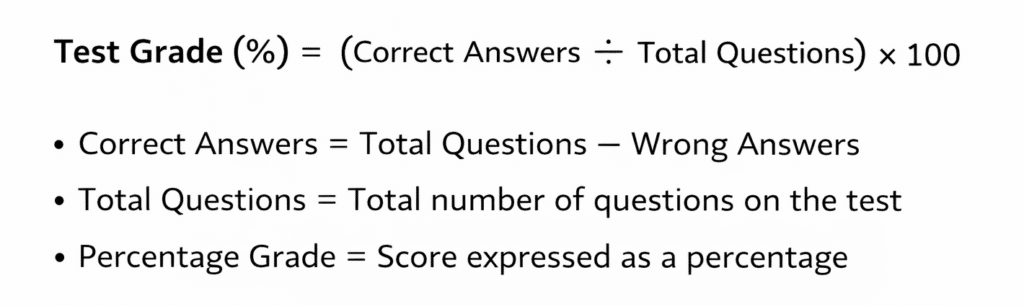
Test Grade Example
Let’s say a student took a 25-question test and got 5 answers wrong.
- Total Questions = 25
- Wrong Answers = 5
- Correct Answers = 20
Now apply the formula:
Test Grade = (20 ÷ 25) × 100 = 80%
On a standard letter scale, 80% is usually a B- or B, depending on the school’s grading policy. This is why a calculator is useful. It gives the result right away and removes guesswork.
Importance of a Test Grade Calculator
A test grade calculator saves time when you grade many papers. Teachers can check results fast, and students can see how they performed without doing manual math. It also lowers the chance of simple calculation errors. That matters a lot when you grade dozens of quizzes in one sitting. Ever make a math slip when you were in a hurry? This tool helps avoid that.
The calculator also helps users better understand their grades. Instead of only seeing a raw score, they can see the percentage, fraction, and letter grade together. This makes the result easier to explain and compare.
FAQ
Q1. What is a test grade calculator?
A test grade calculator is a tool that calculates a student’s percentage score, letter grade, and fraction score based on the total number of questions and the number of wrong answers.
Q2. How do you calculate a test grade?
You subtract wrong answers from the total number of questions, divide the correct answers by the total number of questions, and multiply the result by 100.
Q3. Can a test grade calculator show a letter grade?
Yes. Many test grade calculators convert the percentage score into a letter grade based on a grading scale such as A, B, C, D, and F.
Q4. Who can use a test grade calculator?
Teachers, students, tutors, parents, and schools can use a test grade calculator to quickly check quiz, test, and exam scores.
Q5. Why should I use a test grade calculator?
It saves time, reduces errors, and gives instant results. It is very useful when you need to grade many tests or quickly check practice scores.
Summary
A test grade calculator is a simple tool, but it solves a real problem. It helps you calculate scores quickly, reduce mistakes, and better understand results. You only need the total number of questions and the number of wrong answers. The calculator then shows the correct answers, the percentage, the fraction, and the letter grade. Whether you are a teacher or a student, this tool makes grade checking easy and clear.

I am Mohammad Fahad Usmani, B.E. PMP, PMI-RMP. I have been blogging on project management topics since 2011. To date, thousands of professionals have passed the PMP exam using my resources.