
Wrike has grown from a simple task tracker into an integrated project and work management platform used by millions. This Wrike review examines its features, pricing, advantages, disadvantages, and how it compares to competitors. You will also learn about new capabilities like AI?powered Work Intelligence and Datahub, and how Wrike can help your team deliver projects more efficiently.
What is Wrike
Wrike is a cloud?based work management tool launched in 2006. It has a global presence with nine hubs and supports 2.4 million customers in over 140 countries. Wrike’s software helps teams increase productivity by 50% and reduce email by 90%. Users can manage projects, tasks, resources, and communication in one place. The platform scales from small teams to enterprise organizations, serving industries ranging from technology and professional services to construction and healthcare.
Why project management software matters: Only 25 % of organizations currently use project management tools, yet 77 % of high?performing projects rely on such software. Teams adopting project management best practices are 2.5 times more successful. Using software can also save employees up to 498 hours per year, freeing time for strategic work.
Key Features of Wrike
Now, we will review a few key features of Wrike. Let’s start with space that gives you a glimpse of all your processes in one place. The Wrike Dashboard!
Dashboards

In the dashboard, you can customize what you want to look at. For this, you will have to add the appropriate widgets. A set of widget options can be shown above in the screenshot.
Here are some of the pre-built widgets which you can add:
- Project
- Active tasks
- Important (starred) tasks
- To-do by day or week
- Assigned to me tasks
- Overdue tasks
- My files
- Backlogs Tasks (the ones without due dates)
You can even create your custom widgets and change the dashboard’s appearance.
Here is a glimpse of an example dashboard.
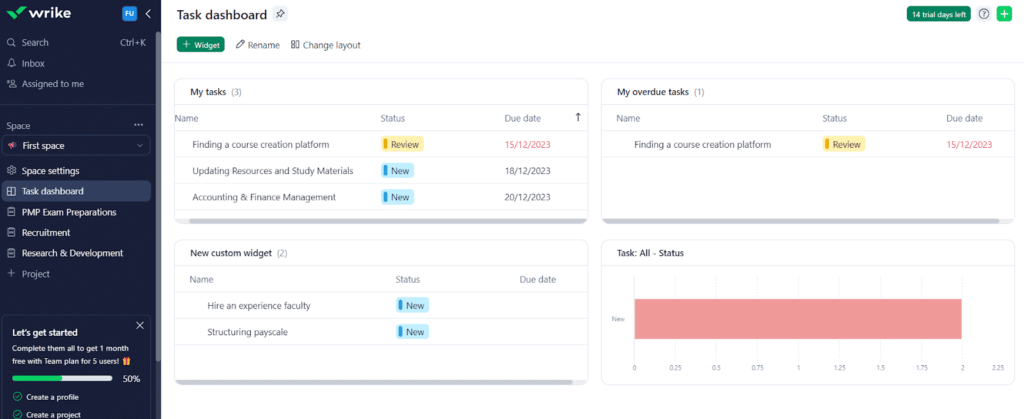
The custom widget gives you several filters to get a glimpse. There’s much to play with to make your dashboard visually appealing, backed by the numbers and statuses you want to see.
Workload & Team Utilization
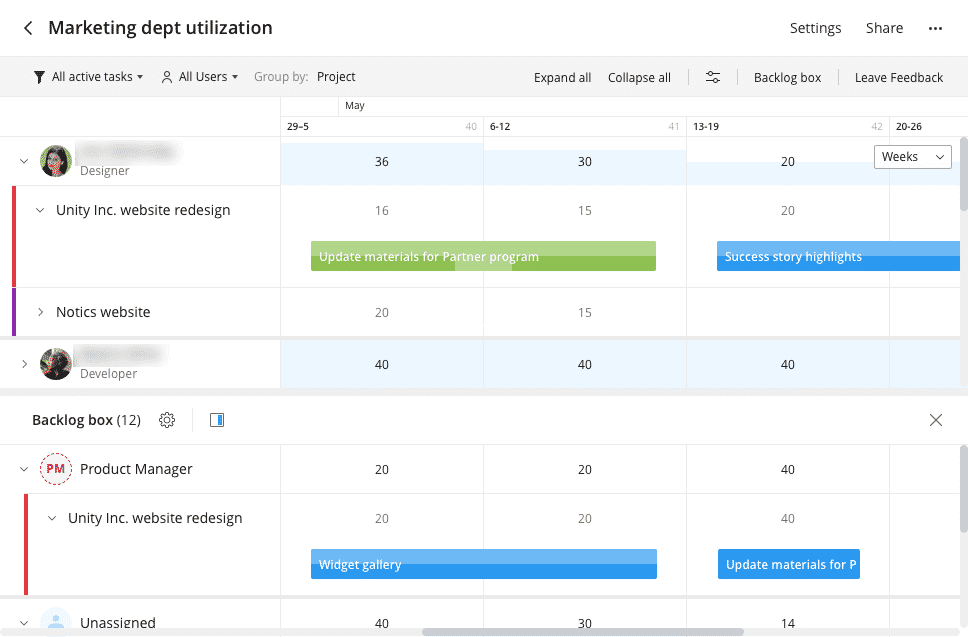
In Wrike, you can assign the best person to the task, and once the task is complete, the next task starts immediately. Wrike Workload improves efficiency and helps you use your resources efficiently.
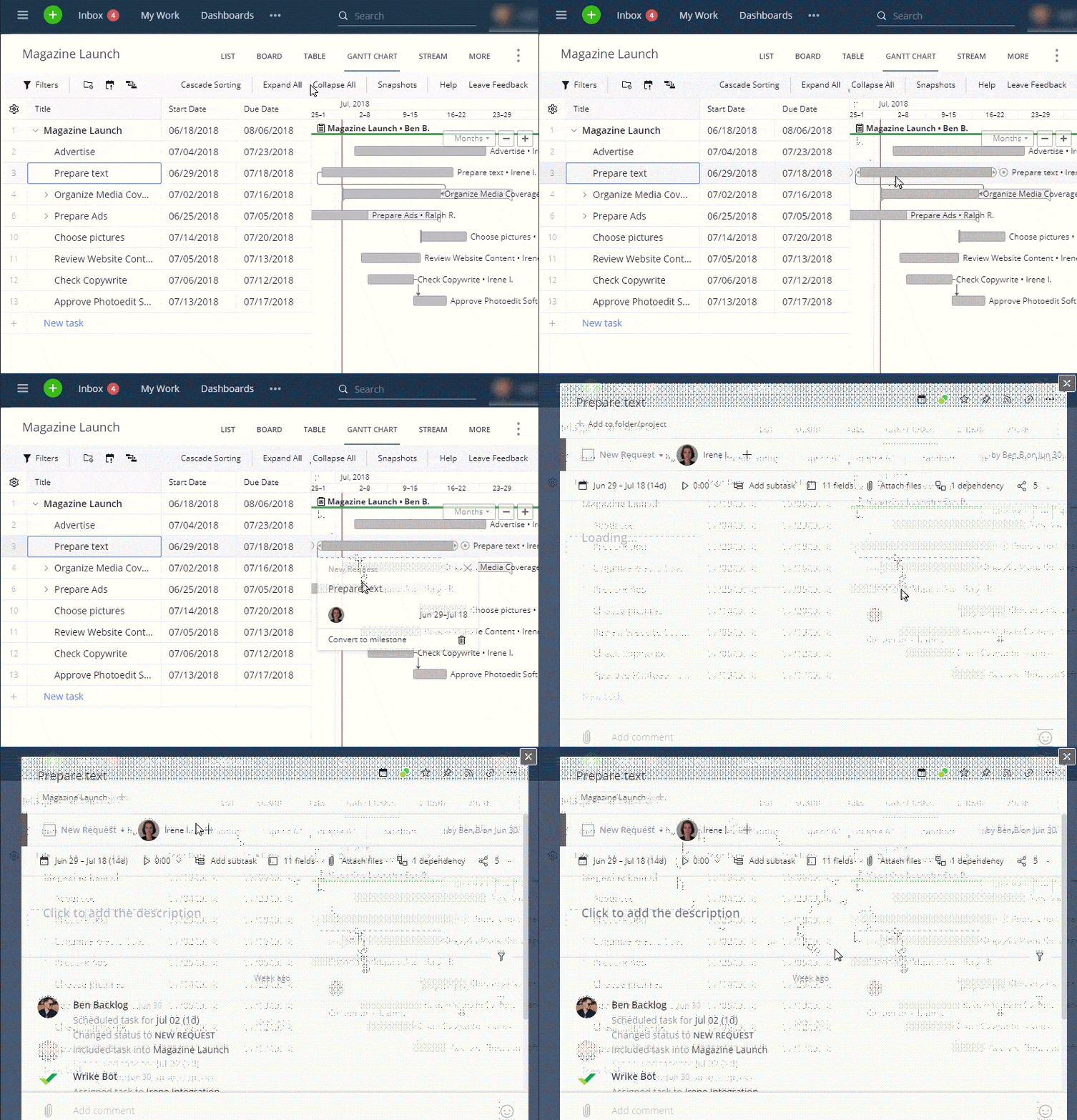
Wrike Gantt Charts
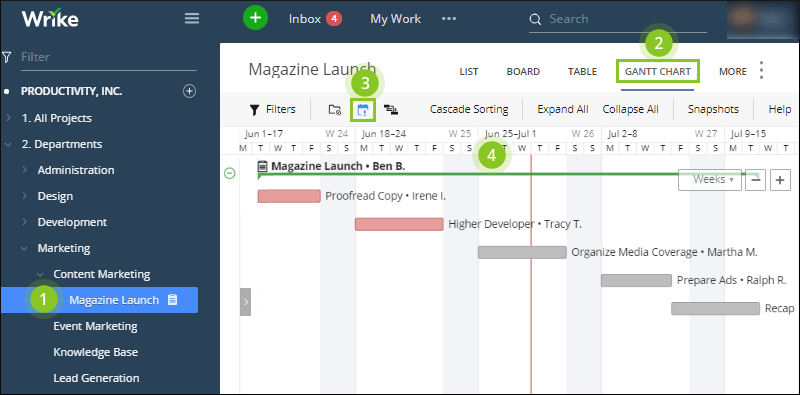
Wrike has Gantt charting, which helps you know the tasks or events involved in your project when they occur, and if the activities overlap. You don’t necessarily need to put data manually here; you can import data from Microsoft Projects and spreadsheets.
You can also create task dependencies in Gantt charts. Once your Gantt chart is ready, you can share it with your team internally and externally by exporting it as a PDF or taking a snapshot.
Wrike’s Gantt chart view is interactive, meaning you can drag and drop items to change their duration or dependencies. Drag and drop are smooth, but re-ordering the tasks can sometimes be fussy and imprecise.
Document Editor
Many other project management tools have only desktop applications for creating content and then collaborating manually, making workflow complicated and clashing with different versions of the same document.
Wrike provides a desktop editor that lets you work on Wrike files in the cloud. You can edit files on your computer, and Wrike handles everything. Everyone on your team will have the same latest updated file. You can use the entire Adobe Creative product suite with the Wrike Marketing package. The editor is available for PC and Mac operating systems.
User Groups

Users are organized into groups. Every user is categorized into one of these five groups:
- Regular users can access the Wrike functionality and view other users’ tasks and other info.
- External users have the same capabilities as regular users but cannot see any user’s file who has not shared the data.
- Collaborators can participate in tasks but cannot create or edit them.
- Invitation and pending groups are those whom you have added but have not accepted the invitation.
- Ungrouped cannot be included in any custom group or subgroup.
Wrike Resource
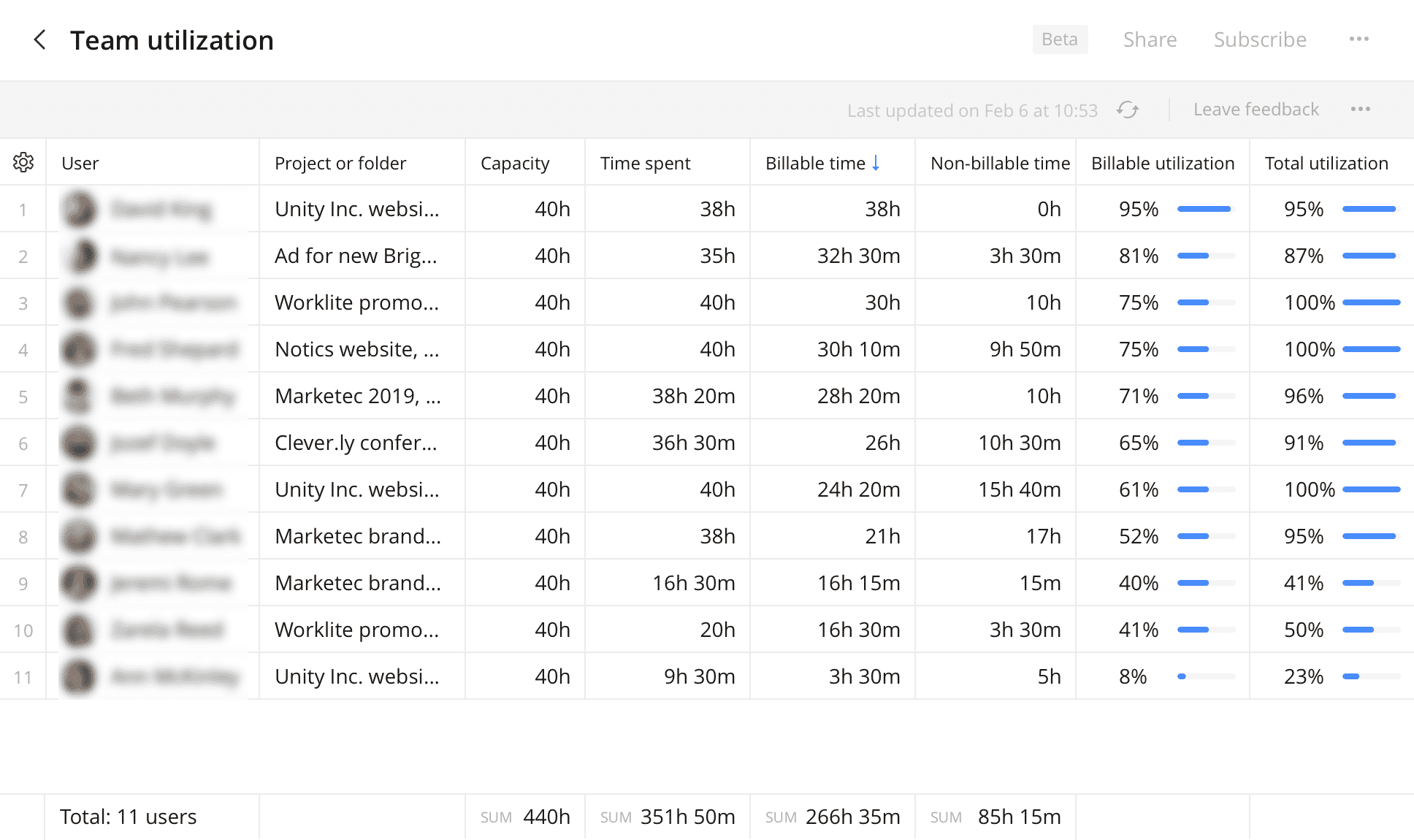
Wrike comes with resource management software along with its many offerings. Here, you can plan, schedule, and allocate your resources for the project smoothly. You can get insights into their availability, workload, and contribution instantly.
With this, Wrike greatly supports workforce or resource management, budget management, time management, and maximizing team performance.
Time Tracking

Time tracking lets you see the time completion duration for all team members. If online logging is not possible, you can add it manually. This feature is useful for cross-team budget transferring.
Wrike’s time reporting is robust. You can set it to receive alerts for certain events or actions.
Please note that Wrike has no invoicing or billing tools. But you can integrate Wrike with a billing tool for seamless processing of invoices.
File Management
In Wrike, you can have many user groups with files that must be organized, tracked, and versioned. Wrike does a great job of keeping everything in order and easy to find.
Workflow
Workflows help to automate tasks and projects and accelerate efficiency. Wrike provides a standard workflow package organized by statuses. Each workflow has four groups: active, completed, deferred, and canceled.
If you are subscribed to the Enterprise Plan, you can create custom workflows.
Wrike’s Mobile App
Apart from the web version and desktop app, Wrike offers an Apple iOS app and an Android app with the following features:
- Mobile real-time collaboration
- Creating tasks
- Workflow participation
- View and monitor projects
- Report and document access
- Enterprise level security
- Offline mode for poor signal areas
- Different language support other than English
So, if you are away from your PC, you can use the mobile app to keep work moving.
Advanced Capabilities
Now, we will review a few advanced features of Wrike.
Wrike API
If your development team wants to extend or integrate the product with other systems, they can use Wrike API. This lets you interact with webhooks for Folders, Accounts, and Spaces.
The full set of API documentation can be found here: https://developers.wrike.com/
Wrike Labs
Wrike takes user feedback seriously and uses it to improve its product. You can upvote user suggestions in the product feedback section of the Wrike Community area. Wrike will provide access to pre-release features for evaluation and suggested improvements.
You can log in to access the Lab features: https://www.wrike.com/labs/
Advanced Capabilities
AI Work Intelligence
Wrike has invested heavily in artificial intelligence. Its Work Intelligence suite uses machine learning to automate routine tasks and provide insights. In 2024, Wrike released 134 innovations and enhanced AI capabilities. Key features include:
- AI Content Creation: automatically craft task descriptions or project briefs.
- AI Editing and Translation: polish text, adjust tone, and translate between languages.
- AI Summaries: generate quick summaries of lengthy discussions to help you catch up.
- AI Widget Creation: build personalized dashboard widgets in seconds.
- AI Q&A: ask questions about your tasks and projects and get instant answers.
- AI Risk Prediction: The business plan utilizes AI to assess project risks and recommend actions.
These AI tools help reduce manual work and improve decision-making.
Datahub: Unified Data Platform
Wrike Datahub, launched in 2024, centralizes data and connects workflows to multiple sources. It provides a single source of data, enhanced collaboration, and streamlined workflows. Datahub connects your Wrike workspace to spreadsheets, CRM files, and databases, delivering a unified platform. This eliminates the need to switch between different tools, thereby boosting productivity. Teams can store up to 500,000 records in a table. Datahub also supports access controls, allowing you to manage who views and edits the data.
Wrike API and Labs
Wrike offers a robust REST API for developers to integrate Wrike with other systems and automate tasks. Wrike Labs allows users to test and upvote experimental features before official release. Recent Labs features include AI widgets and Q&A, providing early adopters with access to cutting-edge innovations.
Pricing and Plans
Wrike has moved to a simplified pricing model. As of 2025:
| Plan | Users | Price (billed annually) | Key Features | Storage |
| Free | Unlimited | Free | Board and table views, simple tasks and subtasks, file sharing, real?time activity stream, starter integrations (Dropbox, Google Drive, Box, OneDrive), mobile apps | 2 GB account storage |
| Team | 2?15 | US$10 per user/month | Folder structure, unlimited projects/tasks/subtasks, shared space, one dashboard, unlimited custom fields, 50 automation actions per user/month, Gantt charts, calendar and chart views, basic integrations, generative AI, 2 GB storage per user | 2 GB per user |
| Business | 5?200 | US$25 per user/month | All Team features plus unlimited request forms, multiple shared spaces, unlimited dashboards, approvals and guest approvals, resource and capacity planning, 200 automation actions per user/month, custom item types, file and video proofing, real?time reports, user groups, and AI risk prediction | 5 GB per user |
| Enterprise | Custom | Custom pricing | All Business features plus SAML 2.0 Single Sign?On, advanced security, two?factor authentication, audit reports, network policies, and business intelligence | 10 GB per user |
| Pinnacle | Custom | Custom pricing | All Enterprise features plus 15 GB storage per user, enhanced analytics, advanced budgeting, project portfolio management, and premium support | 15 GB per user |
Each paid plan includes a 14-day free trial, which does not require a credit card.
Add?ons
Wrike offers several optional add?ons:
- Wrike Integrate: connect with over 400 third?party apps.
- Wrike Sync: two?way sync with technical tools like GitHub and Jira.
- Wrike Lock: encryption key management for advanced security (available on Enterprise and Pinnacle).
Check Wrike pricing on their website
User Experience
Now, we come to the most important part of this Wrike Review: user experience.
Wrike has a clean and modern user interface. You can customize it in whatever way you like. You can share your dashboard among team members and add widgets for additional views, alerts, and functionality.
The workspace has a set of tabs across the top with access to your project’s independent workspace tools like calendar, inbox, reports, streams, etc. There is an activity feed where you can give feedback to other team members on any task, but there is no live chat or Zoom-like video calling.
The basic project layout is an easy-to-navigate set of hierarchical windows:
- Project List — The starting point is a list of all the projects you work on or manage.
- Tasks — When a project is selected, a list of tasks appears.
- Task Details — The task detail is presented when a task is selected.
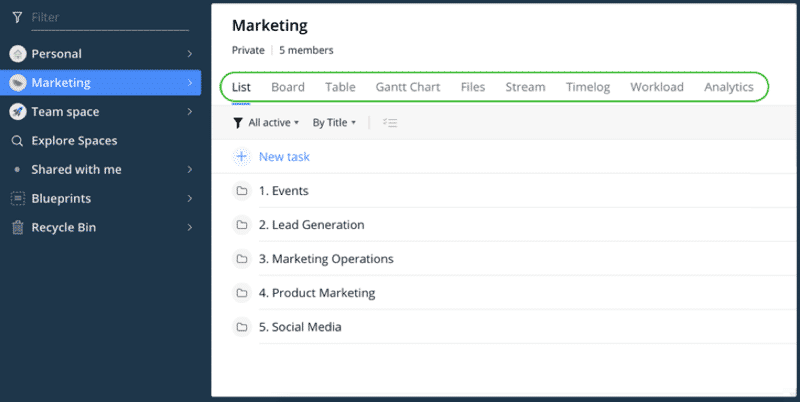
You can view tasks with different layouts.
The task layouts include:
- Table: The table view lets you see active tasks, folders, and subfolders. There are many sorting options, including status, modification date, creation date, and importance.
- Board: The board view is organized in columns. Project, folder, or space tasks are in subfolders.
- Gantt: You can see your tasks in dynamic Gantt charts.
- Calendar: You can view all tasks updated in the calendar under their respective dates.
- Groups: You can now group items or tasks by different properties like status, assignee, budget, etc. This view can be collapsed as well as expanded. You can drag and drop tasks or items easily.
- Fields: In Wrike, we get a ‘fields’ option that lets us add multiple fields like author, files, and assignees beside our respective tasks; this gives us all the required information at a glance.
Wrike Components
The building blocks of Wrike include Tasks, Folders, Projects, and Spaces.
Tasks
Tasks are an important building block of any project management product. With Wrike, you can perform many task-related functions:
- Create new tasks
- Assign tasks
- Schedule tasks
- Follow or unfollow a task
- Create tags for tasks
Tasks can also have dependencies, such as:
- Finish to Start — Task A must be finished to start task B.
- Start to Start — Task A must start before task B can start.
- Finish to Finish — Task A must finish before task B.
- Start to Finish — Task A must start before task B can finish.
Folders
Folders are the organizational structure used to collect group-related tasks. You can add tags to tasks and see them in multiple folders.
Projects
Projects act like folders but can have attributes. This helps with reporting and tracking. These attributes include status, owner, start, and completion dates.
Spaces
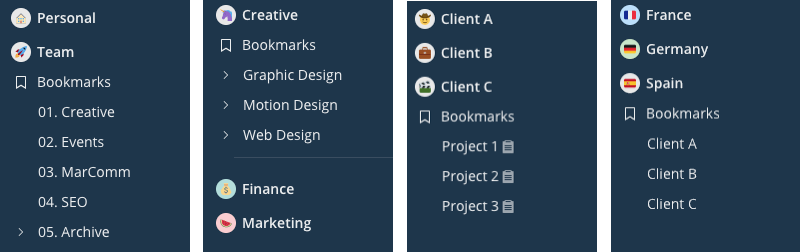
Spaces organize folders and projects. You can create public and private spaces.
Pros and Cons
Pros
- Quick Deployment: little training needed; easy onboarding.
- Robust Feature Set: dashboards, AI, Datahub, resource planning, and many integrations.
- Flexible Views: table, board, Gantt, calendar, groups, and fields.
- Document Editor: real?time file editing in the cloud.
- Advanced Features: Work Intelligence and Datahub provide AI, automation, and unified data.
- Strong Security: SAML 2.0, two?factor authentication, and encryption options on higher plans.
Cons
- Pricing: may be higher than some competitors; Business plan costs $25 per user/month, and Enterprise pricing is custom.
- Limited Invoicing: no built?in billing; requires integration.
- No Built?in Chat or Video Calls: must rely on third?party tools.
Wrike Alternatives and Comparisons
Wrike Vs Asana
Asana is a popular competitor founded by former Facebook engineers. Asana offers Kanban boards, automation rules, forms, and workload monitoring. Its free plan for up to 10 users includes basic functionality, while paid plans start at US$10.99 per user/month. Asana lacks built?in budgeting and invoicing features, and reporting options are limited.
Wrike offers more customizable dashboards, AI tools, and deeper resource management, but Asana’s interface may be more straightforward and its pricing slightly lower for small teams.
Wrike Vs Jira
Jira originated as an issue?tracking tool for developers. Its strengths include task and issue tracking, time tracking, and robust reporting. Jira offers a free plan for up to 10 users and a low entry price of around US$7 per user/month. However, it lacks financial management features and customizable dashboards.
Wrike offers a more balanced platform for non-engineering teams, featuring built-in resource management, AI, and a broader range of views. Jira remains ideal for software development teams focused on issue tracking.
Support, Training, and Community
Wrike invests in customer success through tutorials, certifications, and community support. Users can access:
- Tutorials and Webinars: Wrike offers beginner tutorials, weekly webinars, and a library of video guides.
- Certification Programs: Bronze and Silver certifications help users master Wrike.
- Best Practices and Cheat Sheets: available through Wrike’s resource library.
- Community Forum: users interact with Wrike staff and peers to ask questions and share tips.
- Support Channels: tickets and chat support are provided.
- Wrike User Conference: an annual event where customers learn from experts and network.
User Testimonials
Wrike earns high praise on review sites. Over 91 % of Trustpilot reviewers rate Wrike as Great or Excellent. Customers appreciate its ability to keep projects and tasks organized and to improve capacity planning. For example, one marketing team noted that Wrike established a baseline for project capacity, preventing tasks from being overlooked. Another long?term user praised Wrike for making project management easier and more effective.
Frequently Asked Questions
Q1. What industries use Wrike?
Wrike serves a wide range of sectors, including marketing, creative, product development, client services, IT, operations, and construction. Its customizable workflows suit both small and large teams.
Q2. How does Wrike handle security and compliance?
Wrike provides enterprise-grade security, including SAML 2.0 single sign-on, two-factor authentication, and encryption via Wrike Lock. Enterprise and Pinnacle plans offer audit reports and advanced compliance features.
Q3. Can Wrike integrate with my existing tools?
Yes. Wrike integrates with over 400 applications through Wrike Integrate. It also supports two?way synchronization with technical apps like GitHub and Jira through Wrike Sync.
Q4. Does Wrike support billing or invoicing?
Wrike omits native invoicing. Teams can track time and export reports, but they must integrate with external billing tools to ensure seamless billing.
Q5. What is the difference between the Business and Enterprise plans?
The Business plan offers unlimited dashboards, request forms, resource planning, and AI risk prediction for up to 200 users. The Enterprise plan includes advanced security features (SAML 2.0 SSO, two-factor authentication), audit reports, and up to 10 GB of storage per user.
Conclusion: Is Wrike Right for You?
Wrike is a comprehensive work management platform that offers robust project management and collaboration features. Its 2025 release adds AI?powered Work Intelligence, Datahub, and advanced dashboards, making it one of the most capable tools on the market. Pricing may be higher than budget solutions, but its rich feature set, security, and scalability justify the cost for teams seeking a unified platform.
If you need a tool that combines task management, resource planning, collaboration, and AI automation, Wrike is a worthwhile consideration. For teams wanting simple task tracking or robust issue management, Asana or Jira may be better alternatives.
I hope this Wrike review was useful to you. Please share your thoughts on this platform through the comments section.
Disclosure: Some links in this post are affiliate links, and I will earn a commission if you purchase after clicking. Please understand that I recommend these resources because they are useful, not just because of my commissions. Please do not purchase unless you need the materials to achieve your goals. Read the disclaimer.

I am Mohammad Fahad Usmani, B.E. PMP, PMI-RMP. I have been blogging on project management topics since 2011. To date, thousands of professionals have passed the PMP exam using my resources.





Wrike may be good but I use Restyaboard to keep track of my tasks and projects. It’s a total game-changer because it is easier to understand and has more features in the free version.