Projects often fail not because of poor ideas, but because of weak planning. That’s where a schedule model becomes critical. It helps you map out tasks, define timelines, and understand how work flows from start to finish. Instead of guessing, you make informed decisions based on clear logic and dependencies.
Whether you manage small tasks or complex programs, a strong schedule model keeps everything aligned. It improves communication, reduces risks, and supports better use of resources.
In this blog post, you will learn what a schedule model is, why it matters, and how to build one step by step for real project success.
What is a Schedule Model?
A schedule model is a detailed plan that shows how a project will be completed over time. It includes all project activities, their durations, and the relationships between them. Instead of just listing tasks, it explains the order in which work should happen and how one task depends on another. This helps project managers understand the full workflow before execution begins.
The schedule model also includes resources, constraints, and assumptions. When entered into a scheduling tool, it creates a visual layout such as a network diagram or Gantt chart. This allows teams to see the timeline clearly and identify the critical path, which is the sequence of tasks that directly affects the project’s completion date.
As the project progresses, the schedule model is updated with real data. This makes it a dynamic tool that supports planning, monitoring, and control throughout the project lifecycle.
Why Schedule Models Matter Today
A schedule model plays a key role in successful project management. It helps you plan tasks clearly and understand how each activity connects to others. With a strong model, you can see potential delays before they happen and take action early. It also improves resource use by showing who is doing what and when. This prevents overload and confusion within the team.
A schedule model supports better communication because everyone can view the same plan and stay aligned. It also helps track progress and measure performance against the plan. In complex projects, it brings structure and control, making it easier to deliver work on time and within budget.
Components of a Schedule Model
Creating a schedule model starts with understanding what goes into it. The model contains:
- Activities: break the project into discrete tasks. Each activity should deliver a clear output.
- Durations: estimate how long each activity will take. Use historical data or expert judgement to keep estimates realistic.
- Dependencies: identify which tasks must happen before others can start. Dependencies include finish-to-start relationships and more complex links, such as start-to-start.
- Resources: list the people, equipment, or materials needed. Assigning resources ensures that no one is overloaded and that the right skills are available.
- Constraints: note any fixed dates or other conditions. For example, regulatory deadlines or limited access to a facility can affect when work can occur.
When you input these elements into a scheduling tool, it generates a network diagram or a Gantt chart that shows how the project flows. This visual representation helps teams understand the logical order of work and the impact of delays.
Steps to Build a Schedule Model
You can follow the following steps to develop a schedule model for your project:
- Plan schedule management. Start by deciding how you will manage scheduling. Identify your stakeholders, agree on the level of detail, and choose your scheduling tool.
- Identify activities. Break down your scope into a list of tasks. Use work breakdown structures to ensure that nothing is overlooked.
- Determine dependencies. Ask: Which activities must happen before others? Document these relationships so that delays in one area trigger appropriate changes elsewhere.
- Estimate durations and resources. Work with subject matter experts to estimate how long each task will take. Assign people, equipment, or materials, taking into account their availability and workload.
- Sequence activities. Order the activities based on dependencies. At this stage, you arrange the tasks logically without setting exact dates yet.
- Build the schedule. Enter the activities, durations, and resources into your tool. The tool calculates start and finish dates, highlights the critical path, and creates a baseline for tracking progress.
Following this process ensures that your schedule model is complete and that everyone understands how it will be built.
Benefits of Using a Schedule Model
A robust schedule model offers multiple benefits beyond simply listing dates:
- Clarity and communication: A visual model makes it easier to explain the project plan to stakeholders. Everyone can see how tasks relate to one another and where their work fits.
- Risk identification: By mapping dependencies, you can spot bottlenecks and tasks that must finish on time. This helps you address risks before they become issues.
- Resource optimisation: Assigning resources within the model prevents over-allocation and highlights periods of high demand. This reduces burnout and improves morale.
- Performance tracking: Once the project begins, you can compare actual progress against the model. Variances prompt timely adjustments.
In my own experience managing a cross-functional product launch, building a detailed schedule model uncovered a dependency between marketing approvals and manufacturing that could have delayed the release. Addressing it early meant we delivered on time.
Schedule Model Vs Project Schedule
People often confuse a schedule model with a project schedule. They serve related but distinct purposes. The schedule model is the blueprint from which the schedule is derived. It focuses on logic and relationships, while the schedule adds real dates and assignments once the plan is approved.
The following infographic highlights these differences:
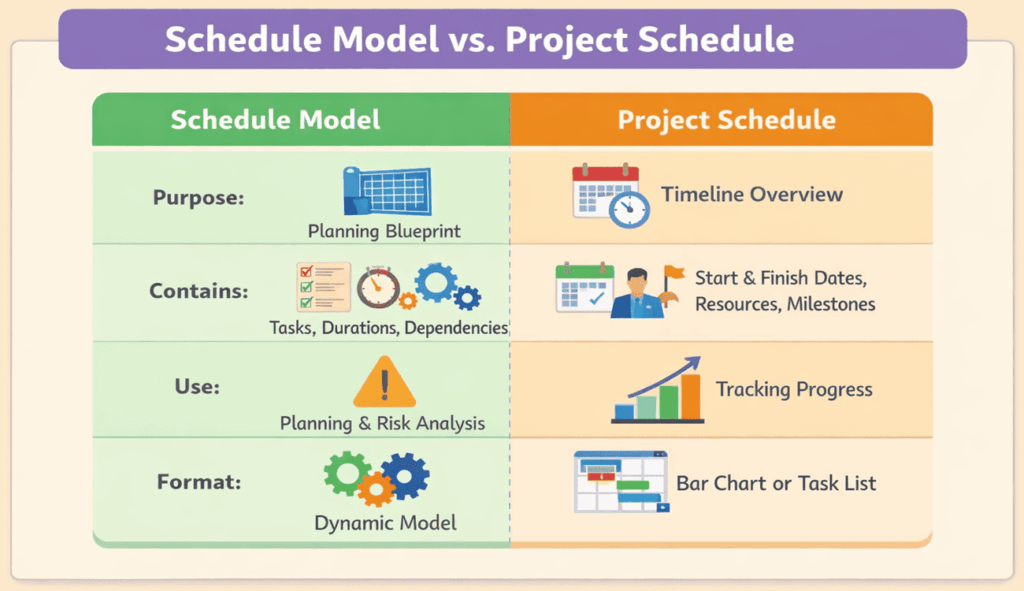
Understanding the distinction helps you communicate clearly. When stakeholders ask for the schedule, they typically mean the document with dates and assignments. The schedule model is the engine behind it.
Best Practices for Maintaining Your Schedule Model
Building a model is only the first step. Keeping it accurate throughout the project requires discipline:
- Update regularly: Treat the model as a living document. Update it whenever tasks begin, finish, or change. Frequent updates prevent surprises.
- Engage the team: Involve team members in estimating durations and dependencies. Their input improves accuracy and commitment.
- Use real-time data: Many tools integrate with timesheets or other systems. Leveraging live data reduces manual entry and highlights issues quickly.
- Integrate risk management: Link your model to a risk register. If a risk materialises, you can see which tasks will be affected and adjust accordingly.
- Communicate changes: When the model changes, promptly inform stakeholders. A short weekly briefing or dashboard can keep everyone aligned.
Common Challenges and How to Overcome Them
Even seasoned professionals encounter obstacles when building schedule models:
Unrealistic estimates. Overly optimistic durations lead to compressed timelines and stress. Mitigate this by consulting subject matter experts and using data from past projects.
Missing dependencies. Forgetting a dependency can cause tasks to overlap incorrectly. Review the sequence with the team and use your software’s network diagram to spot gaps.
Resource conflicts. Assigning the same person to multiple tasks at once results in delays. A resource-loaded model makes overloads visible so you can balance workloads.
Scope changes. Projects rarely stay static. When scope changes occur, revisit your model. Update activities, durations, and dependencies promptly to keep the schedule realistic.
By anticipating these challenges, you can build a model that withstands changes and keeps your project on track.
FAQs
Q1. What is a schedule model in project management?
A schedule model is a structured plan that maps out activities, durations, dependencies, resources, and constraints. It lets teams forecast timelines and adjust to changes.
Q2. How does a schedule model differ from a project schedule?
The model focuses on the logic and relationships between tasks, while the schedule assigns actual start and finish dates and resources, turning the model into a timeline.
Q3. Why are schedule models important?
They help organizations avoid delays and cost overruns by making dependencies visible. When used properly, they improve communication and resource planning, leading to better outcomes.
Q4. Which tools can help build a schedule model?
Project management software such as Microsoft Project, Primavera, or Jira can automate calculations and highlight risks, but simpler projects may use spreadsheets or templates.
Q5. How often should you update your schedule model?
Update the model whenever a task starts or finishes, when scope changes occur, or when risks materialise. Regular updates keep the model accurate and useful.
Summary
A schedule model helps you plan, organize, and control your project with confidence. It shows how tasks connect, how long they take, and where risks may appear. When you build and update it regularly, you avoid delays and improve teamwork. In today’s fast-paced projects, clear scheduling is no longer optional. It is essential. Use a strong schedule model to stay on track, make better decisions, and deliver your projects on time and within budget.
References:

I am Mohammad Fahad Usmani, B.E. PMP, PMI-RMP. I have been blogging on project management topics since 2011. To date, thousands of professionals have passed the PMP exam using my resources.