monday.com started as a simple task tracker in 2012 and has evolved into a flexible work operating system used by thousands of teams. In 2025, the platform goes beyond project management. It offers AI tools, a customer service hub, a CRM, a white-boarding canvas, and more.
This monday.com review explains the latest features, pricing, and user statistics so that you can decide whether monday.com fits your team.
Let’s get started.
monday.com Review
monday.com is a cloud-based work management platform that helps teams plan, track, and deliver projects. Founded by Roy Man and Eran Zinman in 2012, the tool was initially called daPulse and was renamed monday.com in 2017. It now serves over 225,000 customers worldwide, up from 186,000 in 2022 and 152,000 in 2021.
Many of those customers are small businesses, but large enterprise accounts are growing quickly. As of June 2025, the number of paid customers with more than 10 users reached 61,803, an 8 % increase over June 2024. monday CRM alone surpassed $100 million in annual recurring revenue (ARR) in 2025.
The platform is organized into four core products: Work Management, CRM, Dev and Service, along with two add-ons called WorkForms and WorkCanvas. Each product is built on the same underlying WorkOS so that you can move data between boards, automations, and dashboards.
Key Features of monday.com
The following are a few key features of monday.com:
AI-powered tools
monday.com invested heavily in artificial intelligence. The company launched a suite of AI products called monday magic, monday vibe, and monday sidekick in 2025. monday magic transforms a simple prompt into a ready-to-use work solution; you describe your workflow, and the tool builds a board, dashboard, and automations automatically. monday vibe is an AI-powered app builder that turns natural language into secure, custom applications. Other AI features include an email assistant within the CRM, a formula builder that writes complex formulas, autofill suggestions, and AI templates. Administrators can enable or disable AI across the account and monitor AI credit usage.
The AI tools rely on credits. Every account receives 500 credits per month on paid plans. Standard, Pro, and Enterprise users can purchase extra credits; Basic plan users cannot.
Collaborative Team Management Tool
monday.com provides real-time collaboration among project team members. Being cloud-based makes it accessible from anywhere and on any device. All project files are saved on a web server, allowing team members to have the same file version. This avoids conflicts with having different versions of the same document and increases productivity.
You can manage your team with a graphical user interface. You can assign a new team member, assign the task, change the task, customize workflow, and monitor progress until the project is completed.
Templates for All Use Case
monday.com provides templates for almost all scenarios. A template set is available for you per your respective industry; you get many engaging templates from software development, design, marketing, content production, operations, and many more.
If you are in a hurry, you can use them as-is and customize them later, making the work much easier. That is the main purpose of having a project management tool.
Visual Planning and Automation
monday.com is a graphical-based platform. You can plan projects, track their progress, and compare them with the planned progress visually.
This project management platform lets you automate many recurring tasks and streamline workflow using automation recipes. It provides many recipes (a combination of triggers and actions) to create workflow automation.
A few pre-built recipes are:
- Notification
- Status Change
- Recurring Tasks
- Auto-assign Tasks
- Date Reminders
monday.com provides customizable pre-built workflows. Again, you can select a template and customize it as per your needs here.
Boards and Columns
On a board, you can group items. It is a virtual place to help you keep track of your project and everyday activities. It lets you manage your tasks and sub-tasks. Tasks and subtasks are known as items and subitems on monday.com.
monday.com offers different boards for different purposes, such as:
- A mainboard that all team members in your account can see.
- Shareable boards to share with people outside your team, such as clients, contractors, and consultants.
- Private boards are accessible to the creator and those who have access.
You can change the boards as per your needs.
Your board comprises columns. You can add as many columns as you require, such as:
- Team member column
- Timeline column
- Status
- Priority
- And more
You can remove columns and set permission to access, view, and edit. You can pin a column as well.
CRM and Sales Tools
monday.com’s CRM gives sales teams a pipeline view, contact database, email tracking, and deal forecasting. You can design sequences of automated emails and tasks to nurture leads without manual follow-up; the Sequences feature, released in July 2025, helps create outreach campaigns with automated emails and reminders. monday CRM integrates with Gmail, Outlook, and marketing tools, and it recently hit $100 million in ARR, indicating strong adoption. Users can also build dashboards to track revenue, deal stage, and team performance.
monday service: AI-enabled customer support
monday service, released in August 2025, centralizes ticketing, incident management, and knowledge bases in one portal. It connects projects, tickets, and cross-department teams so that service agents have context. Smart automations and integrated workflows use monday’s AI to assign tickets, suggest responses, and summarize past cases. The AI assistant provides a summary, resolution steps, and a ready-made reply for each ticket.
The service module includes a customer portal with its own URL, allowing customers to submit requests without needing a monday.com account. Monday service accounts have unlimited AI credits for tickets, incidents, asset management, and CSAT boards.
WorkCanvas and WorkForms
WorkCanvas is monday.com’s digital whiteboard. You can brainstorm ideas, build diagrams, and collaborate in real time. In September 2025, monday.com released dynamic data layers for WorkCanvas. Data layers let you pull data directly from a monday board and display it on the canvas; you can set rules that change the color or size of shapes based on item values. For example, a product manager can create a map where each circle represents a warehouse and changes color when inventory drops below a threshold. This feature helps teams visualize context without leaving the canvas.
WorkForms is a no-code form builder. You can create forms to collect feedback, survey customers, or gather leads. Forms can be branded with your colors, and responses automatically sync back to a board. This eliminates the need for separate form tools.
Integration
monday.com offers many integrations to make your life easy. If we give it a number, there are more than 200 applications that you can integrate with Monday.com for a seamless working experience. A few popular integrations are:
- GitLab
- Slack
- Gmail
- Google Drive
- Mailchimp
- Dropbox
- Google Calendar
- Zapier
- Integromet
- Etc.
A few other essential features of monday.com are:
- A many-to-many communication tool
- An Execution Board with a big screen display
- Email notifications and updates
- Personal and public boards
- Pre-built checklists
- iOS and Android app.
Benefits of monday.com
- Ease of use: The interface is colorful and intuitive. New users can build projects quickly using templates and drag-and-drop boards.
- Flexible and customizable: You can customize fields, boards, automation recipes, and dashboards to suit any workflow, from marketing to software development.
- Powerful AI features: monday magic, vibe, and the AI assistant help teams build solutions, generate formulas, and reply to customers in seconds.
- Time tracking and workload visualization: Timeline and time tracking columns let you monitor progress and balance workloads.
- Extensive integrations: Over 200 integrations allow you to connect existing tools, reduce manual work, and centralize data.
- Strong community and support: There is a 24/7 support team, a knowledge base, webinars, and an active community forum. monday service accounts even get unlimited AI credits for tickets.
Drawbacks to Consider
- Higher cost for small teams: Each paid plan requires at least three users, so a small team pays for seats it may not use. The Pro plan can be expensive for large teams.
- Limited features on the free plan: The free plan lacks integrations, automations, and guest access.
- Basic plan lacks integrations and AI add-ons: You need to upgrade to at least the Standard plan to use integrations or purchase additional AI credits.
- Enterprise features locked behind higher tiers – Advanced security, SCIM provisioning, and HIPAA compliance are available only on the Enterprise plan.
Who Should Use monday.com?
monday.com suits teams that need a flexible work operating system. Predictive and agile project teams benefit from visual boards and automation. Sales teams can use the CRM and sequences to manage pipelines. Service teams can centralize ticketing and knowledge bases with monday service. Small startups might find the entry price high, but the platform adds value for organizations looking to scale with AI assistance.
Qualities to Look for in a Good Project Management Platform
You should look for the following qualities while selecting a collaboration software platform for your team:
- Ease of use
- Customization
- Integration
- Price
monday.com passes these quality tests, but I find it a little expensive.
A Few Clients of monday.com
A few popular clients of Monday.com are:
- Discovery Channel
- Fiverr
- Frost & Sullivan
- WeWork
- Wix
- Philips
- Carlsberg
- Canva
- Cocacola
Today, over 180,000+ teams in different industries in over 140 countries use monday.com to manage their day-to-day jobs and achieve their goals.
Working with monday.com
Let us start with creating an account with monday.com.
monday.com does not ask for credit card information while creating an account. You can use it for free for two weeks.
Enter your email ID and password, and your account is ready. After the first login, monday.com will ask you for some information to provide a customized experience.
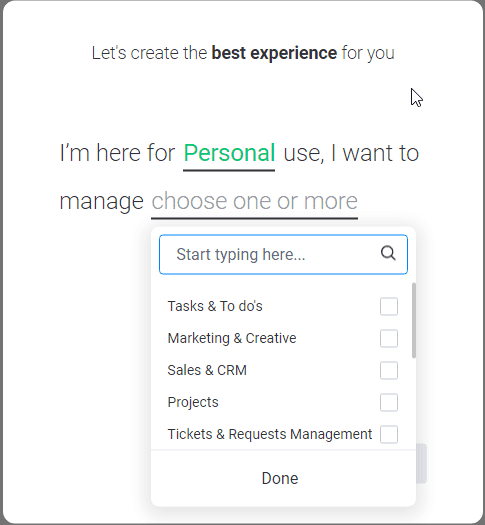
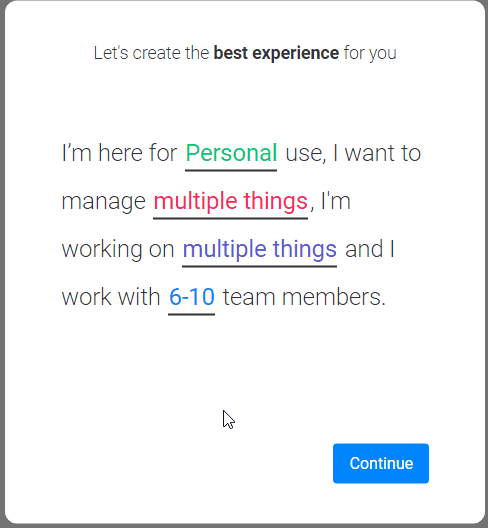
Then, you choose whether to manage a single project or multiple tasks.

Then, you will select your team size.
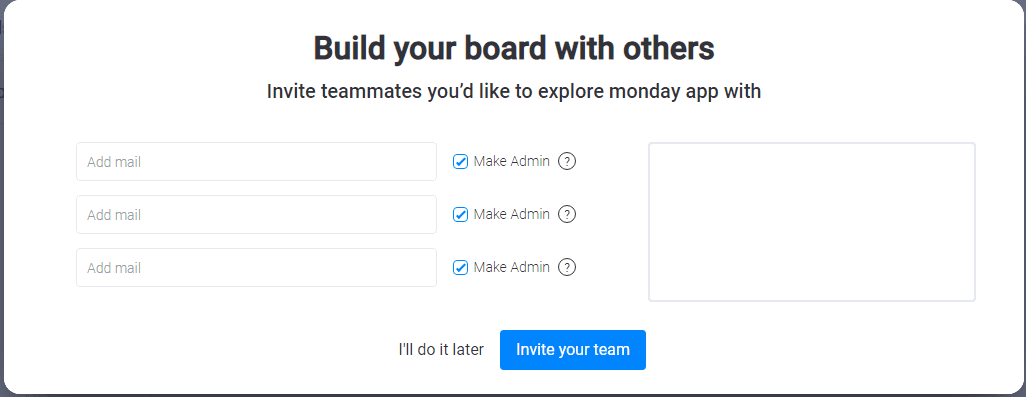
Now you can invite your team members. This is not a mandatory step. If you are not sure about your team members, you can ignore this step and invite them later.
Finally, you can see your main dashboard.
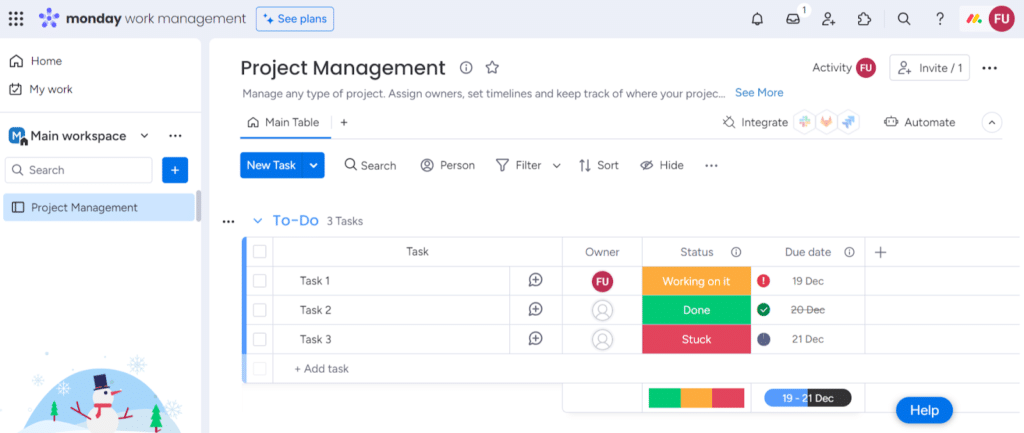
You can create boards for many project management tasks or organizational functions such as human resources and help desk.
To add a new board, click on “Add.”
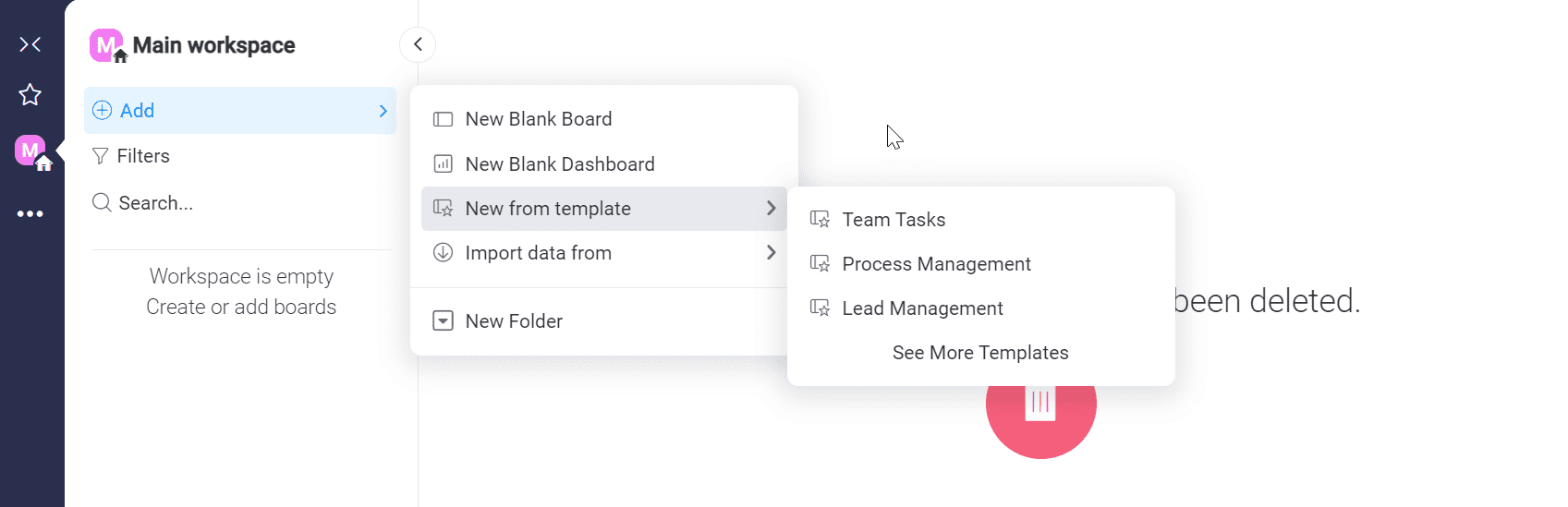
For this monday.com review, I have selected the template “Team Tasks.”
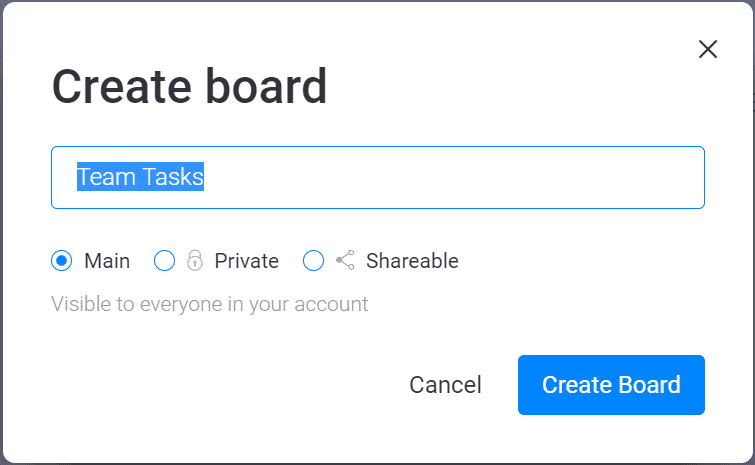
You can create mainboards, private boards, or shareable boards. I have selected “Main.” Below is the default look for the Team Tasks dashboard:
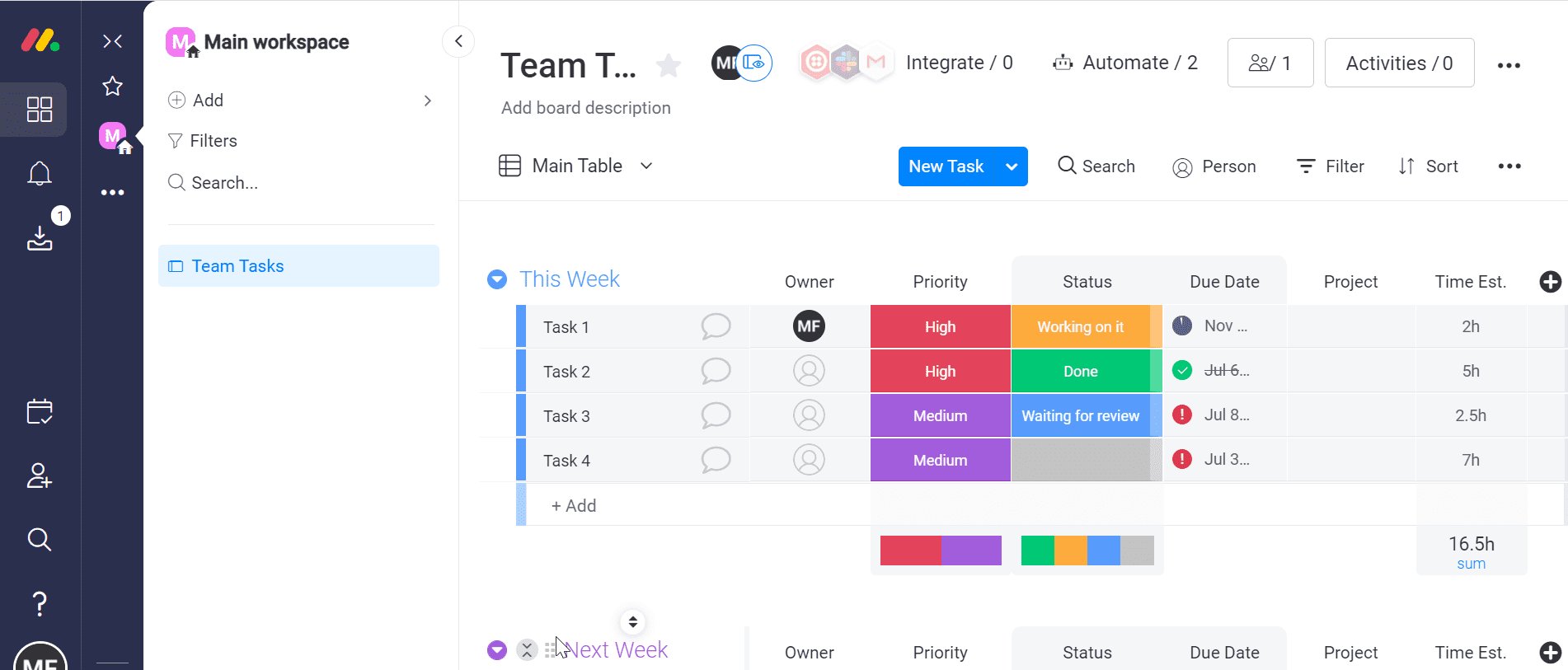
monday.com provides hundreds of templates for you to get started. You can select the most suitable template and customize it as per your requirements.
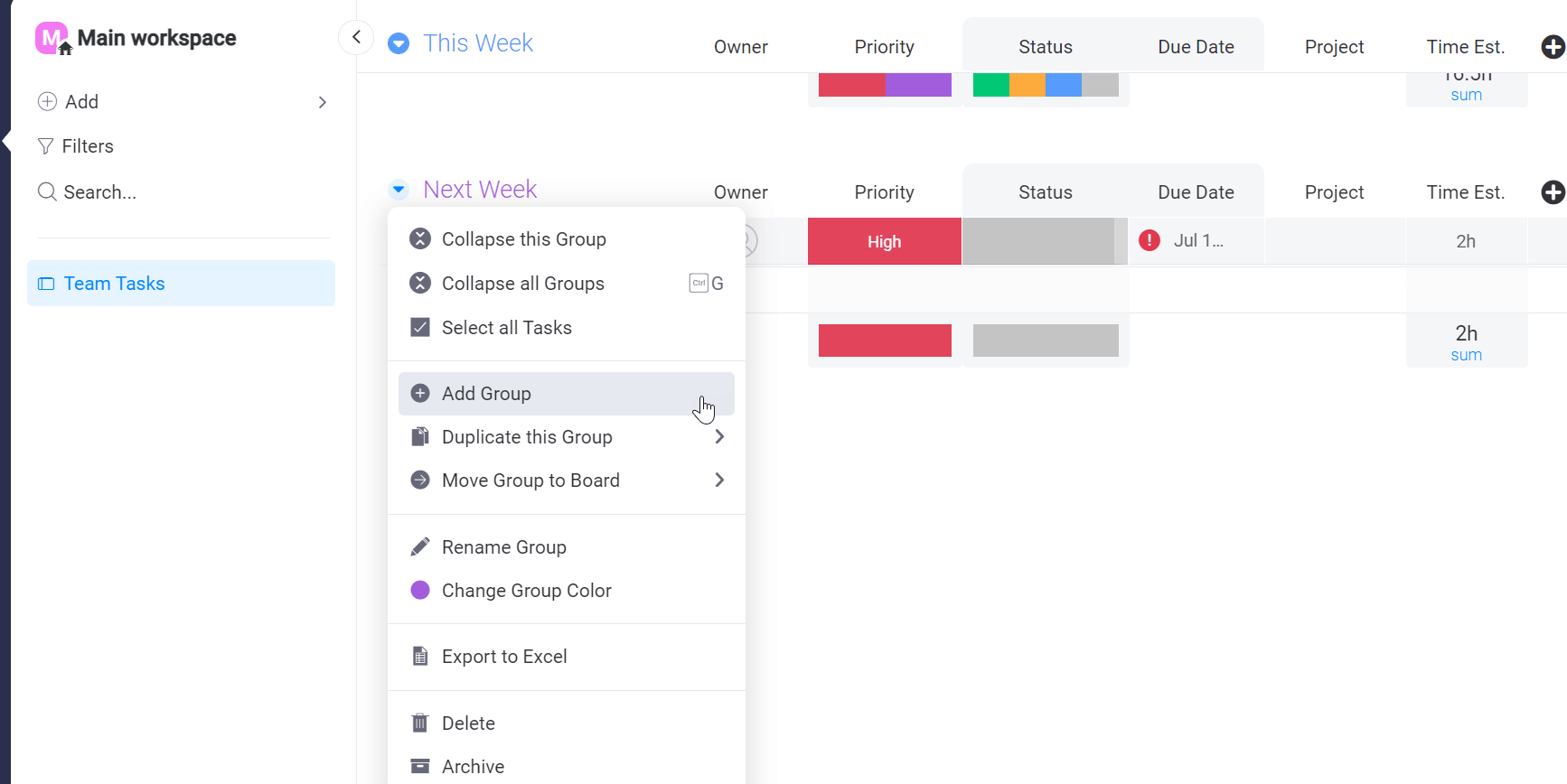
Your board has many boards that contain tasks. You can add, remove, or modify a group. Click on the group name, and a drop-down menu will appear. Click on “Add Group,” and your new group will appear.
Likewise, you can add new tasks after clicking “New Task” and a new column after clicking the “+” sign. You can add as many tasks as you wish. The group has no task limitations. Also, there are many options that you can add as columns, such as status, priority, timeline, tags, etc.
After completing the board, you can assign the task to a team member. You can do so if you have not added a team member to your project.
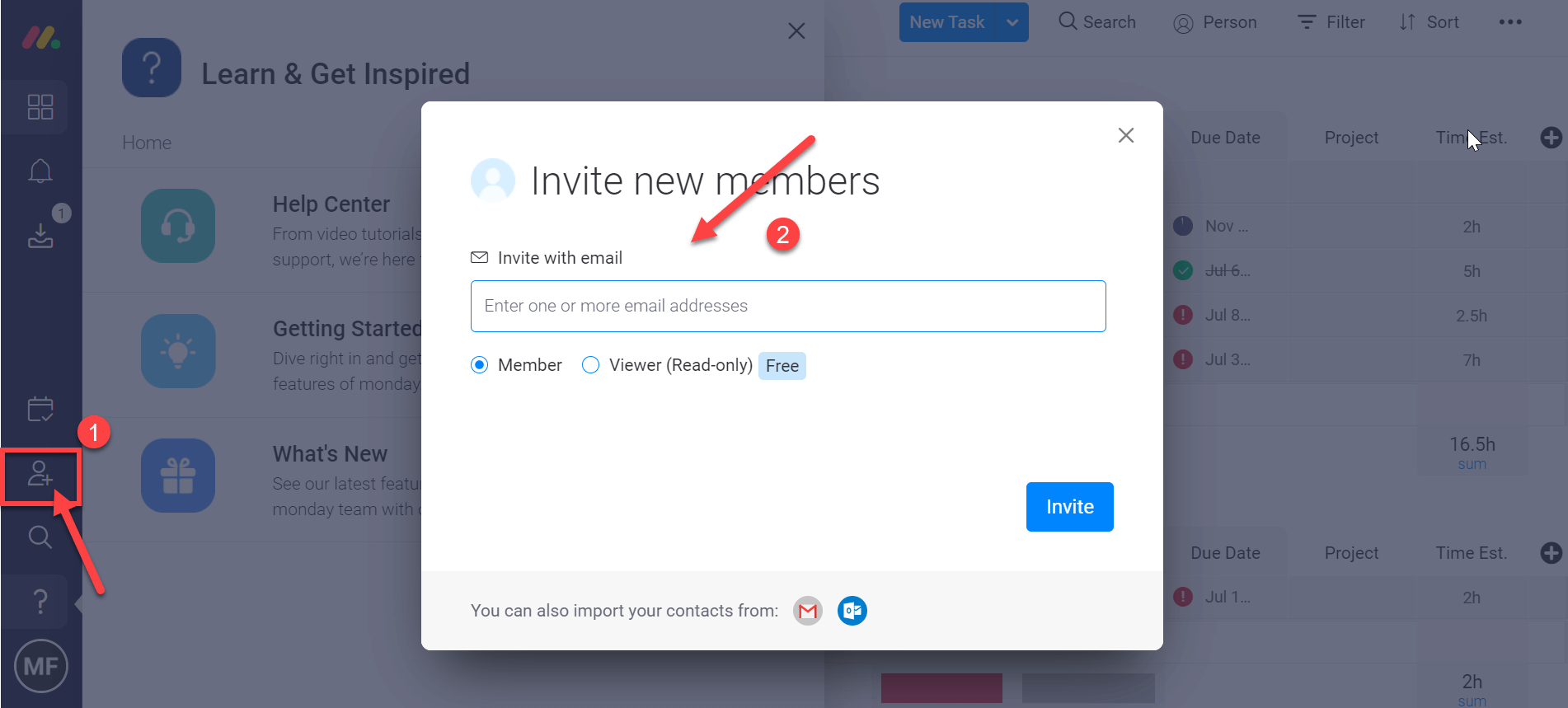
Click on the human icon and add the team member.
Next is setting up the task priority; the choices are high, low, medium, or critical. Click on the task and select the priority. You can add custom priority levels and modify/change the color of the blocks.
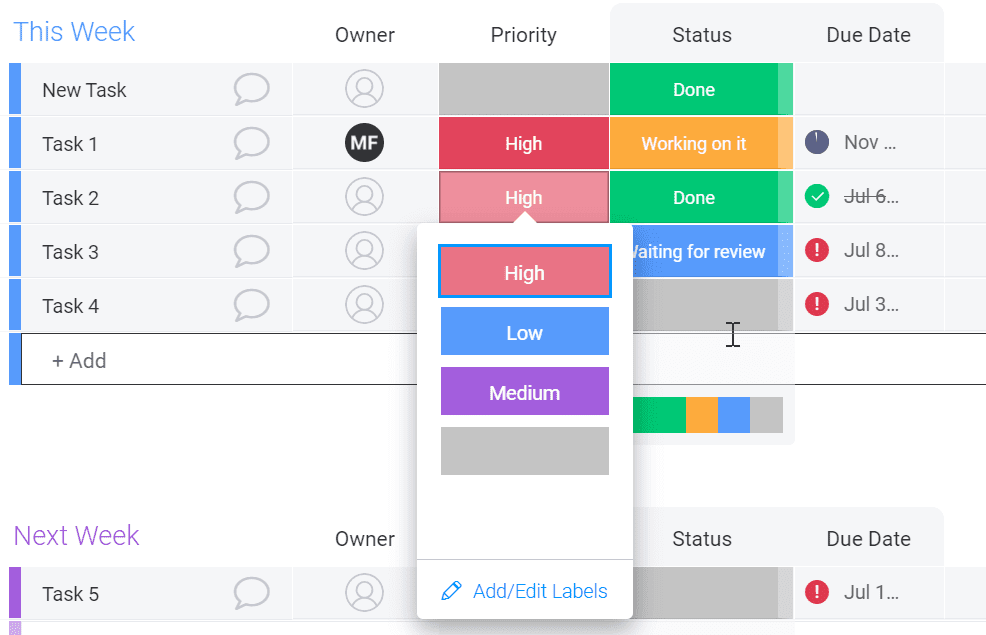
You can also check and update each task’s status with a status column, such as working on it, waiting for review, or done. This is a useful column that shows you completed tasks and where you are stuck.
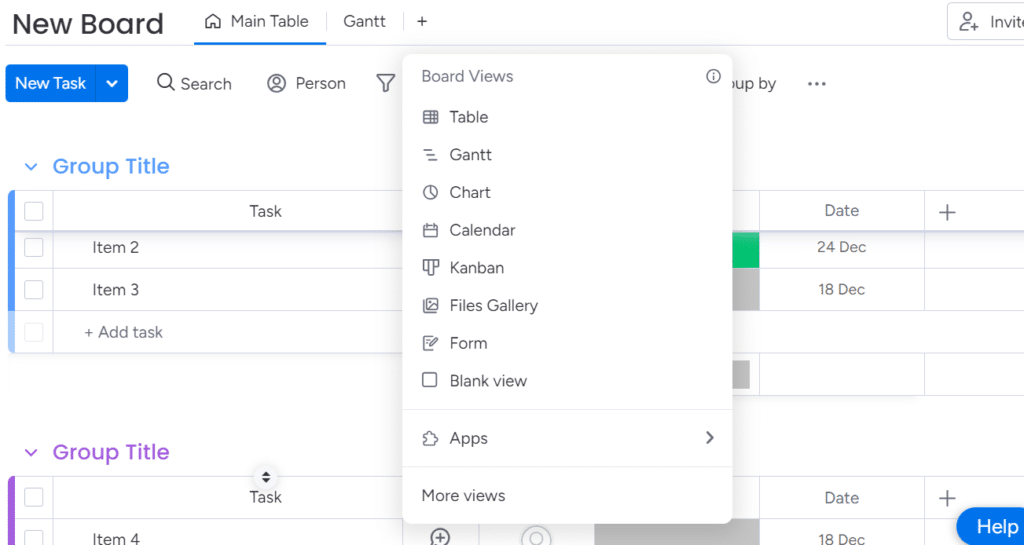
Monday.com provides many options for viewing your tasks and status from a convenient and comfortable lens. From the table, Gantt, chart, kanban, and calendar, there are good layout options provided by Monday.com here.
You can start a conversation with your team member from the mainboard. Click on the chat icon, and a chat window will appear. If the team member uses the monday.com mobile app, they will receive the message instantly.
monday.com Help and Support
monday.com provides email support 24X7. Contacting them is easy. Click the question mark in the bottom left corner for help and support.
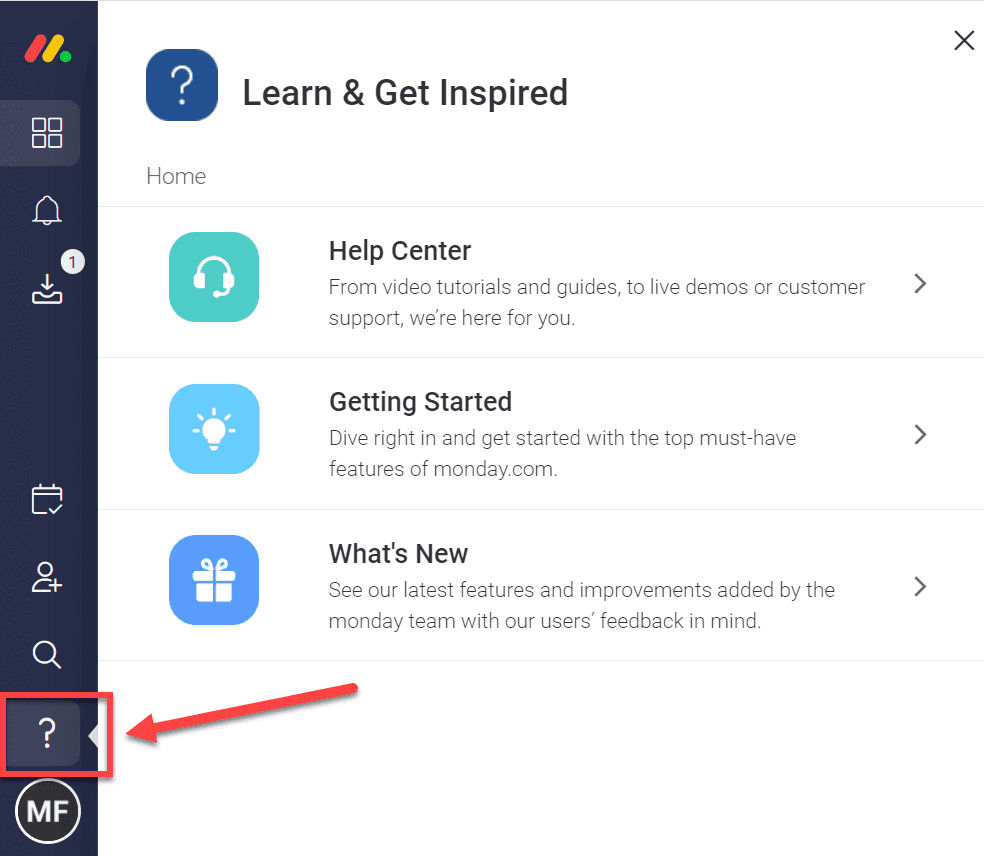
You can watch videos, read tutorials, and raise support requests from here. I have watched several videos and gone through tutorials, and I found them very useful. All videos and tutorials are action-oriented; no fluff here.
The knowledge base provides in-depth knowledge and covers every aspect of monday.com.
I contacted their support twice, and I received a friendly response to offer me help.
monday.com Pricing Details
monday.com offers a free plan and four paid tiers. All paid plans require at least three users. Prices below assume you pay monthly; annual subscriptions offer an 18 % discount.
| Plan | Price per user per month (3 user minimum) | Key features | Best for |
| Free | $0 | Up to 2 users, 3 boards, 500 MB storage, 1-week activity log, 200+ templates; no guest access, integrations, or AI | Individuals or two person teams testing the platform |
| Basic | $12 (or $9 when billed annually) | Unlimited boards and docs, custom fields, one dashboard, 5 GB storage, 24/7 support[27]. Includes 500 AI credits but cannot purchase more | Small teams needing simple task management |
| Standard | $14 (or $12 annually) | 20 GB storage, 6 month activity log, integrations and automations (250 actions per month), guest access (4 guests count as 1 seat), dashboards combining up to 5 boards and timeline/Gantt/calendar/map views | Teams that need integrations and better visualization |
| Pro | $24 (or $19 annually) | 100 GB storage, 1 year activity log, unlimited guests, dashboards with up to 20 boards, time tracking, 25,000 automation actions, private boards, chart view, formula column, and dependency management | Larger teams with complex workflows and advanced automation |
| Enterprise | Custom | 1 TB storage, 5 year activity log, 250,000 automation actions, 50 board dashboards, guaranteed 99.9 % uptime, HIPAA compliance, IP restrictions, integration permissions, audit logs, and dedicated success manager | Organizations needing scalability, advanced security, and custom onboarding |
monday CRM pricing follows the same tiers. When billed annually, CRM costs start at $12/user/month for the Basic CRM, $17/user/month for Standard CRM, and $28/user/month for Pro CRM.
Click here to visit monday.com
Monday.com Alternatives
If the pricing or feature set does not meet your needs, consider competitors:
| Tool | Free plan | Starting price per user per month | Notable strengths |
| Asana | Yes, up to 10 team members | $10.99 | Generous free plan, integrated calendar view, and unlimited storage |
| ClickUp | Yes, unlimited users | $7 | Real-time collaboration documents, whiteboard, and chat; more affordable than monday.com |
| Zoho Projects | Yes | $5 | Low-cost plans with time tracking, Gantt chart,s and unlimited projects |
These alternatives may appeal to small teams or those needing free plans with more features.
monday.com Statistics and Market Growth
monday.com has grown rapidly over the past few years. By the end of 2023, the company served 225,000 customers. In the first quarter of fiscal 2024, revenue jumped 34 % year over year to $216.9 million. Non-GAAP operating income improved to $21.5 million, while free cash flow nearly doubled.
By August 2025, the number of paid customers with more than 10 users reached 61,803, an 8 % increase over June 2024. Customers with more than $50,000 in ARR grew to 3,702 and those with more than $100,000 in ARR rose to 1,472. monday CRM crossed $100 million in ARR just three years after its launch. These figures show strong market adoption and continued growth.
Frequently Asked Questions
Q1. Is monday.com free?
monday.com has a free plan for up to two users. It includes three boards and limited storage but lacks integrations and automations.
Q2. What is monday magic?
monday magic is an AI tool that converts a short prompt into a fully configured board, dashboard, and automations. It helps teams build workflows without manual setup.
Q3. Does monday.com offer a CRM?
Yes. monday CRM is part of the WorkOS. It lets you manage leads, track deals, automate emails, and integrate with marketing tools. monday CRM reached $100 million in ARR in 2025.
Q4. How many customers use monday.com?
The platform served around 225,000 customers by the end of 2023. Paid customers with more than 10 users reached 61,803 by June 2025.
Q5. Can I use AI features on all plans?
Every paid plan includes 500 AI credits per month. Standard, Pro, and Enterprise users can purchase more credits, but Basic users cannot. monday service includes unlimited AI credits for support boards.
Conclusion – monday.com Review
monday.com is one of the most popular project management software options available for project professionals. It is a complete CRM tool to help you run and manage your project. If you are looking for a useful project management collaboration tool, a tool that can motivate your team and make them more productive, monday.com is the right choice.
I hope this monday.com review was useful for you.
Start your 14-days free trial now
Disclosure: Some links in this post are affiliate links, and I will earn a commission if you purchase after clicking. Please understand that I recommend these resources because they are useful, not just because of my commissions. Please do not purchase unless you need the materials to achieve your goals. Read the disclaimer.

I am Mohammad Fahad Usmani, B.E. PMP, PMI-RMP. I have been blogging on project management topics since 2011. To date, thousands of professionals have passed the PMP exam using my resources.