
A WBS dictionary helps project teams explain every work package in detail. While the Work Breakdown Structure shows the project hierarchy, the WBS dictionary describes the scope, deliverables, schedule, budget, resources, and responsibilities for each task. It serves as a reference guide, keeping team members, stakeholders, and clients aligned throughout the project lifecycle. Without a clear WBS dictionary, projects can face confusion, delays, and scope creep. This document improves communication, supports accurate planning, and helps track progress more effectively.
In this blog post, you will learn what a WBS dictionary is, why it is important, how to create one step by step, and how to use templates and examples to manage projects successfully.
Key Takeaways
- A WBS dictionary explains each element in your work breakdown structure. It lists the work package, scope, deliverables, timeline, responsible team member, budget and acceptance criteria.
- Having a well-written dictionary reduces misunderstandings, improves alignment with the scope baseline and prevents scope creep.
- You can create a dictionary using simple tools like Excel or Word. Larger teams often rely on project management platforms such as monday.com and nTask for automation and collaboration.
- Project management jobs are growing. The U.S. Bureau of Labor Statistics projects the number of project management specialists will rise from 1,046,300 in 2024 to 1,105,000 in 2034, a 6% increase. Understanding the WBS dictionary helps you stand out in this growing field.
- Recent research from the Project Management Institute found that 92% of respondents believe power skills, such as communication and collaboration, help them work smarter and improve outcomes. A clear dictionary promotes those same skills by improving team communication.
What is a WBS Dictionary?
The WBS dictionary is a supporting document that provides detailed information about each element in the WBS. It expands on the graphical or tabular WBS by defining every work package in plain language. According to ProjectManagement.com, a WBS dictionary is “a document that provides detailed deliverable, activity and scheduling information about each component in the work breakdown structure”.
In other words, while the WBS shows how work is broken down, the dictionary tells everyone what each piece means and how to judge when it’s done.
Each entry in the dictionary usually includes:
- WBS Identifier – a unique ID and title for each work package.
- Description – a short description that defines the boundaries, assumptions and constraints.
- Deliverables and Acceptance Criteria – the product or result that must be produced and the criteria for acceptance.
- Duration and Schedule – the estimated time required and key milestone dates.
- Resources and Responsible Team Member – the person or team accountable for completing the work, plus any required resources.
- Budget – the allocated cost for the work package.
- Risks – any known risks or issues that could impact the work package.
When you combine these details for every work package, you create a clear roadmap that guides scheduling, resource allocation and progress tracking. The dictionary sits alongside the scope statement and the WBS as part of the scope baseline, ensuring that everyone shares the same understanding of what the project will deliver.
Why You Need a WBS Dictionary
A WBS dictionary is important because it gives clear details about every work package in a project. The Work Breakdown Structure shows the hierarchy of tasks, but it does not explain the work in depth. The WBS dictionary fills this gap by describing the scope, deliverables, schedule, resources, budget, and responsibilities for each activity. This helps team members understand exactly what they must do and what is expected from them.
A well-prepared WBS dictionary improves communication among stakeholders, project managers, and team members. It reduces confusion, avoids duplicate work, and helps prevent scope creep. Since each work package includes acceptance criteria, the project team can measure progress and confirm whether deliverables meet requirements. It also supports better cost estimation, scheduling, and resource planning. During project execution, the WBS dictionary acts as a reference document that keeps everyone aligned with the project goals and ensures smoother project monitoring and control.
WBS Dictionary Template
You don’t need complex software to build a dictionary. A simple table with well-chosen fields is enough. The template below shows one way to structure your document. Use it as a starting point and customize it for your project.
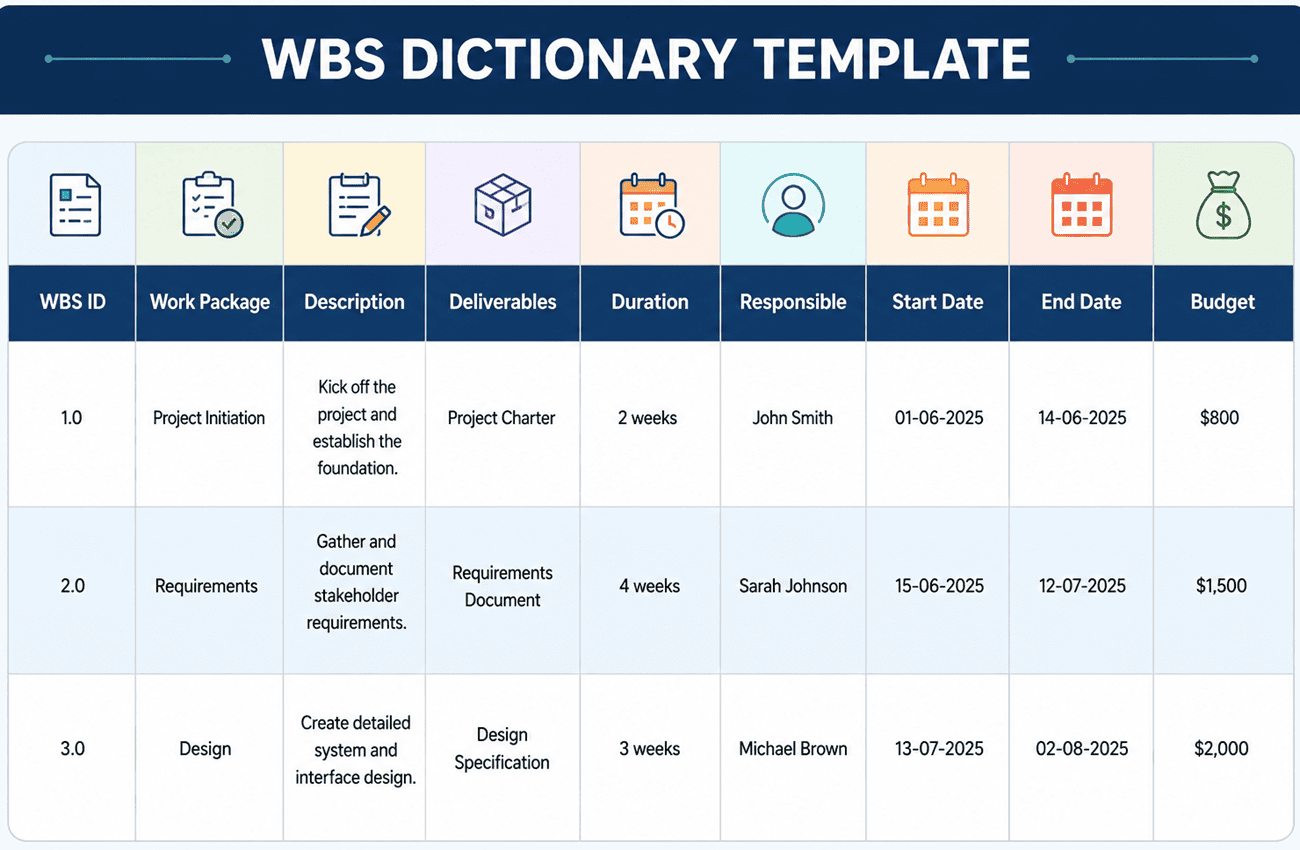
When filling out your template, remember to keep descriptions concise. Focus on what matters: what will be delivered, who will do the work, how long it will take and what success looks like. If you include too much detail, the dictionary becomes hard to maintain. If you include too little, it loses its value.
How to Create a WBS Dictionary
Building a dictionary is an iterative process. Follow these steps to create your own:
1. Review the WBS
Start by reviewing your WBS to understand the overall scope and hierarchy. Confirm that it covers 100% of the project’s work and that there are no overlaps. Familiarize yourself with each level so that you can break down the details correctly.
2. Define Top-Level Elements
Create entries for the high-level deliverables or phases of your project. Assign each an identifier and describe its objectives. Identify the stakeholders responsible for each element so that accountability is clear.
3. Add Lower-Level Elements
Break each top-level element into smaller tasks. Describe the scope, deliverables and resources needed for each task. Doing so helps you understand how much work is involved and how it contributes to the larger deliverable.
4. Create Work Packages
At the most detailed level, define the work packages that can be assigned to individuals or teams. For each package, specify the task description, deliverables, start and end dates, duration, resources, budget and acceptance criteria. When your dictionary is this detailed, you can estimate costs and timelines with greater accuracy.
5. Finalize and Share
Once you have documented all elements, review the dictionary for completeness and accuracy. Validate the entries with stakeholders and adjust based on feedback. After approval, use the dictionary as a living document throughout the project. Keep it updated whenever changes occur.
WBS Dictionary Example
It’s easier to understand the dictionary with a concrete example. Imagine you’re managing a small software project with four work packages. The table below shows how you might document these packages. Use it as inspiration for your own projects.
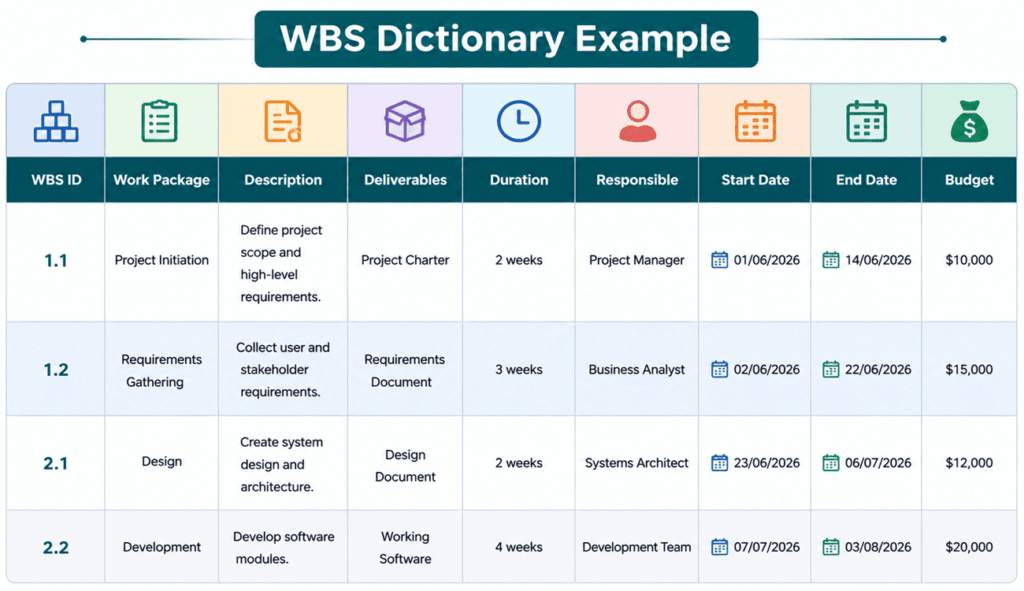
In this example, each work package has a clear description and deliverables. The responsible person and dates are specified, making it easy to schedule and assign work. Adjust the column names and fields based on your project’s complexity. For instance, construction projects often include columns for equipment and materials, while software projects include acceptance test criteria and code review requirements.
How to Use a WBS Dictionary
A well-built dictionary has many uses beyond documentation:
- Scope definition – Use the dictionary to define the scope of each work package. When disputes arise, refer to the dictionary to clarify what is in or out of scope.
- Assign responsibilities – Identify the person or team responsible for each work package. Clear accountability helps with resource planning and performance management.
- Guide execution – Team members can consult the dictionary to understand tasks, deliverables, timelines and resource needs. This ensures everyone knows what is expected.
- Monitor progress – Compare completed work against the dictionary to see whether deliverables meet the defined criteria. This helps track progress, manage budgets and identify delays.
- Change management – When change requests arise, use the dictionary to evaluate how the proposed change affects scope, schedule or resources. Document updates to keep the dictionary current.
- Communication tool – Throughout the project, the dictionary serves as a shared reference for the team and stakeholders. It provides a single source of truth, reducing misunderstandings.
Benefits of a WBS Dictionary
A comprehensive dictionary offers several benefits:
- Improved clarity and alignment – By documenting the details of each work package, you ensure that everyone understands the project scope and their responsibilities.
- Better scope control – The dictionary forms part of the scope baseline. It helps prevent scope creep by defining what is included and excluded.
- Enhanced communication – A shared reference improves communication among team members and stakeholders. Everyone can see the same information, rather than relying on memory.
- Efficient resource management – Knowing the tasks, durations and responsible people helps you allocate resources effectively.
- Reduced risk – Clear definitions and acceptance criteria minimize delays and cost overruns.
FAQs
Q1. Why do we need a WBS dictionary?
Because the WBS alone doesn’t capture details. The dictionary explains each element so everyone knows what the work package includes and what constitutes success. It keeps the team and stakeholders aligned.
Q2. Who creates the WBS dictionary?
It’s a collaborative effort. The project manager coordinates the process, but team members and subject matter experts provide input. Involving the people who do the work improves accuracy and buy-in.
Q3. What tools can I use to build a dictionary?
Many teams start with Excel or Word. As projects grow, tools like monday.com and nTask offer templates, automation and collaboration features that make updates easier.
Q4. How detailed should a dictionary be?
Include enough detail to prevent confusion, but not so much that it becomes hard to update. Focus on scope, deliverables, responsibilities, timeline, resources, budget and acceptance criteria.
Summary
A WBS dictionary is a valuable project management document that explains each work package in detail and supports better planning, communication, and execution. It helps teams understand project scope, assign responsibilities, control costs, and track deliverables more effectively. By reducing confusion and preventing scope creep, the WBS dictionary improves coordination among stakeholders and team members. Whether you manage a small project or a large initiative, creating a clear and detailed WBS dictionary can increase the likelihood of project success and ensure smoother delivery.
This topic is important for the PMP exam.

I am Mohammad Fahad Usmani, B.E. PMP, PMI-RMP. I have been blogging on project management topics since 2011. To date, thousands of professionals have passed the PMP exam using my resources.






The WBS in Project Management is a very useful tool to follow, which helps Project Managers to project completions by observing the various principles as sets out in the Guide.
good