Good meeting minutes save teams time and make decisions traceable. Yet many organizations still waste hours in unproductive meetings because they do not record what was agreed upon.
Recent research shows that 45% of meetings last about thirty minutes, but 64% of recurring meetings lack a structured agenda. Employees spend roughly 392 hours per year in meetings, and the United States alone holds an estimated 11 million meetings every day.

Without clear minutes, those hours disappear into confusion and follow-up meetings. Unproductive meetings cost businesses up to $375 billion annually, and managers spend about thirteen hours per week in meetings. Effective minutes help reclaim that time by turning discussions into actionable records.
In today’s blog post, I will explain what meeting minutes are, why they matter, and how to write them.
You will also find templates, sample minutes, common mistakes, and tools to streamline the process.
Let us get started.
What Are Meeting Minutes?
Meeting minutes (or minutes of meeting, often abbreviated as MOM) are formal records of what was discussed and decided in a meeting. They capture the date and time, attendees, agenda items, discussions, decisions, action items, and any approvals. Minutes are written after the meeting using notes taken during the session.
MOM serves as the official history of the meeting, providing a reference for those who were present and for stakeholders who could not attend. Because they are formal documents, minutes use a consistent structure and neutral language.
Minutes differ from casual meeting notes. Where notes capture ideas and reminders informally, minutes document decisions and assign accountability. Minutes may be required for legal or compliance reasons, such as board meetings or project approvals. They often become part of project records and are shared with stakeholders for transparency.
If you need help with informal notes, see my step-by-step guide to meeting notes.
Why Meeting Minutes Matter
Meeting minutes help teams avoid miscommunication and reduce wasted effort.
They are important for the following reasons:
- Preserve Decisions and Context: Over time, memories fade. Written minutes ensure that decisions, dates, responsibilities, and context are not lost. This is essential when projects last for months or years.
- Hold people Accountable: When tasks and deadlines are recorded, team members know exactly what they need to deliver. Without minutes, action items can fall through the cracks.
- Reduce Unnecessary Meetings: A clear record allows people to refer back to previous discussions, eliminating the need to meet again to remember what was agreed. This saves time, especially when meetings are unproductive. Surveys show that 65 % of people feel they regularly waste time in meetings.
- Support Legal and Audit Requirements: For regulated industries and corporate boards, minutes provide evidence that decisions were made following proper procedures.
- Promote Transparency and Trust: Circulating minutes to stakeholders keeps everyone informed about progress, risks, and next steps. Transparency builds confidence in the process.
Given that ineffective meetings cost the United States an estimated $37 billion per year and that between 36 million and 56 million meetings occur every day, even small improvements in meeting documentation can yield huge savings.
Key Elements of Meeting Minutes
Every set of minutes should include the following elements. Using a consistent structure makes it easier for readers to find information quickly:
- Meeting Title and Objective: Briefly state the purpose of the meeting. For example: “Monthly project status meeting.”
- Date, Start Time, and End Time: Indicate when the meeting took place and how long it lasted.
- Meeting Facilitator and Note-Taker: List who led the meeting and who took the notes.
- Attendees and Absentees: Include names and roles, noting who was absent. This clarifies who is accountable for decisions and tasks.
- Agenda Items: Provide a numbered list of topics discussed. A structured agenda keeps meetings on track; however, research shows that 64 % of recurring meetings lack an agenda, so be intentional when preparing one.
- Discussion Summary: Record key points from each agenda item. Keep summaries concise and objective. If there were disagreements, capture them neutrally.
- Decisions and Resolutions: Clearly state what was decided, including approvals and rejections. For example: “The team agreed to reallocate marketing budget to social media campaigns.”
- Action Items: Assign tasks to responsible persons and due dates. This section is crucial for accountability. See our separate article on action items for more guidance.
- Next Meeting or Next Steps: Note the date of the next meeting or outline follow-up actions. Include deadlines for completing tasks.
Step-by-Step Process to Prepare Meeting Minutes
You can follow the following process to create minutes of meeting:
1. Prepare the Agenda
A clear agenda provides structure and helps attendees come prepared. Send the agenda to participants at least a day before the meeting. According to Flowtrace, 64 % of recurring meetings lack a structured agenda. When there is no agenda, meetings often run over time and end without clear decisions. If you need help writing an agenda, start with a list of questions or problems the team needs to solve, then order them by priority.
2. Invite the Right People
Only invite people who are directly involved in the agenda topics. Too many attendees slow down decision-making and increase costs. Fellow’s study reports that managers spend about thirteen hours per week in meetings, and unproductive meetings with many participants can cost organizations $28,000 per meeting. Confirm that key decision makers can attend. If they are unavailable, reschedule or designate someone with authority to make decisions.
3. Take detailed Meeting Notes
During the meeting, the note-taker should capture the discussion and key points for each agenda item. Do not try to transcribe everything; focus on decisions, questions, objections, and context. Use a template to structure your notes and mark action items clearly. In large or critical meetings, assign two note-takers to ensure nothing is missed.
4. Write the Minutes Soon After the Meeting
Draft the minutes while the discussion is still fresh. Convert the notes into complete sentences and organize them under each agenda item. Use clear, simple language and the past tense. Avoid subjective opinions; minutes should be objective and factual. Include all decisions, action items, and deadlines.
5. Review and Edit
Check the minutes for accuracy. Verify dates, names, numbers, and references. Edit for grammar and clarity. Ensure consistent formatting, heading levels, and tenses. Remove personal comments or discussions that are off topic. Maintaining a professional tone supports the minutes’ credibility.
6. Send the Draft for Feedback
Share the draft minutes with attendees for review. Encourage them to check that action items are correctly assigned and that summaries accurately reflect the conversation. Ask them to provide feedback within a set time frame (e.g., two days). Incorporate any corrections and record final approvals.
7. Finalize and Distribute
After making revisions, finalize the minutes and send them to all participants and other stakeholders. Store the approved minutes in a centralized location, such as your project management tool or document repository. This ensures that everyone can access them later. Note the date of the next meeting or follow-up actions at the end of the document.
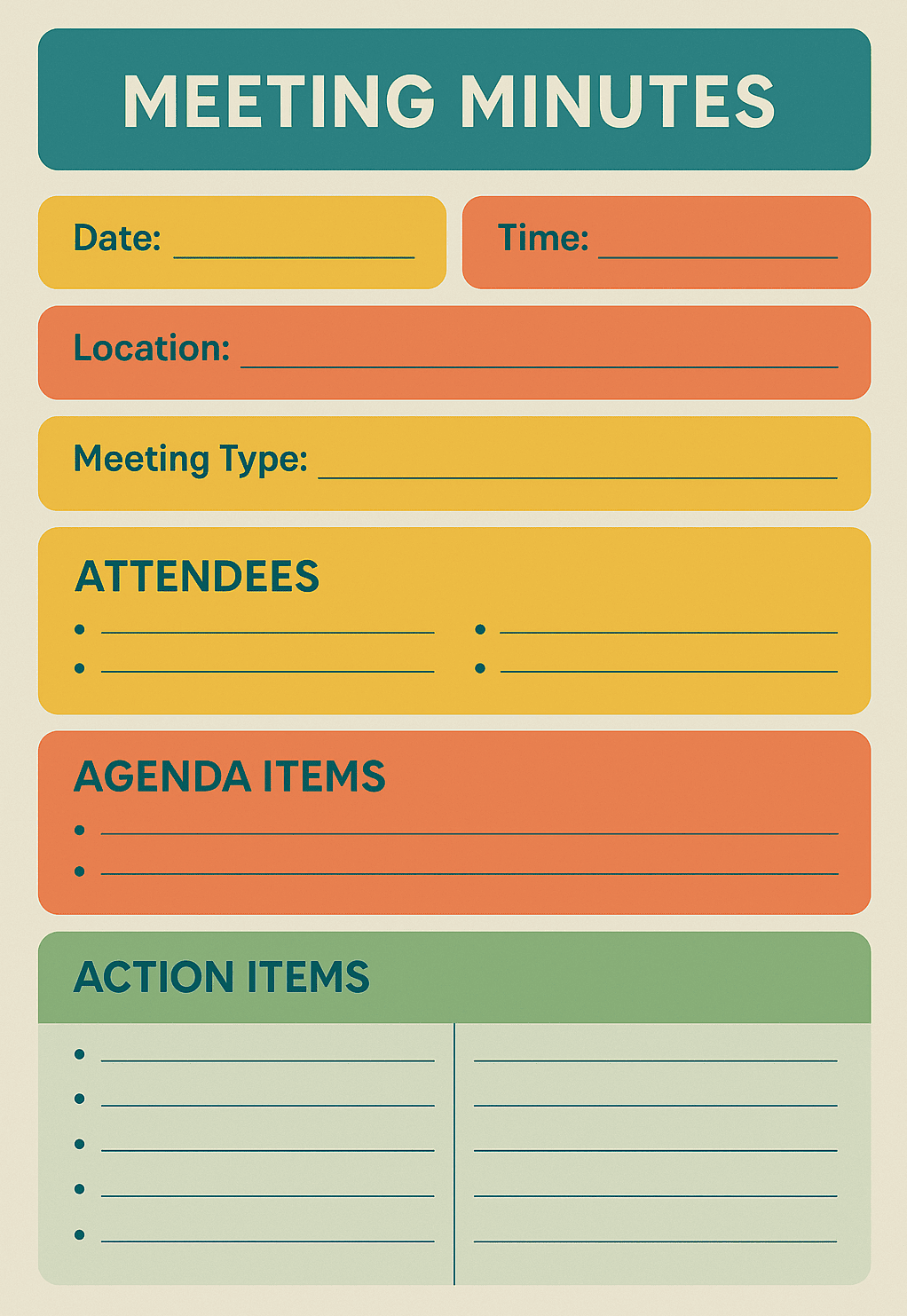
Meeting Minutes Template
The image below shows a minutes of meeting template:
Sample Meeting Minutes
The image below shows an example of meeting minutes:

How to Track Action Items
Tracking action items ensures tasks do not fall through the cracks. Use these steps to manage follow-ups effectively:
- Document Every Action Item: Record the task description, the responsible person, the due date, and any context. The meeting minutes template above includes a table for this purpose.
- Maintain an Action Item Log: Use a spreadsheet or project management tool to list all action items, their statuses (e.g., in progress, completed, delayed), and deadlines. Update this log regularly.
- Assign Responsibility Clearly: Make sure the responsible person understands the task and has the authority to complete it. Good accountability prevents confusion later.
- Set Realistic Deadlines: Align deadlines with the overall project schedule. Provide “start” dates to encourage action before the due date.
- Review Progress Regularly: At each meeting, review the action item log. Celebrate completed tasks and address delays promptly. Regular reviews keep momentum.
- Follow up and Support: Send reminders and offer help if someone is struggling. A quick check-in can prevent tasks from stalling.
- Use Project Management Tools: Platforms like Monday.com, Wrike, Asana, Trello, or Jira allow you to assign tasks, set deadlines, and track progress. Choose a tool that integrates with your workflow.
Common Mistakes and How to Avoid Them
Even experienced professionals make errors when recording meeting minutes. Knowing these common mistakes helps teams stay accurate, save time, and maintain clear, consistent records.

Avoid these common pitfalls:
- Not Capturing Decisions: Failing to record decisions means team members might revisit the same issues. Always write down what was decided and why.
- Ambiguous Action Items: Vague tasks like “follow up” can confuse. Specify a verb, subject, and deadline, such as “John will send the draft report by 15 December 2025.”
- Delaying the Draft: Waiting days to write minutes causes details to fade. Draft them while the discussion is fresh.
- Missing Attendees: Forgetting to list an attendee can lead to misunderstandings about who was present and responsible. Ask participants to sign an attendance sheet.
- Subjective Language: Minutes should be objective. Avoid personal opinions and emotions. Instead of “Jane seemed annoyed,” write “Jane raised concerns about the timeline.”
- Skipping Reviews: Without review, errors or omissions may persist. Circulate the draft for feedback and corrections.
Meeting Minutes Vs Meeting Notes
Meeting notes and meeting minutes both record what happens during a meeting, but they serve different purposes:
| Feature | Meeting Notes | Meeting Minutes |
| Purpose | Informal record of ideas, discussions, and tasks for internal reference | Formal document capturing decisions, resolutions, and action items; may be used for legal or compliance purposes |
| Level of detail | Summarizes main points and context; uses simple language | Includes precise wording of decisions, a list of attendees, motions, and approvals |
| Timing | Taken during the meeting and refined afterward | Prepared after the meeting using notes and reviewed by participants |
| Usage | Shared within the team; helps with follow-up and task assignments | Sent to stakeholders; acts as the official record |
| Format | Flexible; bullet points or free form | Structured with defined sections and consistent headings |
If your team needs to jot down ideas quickly during a meeting, meeting notes are often sufficient. When decisions must be documented for legal or organizational reasons, minutes are necessary.
Tools and Tips for Effective Meeting Minutes
Technology can streamline the minute-taking process. Consider the following tools and best practices:
- Project Management Platforms: Tools like Asana, Trello, Monday.com, or Wrike allow you to track tasks, attach files, and view deadlines. They integrate with calendars and communication apps.
- Note-taking Apps: Evernote, Microsoft OneNote, and Google Docs offer collaborative note-taking. They allow multiple people to contribute in real time and are handy for distributed teams.
- Voice Transcription Tools: AI-powered tools such as Otter.ai, Rev, or Microsoft Teams’ transcription feature transcribe audio into text. While technology helps, always review for accuracy.
- Templates and Automation: Create reusable templates for different types of meetings. Automate distribution through email or your collaboration tool so that minutes are sent automatically after approval.
- Training and Practice: Train team members on how to take notes and write minutes. Encourage them to watch experienced note-takers and practice in low-stakes meetings.
FAQs
Q1. Why are meeting minutes important?
Minutes record decisions, action items, and context. They ensure accountability and prevent misunderstandings, which saves time and money.
Q2. What is the difference between meeting minutes and meeting notes?
Notes are informal summaries of discussions, while minutes are formal documents that record decisions and are often required for legal or compliance purposes.
Q3. Who should take meeting minutes?
Ideally, someone who is attentive and understands the meeting’s context. In smaller meetings, the facilitator may also take notes, but in larger ones, assign a dedicated note-taker.
Q4. How soon should minutes be distributed?
Send draft minutes within 24 hours. Early distribution helps attendees recall details and provide corrections promptly.
Q5. Do all meetings need formal minutes?
No. Informal team catch-ups may only require notes. Formal meetings, such as board meetings or project reviews, should have minutes for transparency and accountability.
Q6. Can I record a meeting instead of taking minutes?
Recordings can be helpful references, but they should not replace written minutes. Written minutes provide a concise, searchable summary and are easier to share and archive.
Conclusion
Meeting minutes are not just paperwork; they are essential tools for project management and organizational accountability. With millions of meetings happening daily and billions of dollars lost due to inefficiency, effective minutes provide a simple way to capture value from each discussion. By preparing a clear agenda, inviting the right people, taking structured notes, and following a consistent process, you can turn meetings into productive, action-oriented sessions.
Accurate minutes build trust, support legal compliance, and save time in the long run. Use the templates and best practices in this guide to improve your meeting documentation.
Further Reading:

I am Mohammad Fahad Usmani, B.E. PMP, PMI-RMP. I have been blogging on project management topics since 2011. To date, thousands of professionals have passed the PMP exam using my resources.